
kb.system-pulse
Minimal CPU / RAM / temperature review for the Omarchy bar. Monochrome by
design — typography, hairlines, and the theme palette only; urgent is the
single hue allowed in, and only when something needs attention.
What it does
Bar pill — one glyph plus a compact read-out, e.g. 23% 9.4G 66°.
- left click → review popup
- right click → icon-only mode (persisted to shell.json)
- middle click → launch btop (
middleAction) - pill text flips to the theme's urgent color on cpu ≥ 98%, mem ≥ 97%, or a sensor past its hot threshold
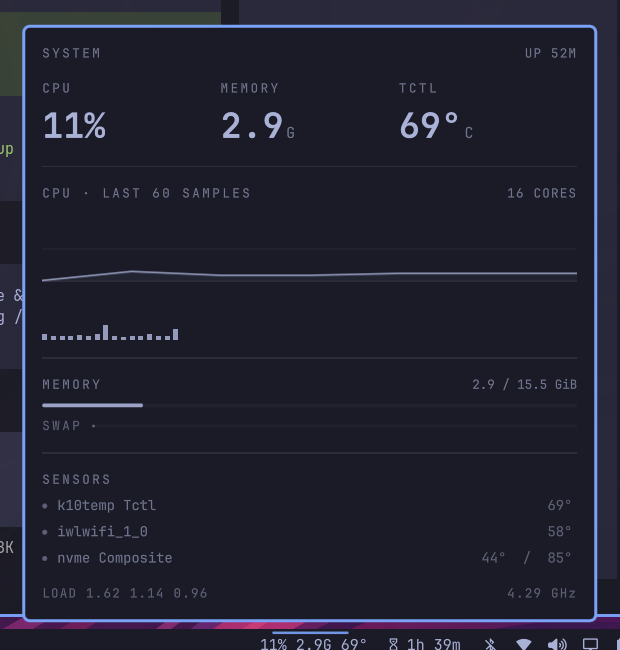
Review popup
- Hero triptych: CPU % · memory GiB · primary temperature
- CPU sparkline over the last N samples with per-core vertical load strip
- Memory track + swap row (swap only when the machine has any)
- Sensor list from every readable
hwmoninput, hottest first, each with a severity dot and its critical threshold; overflow folded into "+N more" - Footer: load averages and current max core frequency
Data comes from /proc/stat, /proc/meminfo, /proc/loadavg, cpufreq, and
/sys/class/hwmon via scripts/sysprobe — no extra packages. Percentages are
computed from jiffie deltas between ticks; history is kept in-memory only.
Install
omarchy plugin add https://github.com/KabirBhattarai/omarchy-system-pulse --enable
Or from an existing clone:
omarchy plugin enable kb.system-pulse right
The widget mounts in the right bar section. Left click opens the review popup.
Remove
omarchy plugin disable kb.system-pulse     # take the widget off the bar
omarchy plugin remove kb.system-pulse      # delete the installed copy
If you installed it by cloning into ~/.config/omarchy/plugins/kb.system-pulse/
manually, disable it first, then delete that folder and remove its entry from
the bar.layout section of ~/.config/omarchy/shell.json.
Dependencies
None beyond a stock Omarchy install:
bash— runsscripts/sysprobe(ships with Arch)- kernel interfaces —
/proc/stat,/proc/meminfo,/proc/loadavg,/proc/uptime, cpufreq sysfs,/sys/class/hwmon; all exposed by the standard Linux kernel, no extra packages - optional:
btopfor the default middle-click action (already ships with Omarchy; change or emptymiddleActionto disable)
The plugin never writes to your configuration; the only file it modifies is
its own entry in ~/.config/omarchy/shell.json when you toggle icon-only mode
via right-click.
Preview
Settings
All settings are inline keys on the widget's entry in
~/.config/omarchy/shell.json:
| key | default | meaning |
|---|---|---|
interval |
2 |
seconds between samples |
history |
60 |
sparkline sample count (20–240) |
showCpu |
true |
include CPU % in the bar label |
showRam |
true |
include used GiB in the bar label |
showTemp |
true |
include temperature in the bar label |
tempUnit |
"C" |
"F" for Fahrenheit |
warmAt |
70 |
warm threshold °C |
hotAt |
88 |
urgent threshold °C |
sensorRows |
6 |
max rows in the popup sensor list |
iconOnly |
false |
start collapsed to the glyph |
middleAction |
"omarchy-launch-or-focus-tui btop" |
command for middle click |
Example entry:
{ "id": "kb.system-pulse", "interval": 3, "tempUnit": "F", "hotAt": 90 }
IPC
omarchy-shell kb.system-pulse toggle
omarchy-shell kb.system-pulse status
License
MIT — see LICENSE.
Files
BarWidget.qml— pill + sampling loop + popup hostPanel.qml— review popupModel.js— pure parse/format/threshold helpersscripts/sysprobe— single-line JSON snapshot of the machine