
OmaVLESS
OmaVLESS is a VPN app for Omarchy that puts everyday connection controls directly in the bar.
Bring your own compatible VLESS profile or HTTPS subscription, choose Full VPN, Routing or Direct, and connect from the panel. Switch between profiles or disconnect without leaving the desktop; one VPN connection is active at a time.
Expand subscriptions and refresh their server lists beside your profiles. Profile management, routing tools, English/Russian language settings and privacy-safe support reports stay close at hand in a compact, terminal-style interface.
Free and open source. OmaVLESS is not a VPN provider: VPN servers, accounts and service subscriptions are not included.
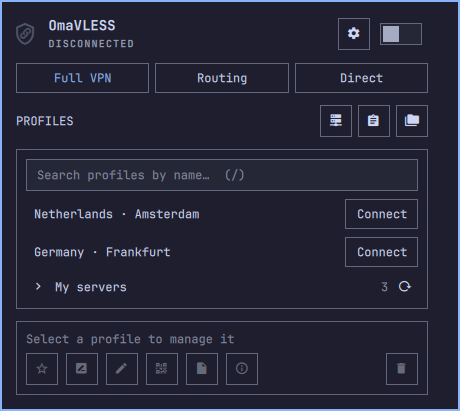
Native interface with demonstration data; no live connection is shown.
Installation
OmaVLESS 0.8.2 is available. New users: add the plugin, then open its panel. Already using 0.7.0? Follow the migration guide before updating.
omarchy plugin add https://github.com/k-kostin/omavless --enable
If the application or Mihomo is missing, Required components offers guided installation. Confirm the steps in its terminal, return to the panel and follow onboarding. You can finish setup later; it never connects a VPN automatically.
This command follows upstream main. The marketplace's reviewed snapshot is updated separately; its older 0.7.0 listing is not the native release.
Follow the installation and upgrade guide, including migration instructions before updating an existing 0.7.0 installation. It covers the matching application package, Mihomo VPN core, TUN permissions and optional clipboard, file-picker and QR tools. Package installation and permission changes require your confirmation.
For manual downloads, use the matching 0.8.2 application and frontend from GitHub Releases. Do not pair this frontend with older 0.8.0/0.8.1 packages.
Everyday use
- Import a profile link or subscription URL from the clipboard or a file. Review the preview before saving.
- Choose Full VPN, Routing or Direct.
- Press Connect beside the profile you want. Selecting a profile for management is not the same as connecting it.
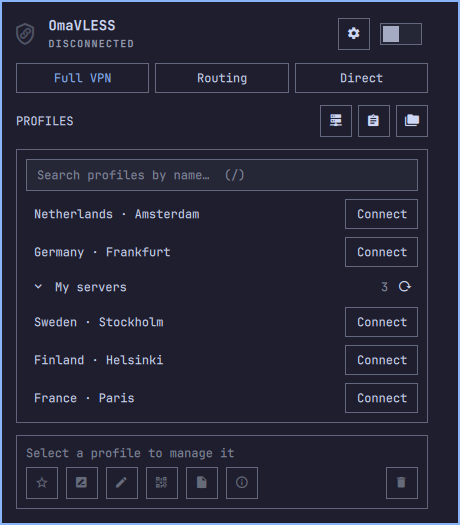
On the native main screen, expand a subscription to browse its profiles. Press ↻ beside the subscription's server count to download its updated server list. Profile management stays in the separate action bar below the list.
- Full VPN sends traffic through the connected profile.
- Routing uses the selected country policy and your domain/IP rules.
- Direct keeps the TUN running while bypassing the proxy.
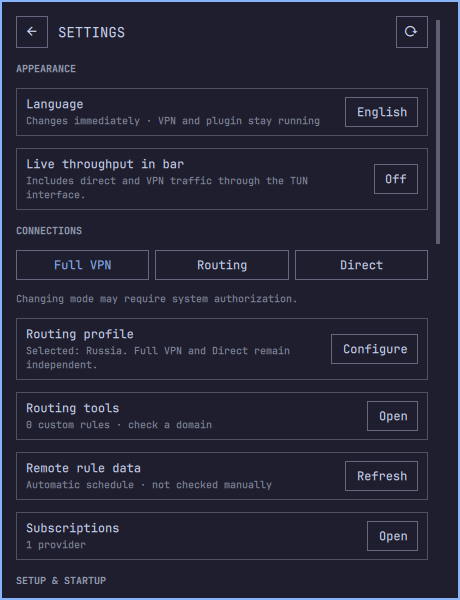
Settings contains language selection, routing tools, diagnostics, subscription management and shutdown controls. Changing the UI language does not restart the VPN. Automatic connection at login is Off by default; see the usage guide for its current limitations.
See controls and everyday use.
View the expanded subscription · View Settings
Supported inputs
| Family | Status |
|---|---|
| VLESS | Supported; includes TCP, WebSocket, HTTP, H2, gRPC and XHTTP, with TLS/REALITY where compatible |
| Trojan, Hysteria2, TUIC v5 | Experimental; real-server coverage is incomplete |
| Subscriptions | HTTPS raw/base64 lists of supported profile links |
Advanced VLESS Encryption/REALITY PQ and XHTTP combinations retain their
experimental limitations. WireGuard, AmneziaWG and vpn:// inputs are not
currently supported by the application.
See protocol support and limitations.
Privacy and help
Profiles and subscription URLs stay in a private local store. Imports accept supported profile links, not arbitrary remote configuration or executable content.
For support, use Copy report or Save report in Settings. Do not post profile files, subscription URLs, private configuration or unredacted screenshots.
Credits and license
Maintained by kdk. Community project; not affiliated with Omarchy, MetaCubeX or a VPN provider.
The interface builds on Omarchy VPN by Justin Köstinger. Routing data comes from RoscomVPN, MetaCubeX and Chocolate4U. See third-party notices.