
Hermes Sessions for Omarchy
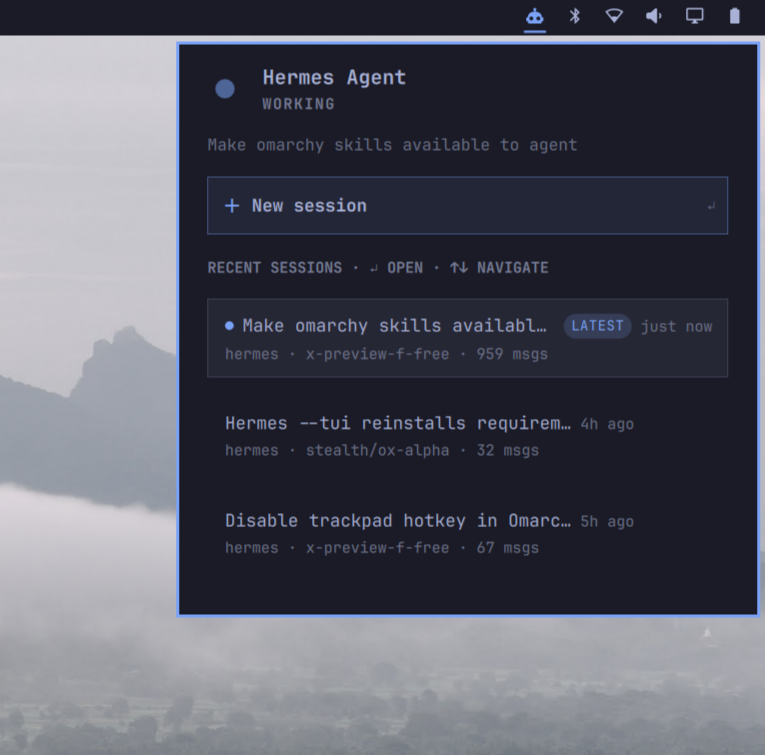
A bar widget that shows what your Hermes Agent is doing — right now and historically — in the Omarchy status bar. Click any past session to continue it in a Hermes TUI terminal.

Features
- Live status — a pulsing indicator shows when Hermes is actively working; the hero line names the current or most recent session
- Bar icon reflects activity — the icon tints with your theme's accent colour while Hermes is working, and returns to the normal foreground colour when idle
- Recent sessions list — title, relative age, workspace, model, and message count for your latest conversations
- Click to continue — each session opens (or re-focuses) its own terminal running
hermes --tui --resume <id> - New session button — one click launches a fresh Hermes TUI
- Keyboard navigation —
↑/↓to move through sessions,Enterto open,Escto close; the New-session button is reachable with arrows too - LATEST badge — instantly spot the newest conversation, separate from the "currently live" dot
Requirements
- Omarchy Linux (Hyprland + omarchy-shell)
- Hermes Agent installed (
hermeson PATH) sqlite3CLI (preinstalled on Omarchy)
Install
omarchy plugin add https://github.com/stevequinn/omarchy-hermes-sessions.git
Then enable it and place it in the bar:
omarchy plugin enable kelso.hermes-sessions
omarchy bar put kelso.hermes-sessions --after omarchy.tray
(Or manage both via Omarchy menu → Plugins.)
Uninstall
omarchy plugin disable kelso.hermes-sessions
omarchy plugin remove kelso.hermes-sessions
If you added the optional hotkey, remove its lines from
~/.config/hypr/bindings.lua and run hyprctl reload.
Hotkey (optional)
To toggle the panel from anywhere, add this to ~/.config/hypr/bindings.lua
and run hyprctl reload:
o.bind("SUPER + SHIFT + H", "Hermes sessions panel", "omarchy-shell kelso.hermes-sessions toggle")
Settings
Right-click the bar icon or use the shell's plugin settings:
| Key | Default | Description |
|---|---|---|
refreshIntervalSec |
30 | How often to poll the session store (10–600). The panel shows the 8 most recent sessions. |
Privacy
Everything is local. The widget reads your Hermes session store (~/.hermes/state.db, SQLite) directly on your machine. No network calls, no telemetry.
How it works
Panel.qml— the bar icon and popup panel (Quickshell/QML, using Omarchy's shared UI components)scripts/snapshot.sh— queries the SQLite store and emits one JSON snapshotscripts/hermes-tui-session— tiny wrapper that resumes a session in the TUI (invoked inside a terminal provided byomarchy-launch-tui)
The widget collapses out of the bar entirely when no sessions exist.
Troubleshooting
- Icon missing: no Hermes sessions found yet — chat with Hermes once and it appears
- Stale info after editing files:
omarchy restart shell(plugin hot-reload occasionally serves a stale component) - Sessions don't open: confirm
hermes --tui --resume <session-id>works in a plain terminal
License
MIT