
Night Light
f.lux-style screen color temperature for Omarchy on Hyprland.
A moon icon in the bar opens a panel with a Kelvin slider, an automatic sunrise/sunset schedule, warmth presets, and pause controls. The compositor backend is hyprsunset.
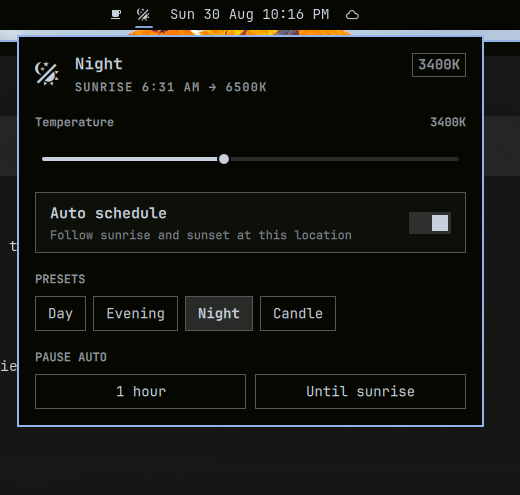
Enabling this plugin replaces Omarchy’s built-in night-light toggle (4000K / 6500K) with the scheduler and panel.
Install
omarchy plugin add https://github.com/key-tone/omarchy-nightlight.git --enable
The widget lands in the center of the bar. Move it with:
omarchy bar move kenny.nightlight --section right
Hyprland’s hyprsunset must be installed (Omarchy ships it). The plugin starts it if it is not already running.
Update
omarchy plugin update kenny.nightlight
Remove
omarchy plugin remove kenny.nightlight
That restores the built-in night-light service.
Controls
| Input | Action |
|---|---|
| Left click moon | Open or close the panel |
| Right click moon | Toggle night / day (switches to manual) |
| Slider | Set Kelvin live (1000–6500) and switch to manual |
| Auto schedule | Follow local sunrise and sunset |
| Day / Evening / Night / Candle | Jump to 6500K / 4000K / 3400K / 1900K |
| Pause 1 hour | Hold daylight until then |
| Until sunrise | Hold daylight until morning |
j / k |
Move between panel rows |
h / l |
Nudge the slider or walk presets |
a |
Toggle auto |
p |
Pause one hour |
s |
Pause until sunrise |
Location is taken from Omarchy weather (~/.local/state/omarchy/settings/weather.json) and geocoded through Open-Meteo if coordinates are missing. Sunrise and sunset are then computed offline (NOAA algorithm), so the schedule keeps working without the network.
Settings persist in ~/.local/state/omarchy/settings/nightlight.json.
Requirements
- Omarchy with shell plugins (Quattro)
- Hyprland +
hyprsunset hyprctl,curl,jq(all present on a stock Omarchy install)
CLI
The plugin keeps the existing nightlight IPC target, so Omarchy’s night-light commands still work:
omarchy-shell nightlight status
omarchy-shell nightlight setMode auto
omarchy-shell nightlight setTemperature 3400
omarchy-shell nightlight preset candle
omarchy-shell nightlight pause 3600
omarchy-shell nightlight pause sunrise
omarchy-shell kenny.nightlight toggle    # open the panel
When auto is on, omarchy toggle nightlight is a one-shot; the scheduler reasserts the scheduled temperature on the next tick.
Development
omarchy plugin validate .
node -e '
const M = require("./NightlightModel.js")
const sun = M.sunTimes(31.50239, -89.27895, new Date(2026, 7, 30, 12))
console.log(M.formatMinutes(sun.sunrise), M.formatMinutes(sun.sunset))
'
The shell hot-reloads QML under ~/.config/omarchy/plugins/ on save. The service process is created once per shell lifetime; restart it after Service.qml changes with omarchy restart shell.
License
MIT