
Theme Colors
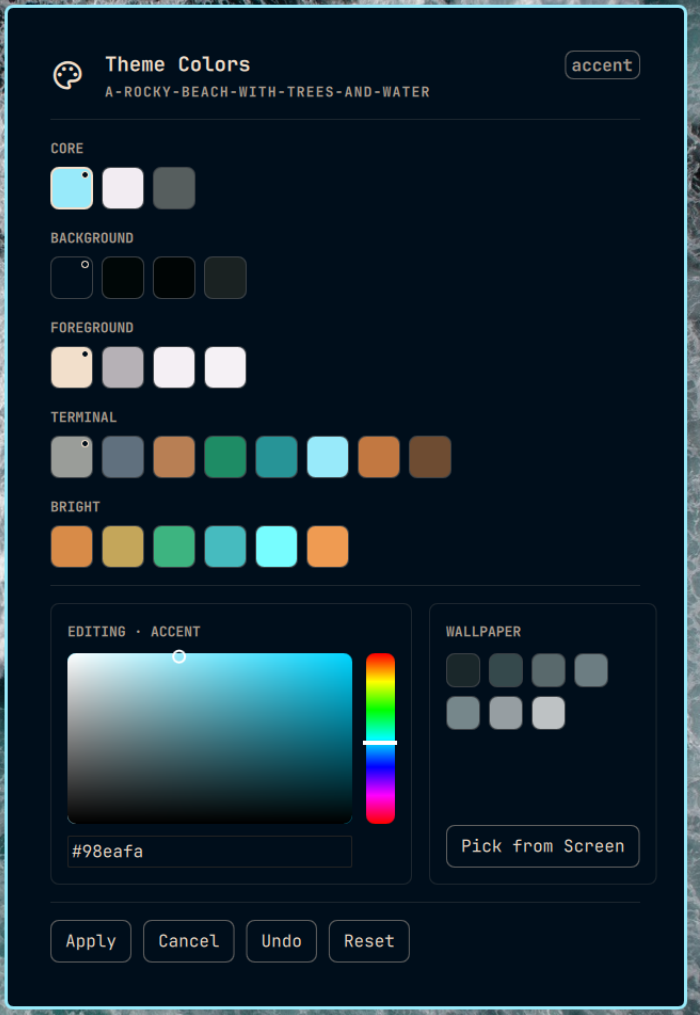
Edit your Omarchy theme's colours from the bar, without opening a file.
Click the palette icon, click a colour, then drag the picker, type a hex code, pull a colour off your wallpaper, or pick one from anywhere on screen. The bar recolours live as you drag. Press Apply to write the change to the theme and refresh the rest of the desktop — terminals, editors, Hyprland borders, the lock screen. Cancel throws the edit away, Undo reverts the last Apply, and Reset goes all the way back to the colours the theme had when you first touched it.
Hovering any swatch tells you what that colour actually controls and whether a change to it will be visible before you Apply — see Not every colour is visible.
Requirements
- Omarchy 4 with its Quickshell bar
hyprpicker— only for the Pick from Screen button; everything else works without itjqand ImageMagick (magick) — both already present on a standard Omarchy install; used for reading the palette and sampling wallpaper colours
Install
omarchy plugin add https://github.com/kevinchiha/omarchy-theme-colors --enable
That clones the plugin, registers it, and adds it to your bar. Then reload the shell so it picks up the new QML:
omarchy restart shell
git clone https://github.com/kevinchiha/omarchy-theme-colors \
  ~/.config/omarchy/plugins/kevinchiha.theme-colors
Add an entry to your bar's widget list in ~/.config/omarchy/shell.json
(alongside the other bar widgets, e.g. in bar.widgets.right):
{ "id": "kevinchiha.theme-colors", "pill": true }
Then omarchy restart shell.
Remove
omarchy plugin remove kevinchiha.theme-colors
omarchy restart shell
That leaves your themes exactly as you last applied them. To also throw away the plugin's undo history:
rm -rf ~/.local/state/omarchy-theme-colors
The plugin writes nothing else outside your theme files — see What it writes.
Not every colour is visible
A theme in Omarchy is one file, colors.toml, holding around 28 named
colours. Not all of them reach something you can see, and the ones that do
don't all reach it at the same moment.
Live preview covers four colours. While you're dragging — before you hit
Apply — only accent, background, foreground and red update the bar.
That isn't a shortcut this plugin took; the bar reads its colours from
~/.config/omarchy/shell.toml, and Omarchy's own template for that file only
pulls those four from the theme. The four that do preview live are marked with
a small dot in the corner of their swatch.
Some colours barely appear anywhere. selection reaches only btop and
Neovim. brown reaches only Neovim. Change one of those and press Apply, and
it is entirely possible that nothing on your screen looks different — the
change landed correctly, there was just nowhere for it to show.
That is why every swatch has a hover tooltip:
selection
Background behind highlighted text
Needs Apply · Neovim and btop only
The "what it's for" line is written by hand. The reach line is derived from Omarchy's own templates at runtime, so it stays true when Omarchy changes which colours a template consumes, rather than quietly going stale.
Undo vs Reset
Before writing any change to a theme's colors.toml, the plugin saves a
snapshot to ~/.local/state/omarchy-theme-colors/<theme-slug>/ — never inside
the theme's own folder, so a theme directory stays exactly what Omarchy put
there.
Two files are kept per theme:
original.toml— the colours as they were the very first time you touched this theme. Written once and never overwritten.previous.toml— the colours as they were right before your most recent Apply. Overwritten on every Apply.
Undo restores previous.toml, stepping back one Apply. Reset restores
original.toml, throwing away every edit you have made to this theme.
What it writes
Worth knowing before you install anything that edits your desktop:
| When | What it touches |
|---|---|
| Dragging a colour (live preview) | A clearly marked block inside your own ~/.config/omarchy/shell.toml, removed again on Cancel, on Apply, when the panel closes, and at shell start |
| Apply | The current theme's colors.toml — one line per changed colour — then runs Omarchy's own omarchy-theme-refresh |
| Apply / Undo / Reset | Snapshots under ~/.local/state/omarchy-theme-colors/ |
| Pick from Screen | Runs hyprpicker, which also copies the hex to your clipboard |
It never edits Omarchy's own files, never touches a theme directory beyond
colors.toml, and never writes anything on install.
Development
Clone it somewhere and symlink it into the plugins directory:
git clone https://github.com/kevinchiha/omarchy-theme-colors
ln -s "$PWD/omarchy-theme-colors" ~/.config/omarchy/plugins/kevinchiha.theme-colors
Run the test suite:
./tests/run-tests            # everything
./tests/run-tests snapshot   # just tests/test-snapshot.sh
Three things that cost time to discover:
QML changes need a full shell restart. A plugin rescan only picks up
shell.json changes. Edit any .qml and run omarchy restart shell, or you
will spend a while debugging code that isn't loaded.
qmltestrunner on PATH is Qt 5. This plugin is Qt 6 QML, and the Qt 5
runner fails by exiting 1 with no output whatsoever — indistinguishable from
a crash. Use /usr/lib/qt6/bin/qmltestrunner. The same applies to qml and
qmlscene. ./tests/run-tests already resolves the right one.
The bar's logs are not a systemd unit log. Use journalctl --user -t omarchy-shell — note -t (filter by tag), not -u. The bar logs through
systemd-cat; -u omarchy-shell finds nothing.
accent has no fallback in Omarchy's colour resolver, unlike every other key
the bar template needs. If a colors.toml omits it, the generated
shell.toml ends up with the literal text {{ accent }} in six places. That
is upstream behaviour, and the reason this plugin must never let you delete
the accent key.
Licence
MIT — see LICENSE.
Independent community plugin. Not affiliated with or endorsed by Omarchy or 37signals.