
Switchboard
A grid launcher for Omarchy. Same menu, same data, laid out so you can see it.
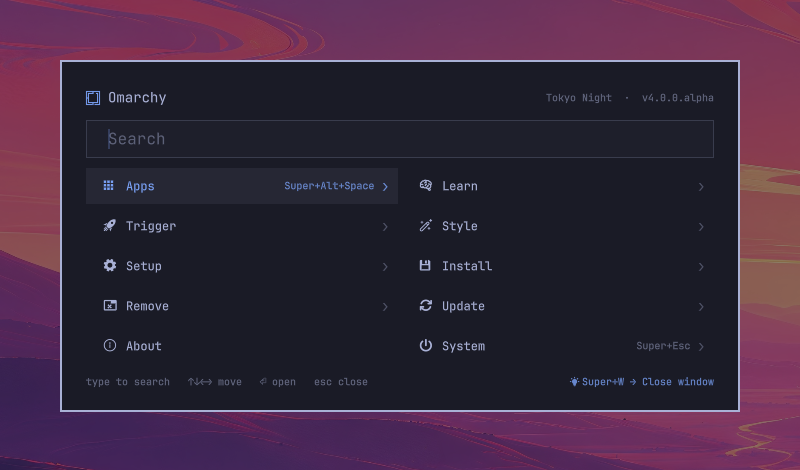
Press SUPER+SPACE. Ten tiles, one search box, nothing else. Type to find
anything anywhere in the menu tree, arrow to it, Enter. Every tile that also
has a global keybinding shows it — so the launcher slowly teaches you not to
need it.
Install
omarchy plugin add https://github.com/krall12/omarchy-switchboard.git
omarchy plugin enable krall.switchboard
That's it. Enabling is the switch: while it's on, every SUPER+SPACE, bar
click, and omarchy menu call opens Switchboard instead of the built-in
menu. Turn it off and you're back, keybindings untouched:
omarchy plugin disable krall.switchboard   # back to the built-in menu
omarchy plugin remove krall.switchboard    # gone entirely
Everything it needs ships with Omarchy: jq, hyprctl, xdg-open,
xdg-terminal-exec, and the omarchy-* helper scripts. No install hooks,
no sudo, no network, nothing written outside the plugin directory.
What it does
Search everything, always
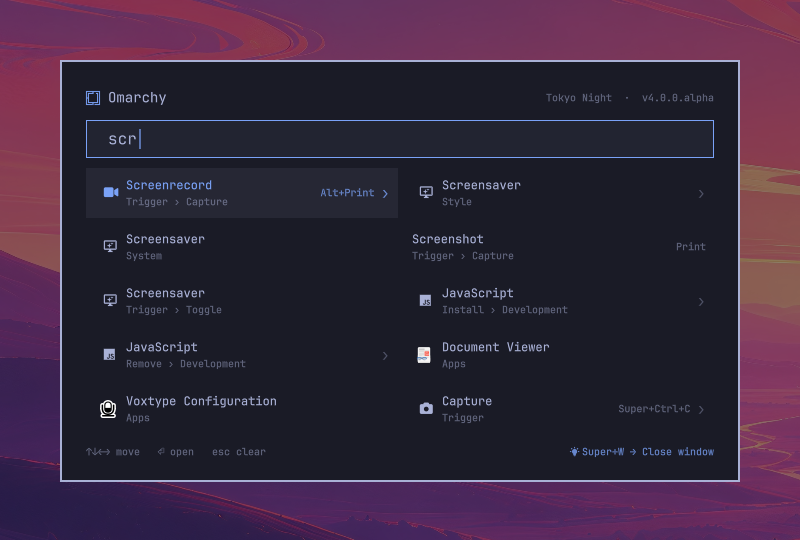
There's no search mode. Just type. The query runs against the current menu
and everything under it, so scr from the root finds Screenshot, Screensaver
and Screenrecord wherever they live, with the path shown under each.
Learn the shortcuts
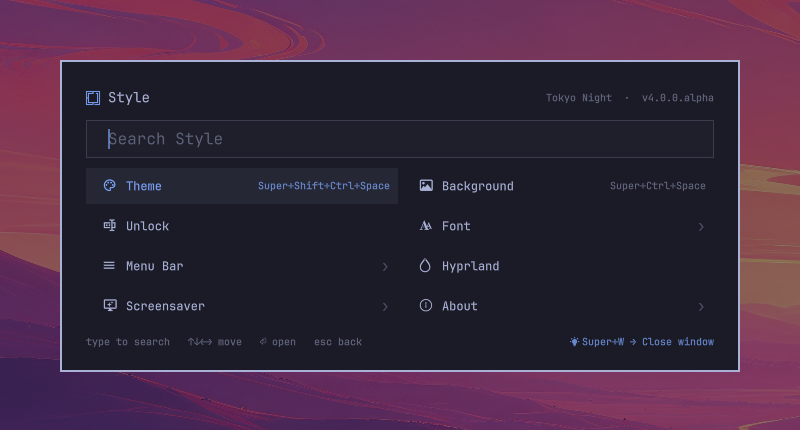
Anything reachable from a Hyprland keybinding shows the combo on its tile.
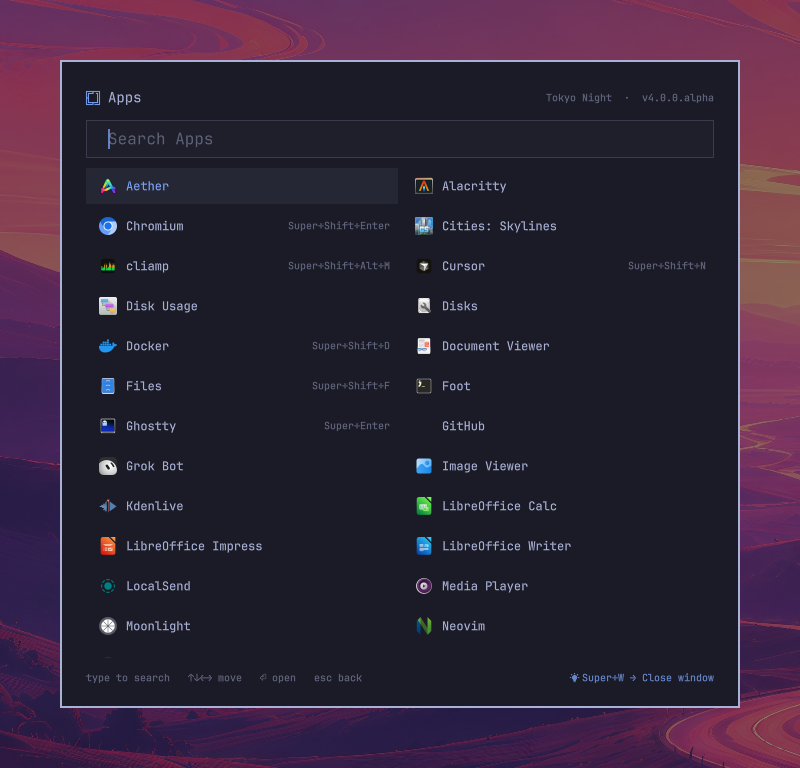
Apps get theirs from your bindings.lua too — Super+Enter on the
terminal, Super+Shift+Enter on the browser. The footer shows one random
binding each time you open it.
Run anything
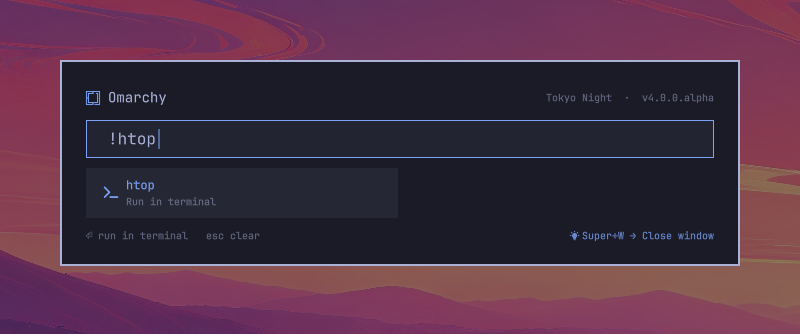
! runs a command in a new terminal, in the directory your active terminal
is already in; the shell stays open afterwards so you can read the output.
~/path or /path opens it with whatever handles it.
Apps, in one width
Long menus scroll instead of resizing the card. The launcher is 680px wide everywhere, so it never jumps under your eyes.
Everything else still works
Switchboard reads the same omarchy-menu.jsonc files as the built-in menu —
the defaults plus your ~/.config/omarchy/extensions/omarchy-menu.jsonc —
including when: / checked: guards, providers, and your own entries. It
answers the select / input requests that omarchy menu select and other
scripts send. Theme colors, fonts, radius and spacing all come from the
theme's [menu] tokens, so every theme already styles it.
Keys
| Key | Menu | select / input |
|---|---|---|
| letters | search | filter / type |
!cmd |
run in a terminal | typed |
~/path |
open with xdg-open | typed |
↑ ↓ ← → |
move | move |
Tab / Shift+Tab |
next / previous | same |
Enter |
open | pick / confirm |
Escape |
clear search → up a level → close | cancel |
Backspace |
delete; when empty, up a level | delete |
Delete |
uninstall the selected app | — |
Toggle from the menu
Want an on/off switch inside the menu itself? Add this to
~/.config/omarchy/extensions/omarchy-menu.jsonc (it's also in
extension/omarchy-menu.jsonc) and a
Switchboard Launcher toggle appears under Trigger › Toggle in both the
classic menu and Switchboard:
"trigger.toggle.switchboard": {
"icon": "",
"label": "Switchboard Launcher",
"checked": "$HOME/.config/omarchy/plugins/krall.switchboard/scripts/enabled",
"action": "$HOME/.config/omarchy/plugins/krall.switchboard/scripts/toggle"
},
How it fits in
The manifest declares omarchy.clonedFrom: "omarchy.menu". The shell treats
an enabled clone as the owner of that plugin id, so summons for
omarchy.menu route here without any keybinding or script changing. That's
the whole integration.
manifest.json     plugin manifest (kinds: menu + bar-widget, clonedFrom omarchy.menu)
Switchboard.qml   the launcher
BarWidget.qml     the bar button (same as the built-in one)
MenuModel.js      menu parsing and search, from Omarchy's menu plugin
Keybinds.js       maps Hyprland binds onto menu items and desktop entries
scripts/keybinds  emits the bind records (reuses omarchy-menu-keybindings' cache)
scripts/read-file bounded, symlink-refusing reader for the menu JSONC files
scripts/status    theme and version for the header
scripts/updates   pending update count for the header
scripts/toggle    enable ⇄ disable
scripts/enabled   exit 0 when Switchboard is active (for `checked:` guards)
extension/        the Trigger › Toggle entry above
Input bounds
Everything the launcher parses is produced by something else — helper
scripts, provider: commands, when: / checked: guard batches, and the
two omarchy-menu.jsonc files — so all of it goes through the same limits
(top of Switchboard.qml, maxProcess* / maxMenuFileBytes /
*TimeoutMs):
- Process output is kept line by line up to 256K characters / 4000 lines; past either the producer is killed and its output discarded.
- Every producer has a deadline (10s providers and guards, 15s helpers, 2min for the update check) after which it is killed.
- Menu files are read by
scripts/read-file, which refuses symlinks, non-regular files, and anything over 1 MiB, and opens withO_NOFOLLOW. The QML only watches those paths for changes; it never reads them itself. - The keybinding cache is picked the same way: newest regular non-symlink
file, size-checked, opened with
O_NOFOLLOW, output capped.
Hacking
Files under ~/.config/omarchy/plugins/ hot-reload on save; if a change
doesn't show, omarchy restart shell. Keybinds.js is a .pragma library
and always needs the restart. Shell logs:
tail -f /run/user/$UID/quickshell/by-pid/*/log.log
The knobs are at the top of Switchboard.qml: tile height and gap, card
width, and cardTop (where the card hangs from — the same distance is kept
below it, so a full launcher sits centred).
License
MIT. MenuModel.js is from Omarchy, also MIT.