
Acer Keyboard RGB
An omarchy status-bar widget that controls the Acer
keyboard backlight — brightness (0–100), RGB color (0–255 per channel), and the
five animation modes (breathing, neon, wave, shifting, zoom) — for keyboards
driven by the facer kernel module.
This is a drop-in replacement for the RGB/brightness control in
acer-predator-turbo-and-rgb-keyboard-linux-module, integrated into the
omarchy bar.
Features
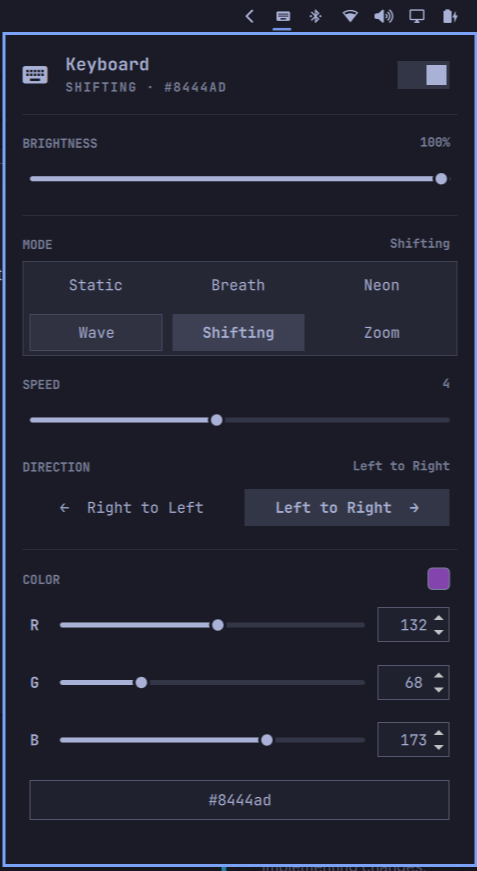
- Power switch — toggles the backlight off (writes brightness 0) or back on, restoring the previous brightness level. On/off is derived from brightness (0 = off), so dragging the brightness to 0 also flips the switch
- Brightness control (0–100) with live preview, mouse-wheel stepping, and an OSD popup
- Static RGB color input via three R/G/B sliders each with a numeric input
and a
#RRGGBBhex field (all kept in sync) - Per-zone color (Static mode) — assign a different color to each of the 4 backlight zones, or use the "All" button to drive every zone from one color
- Five animation modes (breathing, neon, wave, shifting, zoom) in a 2×3 grid, each with per-mode options: animation speed (0–9), wave/shifting direction, and color where the module honors it
- Live color swatch and the current color shown directly on the bar button
- No writes on start — the plugin only touches the keyboard in response to your input; nothing is applied when the shell starts
- Module detection — if the
facerkernel module or its device nodes are missing, the panel shows a warning banner and disables all controls instead of failing silently - Keyboard-navigable popup (j/k/h/l + Enter), matching omarchy's monitor panel
- Keyboard shortcuts for brightness (10% steps) and a backlight on/off toggle via
the
XF86Presentation(Nitro) key - Fully self-contained: no runtime dependencies beyond
bashandprintf
Prerequisites
This widget talks to the facer kernel module's character devices, which are
provided by
acer-predator-turbo-and-rgb-keyboard-linux-module.
Install that module first:
git clone https://github.com/JafarAkhondali/acer-predator-turbo-and-rgb-keyboard-linux-module.git
cd acer-predator-turbo-and-rgb-keyboard-linux-module
# Pin to a reviewed snapshot before building (detached HEAD):
git checkout 49d1d7d1e45755d3cf57e6b438620ec5bfdf0e4d
make
sudo ./install.sh
sudo ./install_service.sh
Disclaimer: this is a third-party kernel module maintained outside of this project. It runs in kernel space with full system privileges, so please review its source and installation scripts yourself, and install it at your own risk.
After a reboot the module exposes the devices listed under Requirements.
Requirements
- Linux with the
facerkernel module loaded (e.g. Acer Nitro) - Write access to the module char devices:
/dev/acer-gkbbl-0— backlight brightness/dev/acer-gkbbl-static-0— static color
- omarchy (Quickshell-based shell, v4)
The devices are write-only, so the widget keeps its own persisted state at
~/.config/omarchy/kshatriya-abhay.acer-keyboard/state.json.
Installation
The repo root is the plugin (manifest.json with its Panel.qml entry point
live at the top level, per the omarchy plugin layout), so it can be added like
any other omarchy plugin.
From the UI: Omarchy Menu > Setup > Plugins > Add Plugin, then enter the repo URL:
https://github.com/kshatriya-abhay/omarchy-acer-keyboard-plugin
From the CLI:
omarchy plugin add https://github.com/kshatriya-abhay/omarchy-acer-keyboard-plugin
Removal
Remove the plugin (this disables it and deletes its files), then delete its persisted state, and (optionally) the keyboard-module service:
omarchy plugin remove kshatriya-abhay.acer-keyboard --yes

# Persisted state (brightness, color, mode, zones):
rm -rf ~/.config/omarchy/kshatriya-abhay.acer-keyboard

# If you set up the optional keyboard shortcuts (see "Keyboard shortcuts"):
# edit ~/.config/hypr/bindings.lua, remove the kbd-rgb lines you added there,
# then reload:
hyprctl reload
The plugin itself is fully gone after the first command — the persisted state and the kernel module are the only leftovers, so they're listed separately above. The keyboard shortcuts are optional and were only ever a helpful tip, so there is nothing to undo unless you chose to set them up.
To also remove the required kernel-module service (from the module's own
README, run from the cloned acer-predator-turbo-and-rgb-keyboard-linux-module
directory):
sudo ./uninstall_service.sh
sudo ./uninstall.sh
rmmod facer
This removes the /dev/acer-gkbbl-* devices and stops the backlight; the
keyboard itself is unaffected.
Usage
Click the keyboard icon in the bar to open the panel:
- Power switch (top-right): toggles the backlight off and on, restoring the previous brightness. Right-clicking the bar icon does the same.
- Brightness: drag the slider or scroll the bar icon to adjust; an OSD shows the current level. Adjusting brightness while off turns it back on.
- Color: drag an R / G / B slider, type into its numeric input, or type a
#RRGGBBvalue into the hex field — all three stay in sync and apply immediately. - Mode: pick from the 2×3 grid (Static, Breath, Neon, Wave, Shifting, Zoom). Selecting a mode applies it immediately; the Speed (0–9) and Direction sections appear only for modes that use them. Color options are hidden for Neon and Wave, since the module ignores color for those.
- The last applied state (mode, brightness, color, and zones) is remembered in
state.json, but the plugin never writes to the keyboard on start — only your changes do.
If the
facermodule or its devices are missing, the panel shows a warning banner (with the specific cause) and the controls are disabled. Runkbd-rgb statusfor a quick check — it printsok,module-missing, ordevices-missing.
Keyboard shortcuts (optional)
The kbd-rgb helper also exposes brightness and power subcommands. Binding them
to your keyboard's media keys is optional — the panel gives you the same
controls — and is only added here as a helpful tip. If you want them, add to
~/.config/hypr/bindings.lua:
local kbd_rgb = os.getenv("HOME") .. "/.config/omarchy/plugins/kshatriya-abhay.acer-keyboard/kbd-rgb"

hl.unbind("XF86KbdBrightnessUp")    -- was: omarchy-brightness-keyboard up
hl.unbind("XF86KbdBrightnessDown")  -- was: omarchy-brightness-keyboard down
o.bind("XF86KbdBrightnessUp", "Keyboard brightness up", kbd_rgb .. " inc 10", { locked = true, repeating = true })
o.bind("XF86KbdBrightnessDown", "Keyboard brightness down", kbd_rgb .. " dec 10", { locked = true, repeating = true })
o.bind("XF86Presentation", "Keyboard RGB toggle", kbd_rgb .. " toggle", { locked = true })
The subcommands read the persisted state and write the devices:
kbd-rgb set <mode> <brightness> <r> <g> <b> <speed> <direction> [<powered> <lastBrightness>] [<zone> <zones>]— apply a full state.<mode>is a name (static,breath,neon,wave,shift,zoom) or its code (0–5). Speed is 0–9 (0 pauses the animation); direction is 1 (left → right) or 2 (right → left) — note the firmware interprets these opposite to facer_rgb.py's CLI help. The optional power pair is accepted for compatibility, but on/off is derived from<brightness>(0 = off) rather than stored as its own flag. The optional zone pair is used by the panel for per-zone color (Static mode):<zone>isallor a zone number 1–4, and<zones>is a semicolon-separated list of fourr,g,btriplets (one per zone).allapplies<r> <g> <b>to every zone; a numbered zone updates only that zone and the others keep their persisted colors. Without them the helper behaves as before (one color on all zones).kbd-rgb inc <percent>— raise brightness (clamped at 100), powers onkbd-rgb dec <percent>— lower brightness (powers off at 0)kbd-rgb toggle— flip backlight on/off, restoring the last brightness on power-on (same behavior as the panel's power switch)kbd-rgb status— printsok,module-missing, ordevices-missing(used by the panel to show the warning banner)
inc/dec/toggle preserve the active mode and its parameters.
Tips for other Acer users
- Your action keys may send different keysyms. On the Nitro the dedicated
key sends
XF86Presentation, but other Acer models use e.g.XF86Launch1,XF86MyComputer,XF86Search, orXF86WebCamfor their action keys. Find out what a key sends by pressing it while runningwev(from thewayland-utilspackage) and watching the keyboard events. - You don't need a special key — the bindings just exec
kbd-rgb, so bind any key or combo you like.inc/dec/toggleread the persisted state, so they work even if the widget isn't in the bar panel. - Unbind first. If a key is already bound (check with
omarchy menu keybindings --print), callhl.unbind(...)before youro.bind(...), or Hyprland keeps both and the first may win. - Point
kbd_rgbat your install. The path above is the default install location; change it if you copied the plugin elsewhere. - Validate after editing
~/.config/hypr/bindings.lua:hyprctl reload, thenhyprctl configerrors(should print nothing).
Roadmap
- Brightness control with slider + wheel + OSD
- Static RGB color with R/G/B sliders and hex inputs
- Restore last state on shell start
- On/off power switch (restores previous brightness)
- Detect missing device nodes / module and show an "unavailable" warning
- Dynamic modes (breath / neon / wave / shift / zoom)
- Per-zone color assignment (Static mode: All + zones 1–4)
Known issues
- The backlight can stop responding — the ACPI registers behind the keyboard can wedge when brightness/color writes are issued while the EC is busy (commonly from setting keyboard brightness in the Acer BIOS/firmware tooling or other brightness utilities). Writes start blocking and colors stop applying. This is a hardware/firmware limitation of the upstream module itself; reset the EC with a hard power off (shut down, unplug, hold the power button ~30s), or reboot.
License
MIT — Copyright (c) 2026 Abhay Kshatriya