
nbfc-linux Fan Control
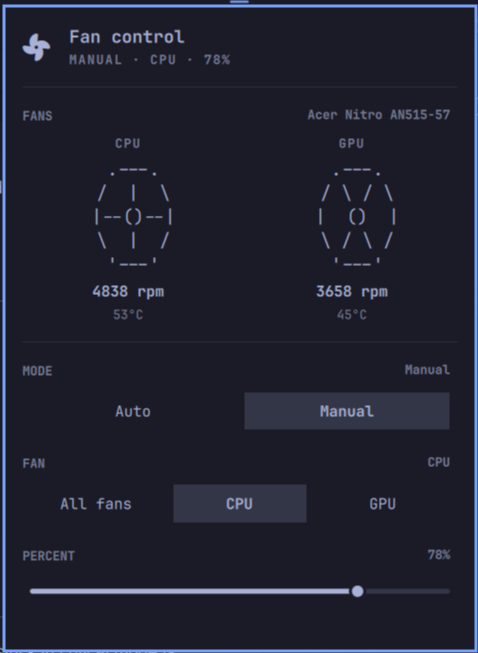
An omarchy status-bar widget for controlling nbfc-linux fans — the Linux port of NoteBook FanControl. It shows each fan as ASCII art that spins faster as the fan speeds up (with the exact RPM printed below), and lets you switch between auto and manual control with staged edits that only reach the hardware when you press Save.
Features
- Live fan art — every fan is drawn as ASCII art that oscillates between cross and X spokes to look like it's spinning; it spins faster as the fan's speed percent climbs (1–4 swaps/sec). The animation only runs while the panel is open. Current RPM is printed right underneath, with the temperature alongside
- Auto / Manual mode — one tap back to nbfc's automatic control, or take over and pick a target speed yourself
- Fan picker (Manual) — "All fans" or a specific fan (labels pulled from the fan names nbfc reports, e.g. "CPU fan" → "CPU"), each seeded with its current target speed
- Percent slider (Manual) — set the target duty 0–100%
- Staged changes — edits are never applied while you drag; a Save / Cancel row appears only once something has changed, and nothing touches the fans until you confirm. Save is themed as the primary (filled) action, Cancel as the secondary (bordered) one
- Polling while open — status refreshes every 2 seconds while the panel is open, so the art and numbers stay live without hammering the CLI when closed
- Service detection — if
nbfc_serviceisn't reachable, the panel shows a warning banner and disables the controls instead of failing silently - Keyboard-navigable popup (j/k/h/l + Enter), matching omarchy's other panels
Prerequisites
-
nbfc-linux with the
nbfc_servicesystemd service running:sudo pacman -S nbfc-linux # Arch systemctl --user start nbfc_service -
A config for your machine. nbfc ships configs for many laptops; pick one with
nbfc config -a(list all) /nbfc config -c <name>, then apply withnbfc config -aornbfc config -c <name>.
The widget drives
nbfcthrough itsset/statussubcommands, so it needs the service socket (/run/nbfc_service.socket) to be accessible to your user. If nbfc is configured to require root for the socket, run the service withnbfc_service's--socket-accessoption or adjust the socket unit. (On Arch's default package the socket is world-writable, so no extra setup is needed.)
Requirements
- Linux with nbfc-linux (
nbfc_servicerunning) and a config applied - omarchy (Quickshell-based shell, v4)
Installation
The repo root is the plugin (manifest.json with its Panel.qml entry point
live at the top level, per the omarchy plugin layout), so it can be added like
any other omarchy plugin.
From the UI: Omarchy Menu > Setup > Plugins > Add Plugin, then enter the repo URL.
From the CLI:
omarchy plugin add https://github.com/kshatriya-abhay/omarchy-nbfc-linux-plugin
Removal
From the UI: Omarchy Menu > Setup > Plugins, select Fan Control, then Remove.
From the CLI:
omarchy plugin remove kshatriya-abhay.nbfc
Removal just unloads the widget and deletes the plugin folder. It never
touches nbfc, its config, or your fan settings — the fans keep whatever mode
they were in (the same state nbfc status reports). To fully restore
automatic control after removing the widget, run:
nbfc set -a
Dependencies
| Dependency | Why | Notes |
|---|---|---|
| nbfc-linux | Provides the nbfc CLI and nbfc_service the widget talks to |
Required, runtime |
| omarchy (Quickshell, v4) | Host shell the widget runs in | Required, runtime |
There are no other runtime dependencies — the widget uses only the QML/JS built-ins that ship with omarchy (no bundled binaries, no install hooks, no remote calls).
Permissions
The widget is read-only with respect to your system: it only runs
nbfc status (polling) and nbfc set (writes), and nbfc set is only
invoked when you press Save — never automatically. It does not modify or
overwrite any configuration file, and uninstalling it leaves no state behind.
Usage
Click the fan icon in the bar to open the panel:
- Fans — read-only display at the top: each fan's animated ASCII art, its RPM, and temperature.
- Mode — choose Auto (nbfc controls all fans) or Manual (you pick). In Auto, no further options are shown.
- Fan (Manual only) — "All fans" sets every fan, or pick one specific fan; the slider seeds from that fan's current target speed.
- Percent (Manual only) — the target duty 0–100%.
- Save / Cancel — appears only after a change is staged. Save writes the pending mode/fan/percent to nbfc; Cancel throws the edits away and reverts to the applied state.
Roadmap
- Animated fan art (oscillates between cross and X spokes, faster with speed)
- Animation only runs while the panel is open
- Auto / Manual mode with staged edits (Save / Cancel)
- Per-fan picker with live target seeding
- Percent slider with keyboard support
- 2s polling while the panel is open
- Service-unavailable warning banner (including "only works with nbfc-linux")
- Config selection — pick among installed nbfc configs from the panel (not planned)
Known issues
- Reading critical mode — nbfc reports
Critical Mode Enabledinstatus, but the panel keeps it read-only for now; a fan stuck in critical mode is shown as-is rather than offering a control that could interfere. - Configs with many fans — the fan row lays out one card per fan; very wide configs (3+ fans) may crowd the panel width.
License
MIT — Copyright (c) 2026 Abhay Kshatriya