
kshatriya-abhay.wiz-lights
Smart home widget for WiZ bulbs (like Philips WiZ LED bulbs) on the local network, for the Omarchy shell (Quickshell).
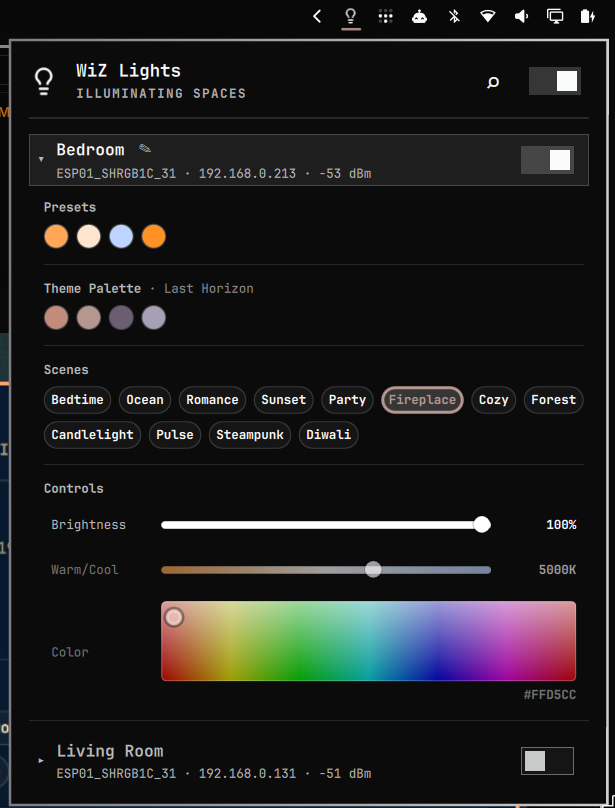
Features
- UDP broadcast discovery of WiZ bulbs on the LAN (
getSystemConfigon port 38899) - Bar button showing how many bulbs are on (
n/m) - Popup listing every saved bulb with an on/off toggle and master toggle
- Direct expanded customization on bulb expansion:
- Quick Warm (2700K) and White (6500K) buttons
- Custom saved preset dots (save color/temp without overriding brightness; right-click to remove)
- Full suite of dynamic WiZ scenes with parity to the official app (Bedtime, Ocean, Romance, Sunset, Party, Fireplace, Cozy, Forest, Candlelight, Pulse, Steampunk, Diwali)
- 2D Hue & Saturation color plane matching the WiZ app with live HEX readout
- Warm/cool white slider (2200K-6500K) and Brightness slider (0-100%)
- Rename bulbs via the pencil button or keyboard shortcut (
N)
- Full keyboard navigation with clear focus outlines:
Up/Down(ork/j) andTab: navigate between header controls, bulbs, presets, scenes, and slidersLeft/Right(orh/l): select swatches, switch between row/switch, or fine-tune slidersEnter/Space: toggle switches, open bulbs, apply presets and scenesR: refresh / re-scan local networkT: toggle power of focused bulb or master switchE/O: expand / collapse focused bulbN: rename focused bulb
- Clean rotating network scan status phrases without distracting dots
- Scan button (also
Rinside the panel) to re-discover; IPs update by MAC when DHCP changes them - Active preset halos and scene selection highlights
- Off-state styling with dimmed cards and grayscale preset filter when inactive
- Slider drags are debounced (~200ms) and pause background polling while in use
Requirements
-
python3(stdlib only — no extra packages) -
UFW users must allow inbound replies from the LAN:
sudo ufw allow in proto udp from 192.168.1.0/24 to any port 38899
Installation
The plugin id is kshatriya-abhay.wiz-lights.
From the repository root:
omarchy plugin add https://github.com/kshatriya-abhay/omarchy-wiz-lights-plugin --enable
Or install manually by cloning the plugin into your user plugins directory:
git clone https://github.com/kshatriya-abhay/omarchy-wiz-lights-plugin \
  ~/.config/omarchy/plugins/kshatriya-abhay.wiz-lights
The shell picks up plugins under ~/.config/omarchy/plugins/ automatically
(hot-reload on save; force with omarchy-shell shell rescanPlugins).
To add the widget to the bar, put { "id": "kshatriya-abhay.wiz-lights" } in the desired
section of ~/.config/omarchy/shell.json, or move it later with
omarchy bar move kshatriya-abhay.wiz-lights --section right.
Removal
omarchy plugin remove kshatriya-abhay.wiz-lights --yes
For a manual install, remove the folder and its entry from the bar layout:
rm -rf ~/.config/omarchy/plugins/kshatriya-abhay.wiz-lights
Cleaning up plugin state
The plugin writes state to disk. Neither is removed by the commands above, so clean them up explicitly if you want a full uninstall:
| Path | Contents |
|---|---|
~/.local/state/wiz-lights/lights.json |
Saved bulb list: MAC addresses, last-known IPs, and user-assigned names |
~/.local/state/wiz-lights/presets.json |
Saved presets per bulb |
~/.cache/quickshell/ |
Compiled QML cache; the shell may briefly show the stale widget after removal until this is cleared |
To remove everything:
rm -f ~/.local/state/wiz-lights/lights.json
rm -f ~/.local/state/wiz-lights/presets.json
rmdir ~/.local/state/wiz-lights 2>/dev/null || true
omarchy restart shell
How it works
wizctl.py talks the WiZ Local UDP API (JSON over UDP port 38899), same
protocol as the official local integration:
- discovery requires the request to be sent from source port 38899 on some firmwares, so the helper binds that port
getPilotpolls state,setPilotsends commands- color commands are sent as hex (
setPilotstill receivesr/g/b, which is what the bulbs speak)
Discovered bulbs are persisted by MAC address in
~/.local/state/wiz-lights/lights.json, surviving reboots and IP changes.
CLI
python3 wizctl.py discover
python3 wizctl.py status
python3 wizctl.py set <ip> <on|off>
python3 wizctl.py set-all <on|off>
python3 wizctl.py scene <ip> <sceneId>
python3 wizctl.py bright <ip> <0-100>
python3 wizctl.py temp <ip> <2200-6500>
python3 wizctl.py rgb <ip> <r> <g> <b>
python3 wizctl.py color <ip> <#rrggbb>
python3 wizctl.py save-preset <mac> '<json>'
python3 wizctl.py delete-preset <mac> <index>
python3 wizctl.py rename <mac> <name>
python3 wizctl.py forget <mac>
All list commands print a single line of JSON.
Credits
The WiZ Local UDP protocol reference and color engine were derived from the
kek's WiZ Light Controller
project (wiz.py), which is released under the GPL-3.0 license. This plugin
reimplements the protocol for the Omarchy shell and is distributed under the
same license (see LICENSE).