
Kodi Remote — Omarchy bar widget
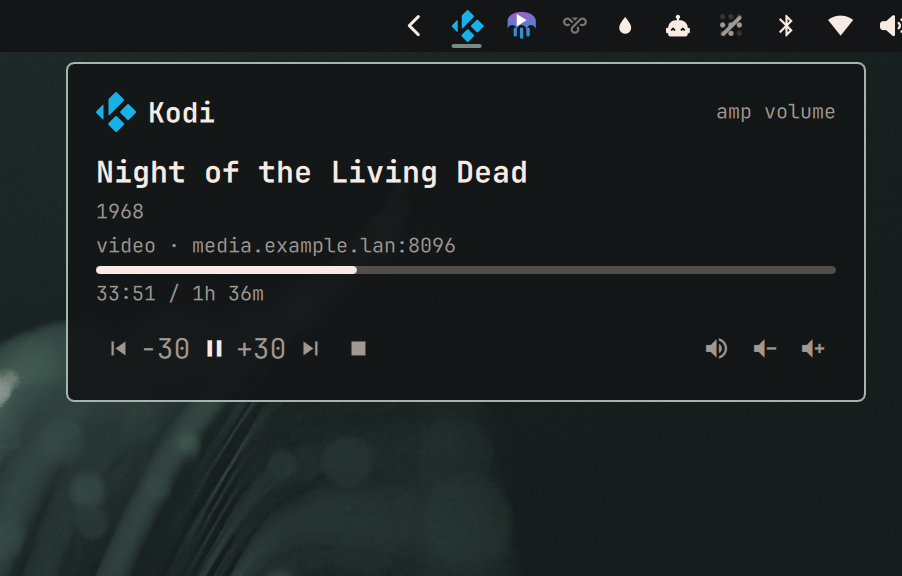
What is playing on Kodi, with transport, 30s seek and volume. Hidden while nothing is playing.
A fault stays visible and worded, because a hidden widget and a broken widget must not look the same.
"Not yet" is not a fault. The bar starts about ten seconds before WiFi associates, so the first poll of every boot fails. While a poll is failing the widget retries every 5s and says nothing; it reports a fault only after 45s of continuous failure, and one success resets that clock. So a boot is quiet, a network blip is quiet, and a genuinely dead Kodi still speaks up within a minute.
Configure
~/.config/omarchy-kodi/config.json, mode 600:
{ "url": "http://<kodi-host>:8080", "user": "<kodi user>", "password": "<kodi password>" }
On the Kodi box: Settings → Services → Control → Allow remote control via HTTP. Without it the
port still answers and every call returns 401, which surfaces here as auth failed rather than
unreachable — the widget names that distinction because the two have completely different fixes.
user and password may be omitted if Kodi's web server has no authentication, but leaving a
media box open on the LAN is worth a second thought.
What it never sends
Player.GetItem returns the stream's file URL, and on a Kodi that plays from Jellyfin that URL
carries a live ApiKey= query parameter. poll.py fetches that field and deliberately never
emits it — only host:port survives into the widget's output, via _source(). Echoing it would
put a working credential into stdout, into any shell that runs backend.sh by hand, and into
whatever collects Quickshell's logs.
Credentials reach the Python helpers through the config file path (OMARCHY_KODI_CONFIG), never
through argv, so they never appear in ps for other users on the box.
Backend, without the bar
The whole network surface is backend.sh, so it can be run and diffed over SSH — the widget itself
can only be checked by eye on the owner's screen.
./backend.sh                      # poll
./backend.sh control playpause    # playpause next previous stop back30 fwd30 volup voldown mute
{"ok":true,"error":"","volume":100,"muted":false,"players":[
  {"playerid":1,"type":"video","title":"Bionic Beauty","subtitle":"The Bionic Woman · S01E07",
   "position_sec":393,"duration_sec":3009,"paused":false,"source":"media.example.lan:8096"}]}
Faults are distinct and each names its own fix: not configured, bad config, auth failed,
unreachable, http <code>, bad response, nothing is playing.
Install on a new machine
Requires Omarchy 4 ("Quattro", Quickshell bar).
# 1. Drop the plugin in place (dir name MUST be the manifest id)
mkdir -p ~/.config/omarchy/plugins
cp -r kodi-remote ~/.config/omarchy/plugins/ky.kodi-remote

# 2. Config — mode 600, outside the plugin dir so credentials are never in the repo
mkdir -p ~/.config/omarchy-kodi
cat > ~/.config/omarchy-kodi/config.json <<'EOF'
{ "url": "http://<kodi-host>:8080", "user": "<user>", "password": "<password>" }
EOF
chmod 600 ~/.config/omarchy-kodi/config.json

# 3. Enable it
omarchy-plugin-enable ky.kodi-remote
Poster artwork
Each player shows a poster: Kodi's art.poster, which for an episode is the series poster —
tall, recognisable, the same all season — falling back to art.thumb and then thumbnail.
Kodi wraps every art path in its own proxy scheme with the real location percent-encoded inside:
image://http%3a%2f%2fhost%2fItems%2f<id>%2fImages%2fPrimary%2f0%3fFormat%3doriginal/
so _poster() strips the image:// prefix and Kodi's trailing slash, decodes what remains, and
keeps only http(s) results. That last guard matters: a Kodi with a local library reports art as
/storage/…, smb:// or a bare DefaultVideo.png, none of which QML's Image can fetch — those
yield no thumbnail rather than a broken one.
maxHeight=180 is appended, guarded on the /Images/ route so a non-Jellyfin source passes through
untouched. Kodi hands out Format=original, which on this library is a 249KB poster; the same image
with maxHeight is 23KB.
No credential is attached, and none is present to begin with. Kodi's Jellyfin art URLs carry
Tag= (a content hash) but not the ApiKey= that the stream URL does. That asymmetry is the whole
reason the poster can be handed to QML while file cannot.
Editing
Panel.qmlrequiresomarchy-restart-shell. Plugin hot-reload picks upbackend.shand the Python helpers but keeps serving a cached compile of the QML — the edit appears to do nothing, and errors report against line numbers from the old file. Do not gate the poster'svisibleonstatus === Image.Readyeither: an Image that starts invisible at zero layout width is never driven to load, so the status it waits for never arrives.
Verified behaviour on this hardware
Kodi 21.3 (Amlogic), library served entirely through plugin.video.jellyfin. Tested 2026-08-13:
| Command | Result |
|---|---|
playpause, stop |
work |
back30, fwd30 |
work — but only once playback has actually started |
next, previous |
accepted; no-op without a playlist |
volup, voldown, mute |
work — forwarded to the receiver over HDMI-CEC |
Three quirks cost a debugging round each and are worth knowing before "fixing" them:
- Seek is ignored while a stream is still starting. For the first ~30s of a
plugin.video.jellyfinitem,Player.Seekis ACKed and does nothing, in every documented form (seconds,step,percentage, absolutetime). Once playback is genuinely advancing all of them work.canseekreportstruethroughout, so it cannot be used to tell the two apart — do not conclude from one early test that seek is unsupported. - Volume uses
Input.ExecuteAction, neverApplication.SetVolume. This is the whole trick.Application.SetVolumedrives Kodi's own mixer, which underaudiooutput.passthroughis bypassed: it moves the reported number while nothing audible changes, so the buttons look like they work. Its documented{"volume":"increment"}/{"decrement"}form is a silent no-op on this box on top of that.Input.ExecuteActionis the user-level action — the path a remote's volume key takes — so Kodi forwards it over HDMI-CEC to the receiver when bitstreaming, and moves its own mixer when not. One API, correct in both configurations. Verified by ear 2026-08-13: nine ExecuteAction steps audibly dropped the receiver whileApplication.GetPropertiesstayed pinned at 100. - The amp's level cannot be read back. CEC is write-only here, so under passthrough the header
reads
amp volumerather than a percentage. The buttons work; only the readout is unavailable. - Kodi ACKs a command before applying it. Polling immediately reads the pre-command state, so
KodiService.qmlwaits 400ms before its confirming poll.
Notes
- Previous restarts the current item first. That is Kodi's behaviour, matching every other player; a second press within a couple of seconds is what steps back. Not papered over here.
- Volume and mute work with nothing playing. They are application-level, and a too-loud Kodi with nothing playing is exactly when you want them. The playback buttons disable themselves instead.
- Commands never report their own result. The next poll is the authority — a pause Kodi refused must not render as paused just because it was asked for.
kodi.pyis deliberately a self-contained copy rather than an import fromky.navidrome-remote. Plugins are installed and updated independently, so a cross-plugin import turns uninstalling one into a silent break of the other.
Preview image
preview.png shows Night of the Living Dead (1968), which is in the public domain in the US — its
original release prints omitted the copyright notice, so neither the film nor its artwork is under
copyright. The host in it is a placeholder. No studio artwork and no real library metadata is
reproduced anywhere in this repository.
Credits and trademarks
Icon from dashboard-icons (kodi.svg, kodi.png),
licensed Apache-2.0. The Kodi name and logo are trademarks of the XBMC Foundation, used here
for identification only. This plugin is not affiliated with or endorsed by the XBMC Foundation.
Plugin code is MIT — see LICENSE.