
NZBGet Queue
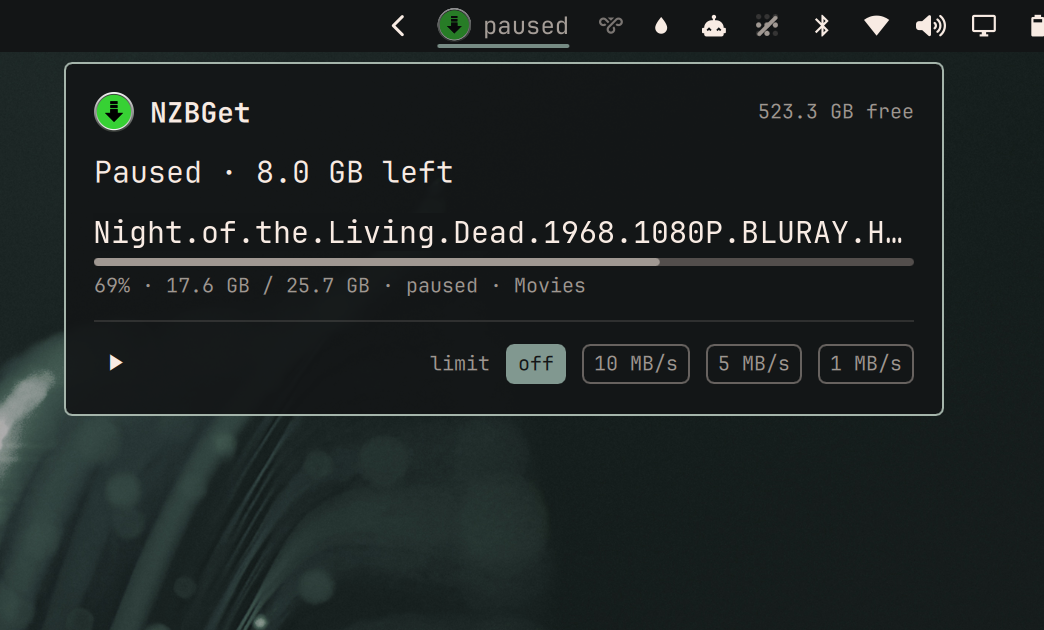
Omarchy bar widget showing NZBGet's live download speed, with the queue, pause/resume and a speed limit in the popup.
Hidden entirely while nothing is downloading.
Install
omarchy plugin add https://github.com/Kyrunner/omarchy-nzbget-queue.git --enable
Setup
Create ~/.config/omarchy-nzbget/config.json:
{
  "url": "http://192.168.1.10:6789",
  "public_url": "",
  "user": "nzbget-control-username",
  "password": "nzbget-control-password"
}
chmod 600 it — those credentials can pause and reconfigure your downloader.
| Key | Meaning |
|---|---|
url |
LAN address. Always tried first. |
public_url |
Optional. Used only when the LAN address is unreachable, so the widget keeps working away from home. Must be https://: the credentials are never sent to a public address over plain HTTP, never follow a redirect, and replies over 4 MiB are refused. Leave "" if NZBGet has no public address. |
user / password |
NZBGet's ControlUsername / ControlPassword, sent as HTTP Basic auth. |
Away from home
With public_url set, the LAN address is tried first and the public one only on
failure. That order matters: at 3s polling this widget makes ~28,800 requests a
day, and pointing that at a public edge with a rate limiter or an IP-ban daemon
is a good way to get banned from your own server.
The choice is remembered in ~/.local/state/omarchy-nzbget/endpoint.json,
because backend.sh runs as a fresh process on every poll and would otherwise
pay a LAN timeout on every one while you are away. After a fallback it stays on
the public endpoint for 10 minutes, then re-probes the LAN — so coming home
restores the fast path on its own. The popup shows remote while on that path.
Bad credentials are never failed over to the public endpoint. Retrying a wrong password against your own public edge is a good way to get banned by it.
Without a public_url, leaving the house makes NZBGet unreachable by
definition, and a red ! saying so tells you nothing you can act on. So that
one case hides from the bar instead (setting Hide from the bar when away from
home, on by default). It is deliberately narrow: NZBGet down while you are at
home, or a configured public address that also fails, is a real fault and still
shows as broken. Turn the setting off to see the fault in every case.
The username and password are NZBGet's Settings → Security →
ControlUsername / ControlPassword, sent as HTTP Basic auth. NZBGet ships with
defaults (nzbget / tegbzn6789); if yours still accepts them, change them
before exposing this or anything else to your network.
Using it
| Bar | NZBGet mark with the current rate, e.g. ↓ 12.4 MB/s. Hidden when idle. |
Bar, paused |
Mark dimmed, with the word — you paused it, nothing is broken |
Bar, processing |
Downloading finished; NZBGet is unpacking or repairing |
Bar, red ! |
Something has been wrong for 45s straight; the popup names it. Off the home LAN with no public_url, the widget hides instead — see Away from home. |
| Click | Show the queue |
| ⏸ / ▶ | Pause or resume all downloading |
off 10 5 1 MB/s |
Speed limit presets |
Space in popup |
Pause / resume |
| Middle-click | Refresh now |
r in popup |
Refresh now |
Esc |
Close |
What it shows, and what it refuses to invent
Each queued item gets a progress bar, percentage, transferred and total size, and
its state in plain words — NZBGet's raw LOADING_PARS and VERIFYING_REPAIRED
say nothing useful to someone watching a download, so they read as checking and
verifying repair.
ETA only appears where it means something. NZBGet reports sizes, not estimates, so the ETA is computed from the current rate. That makes it honest for the item actually downloading and meaningless for anything queued behind it — which would have to guess at everything ahead of it — so queued items simply have no ETA rather than a confident-looking fiction.
For the same reason, a paused queue shows no ETA at all, and post-processing
shows processing rather than ↓ 0 B/s, which reads as broken when NZBGet is in
fact busy unpacking.
Polling
3s while something is downloading, backing off to 15s when the queue is empty. A speed readout needs a few seconds to feel live, but an idle NZBGet does not deserve a wakeup every 3s on a laptop. A failing poll retries at 3s too — the component never backs off slower than the plugin's own steady interval.
The queue itself is only fetched when status says there is one, so an idle
poll is a single small request.
A failure is silent until it has lasted 45 seconds. Inside that window the widget
keeps showing the last known rate, unmarked — nothing on the bar or in the popup
flags it as stale yet; if it has nothing yet — the usual case at boot, since the
bar starts before WiFi associates — it stays hidden rather than appearing just to
say it is broken. Only 45s of continuous failure earns the red !, marks the
popup last-known, and one good poll clears it.
Dependencies
| NZBGet | Developed against 26.2. Uses only the standard JSON-RPC API. |
bash, python3 |
Standard library only — nothing to pip install. |
The bar icon is an SVG, needing qt6-svg — already a hard dependency of
quickshell.
Removing it
omarchy plugin remove ky.nzbget-queue
rm -rf ~/.config/omarchy-nzbget ~/.local/state/omarchy-nzbget
The plugin only ever writes ~/.local/state/omarchy-nzbget/endpoint.json, which
records which address last worked. It reads its config and never edits it.
Debugging
backend.sh is the whole network surface, so it can be run over SSH:
./backend.sh                 # rate, queue and disk, as JSON
./backend.sh pause
./backend.sh resume
./backend.sh limit 5120      # KB/s; 0 = unlimited
Delete ~/.local/state/omarchy-nzbget/endpoint.json to force a LAN re-probe.
bash poll-output.test.sh checks what the poll reports when nothing answers,
including the has_public flag the bar uses to tell "away from home" from
"broken".
bash endpoint-safety.test.sh proves where the credentials may go: never to a
plain-HTTP public address, never along a redirect, and never into a reply larger
than 4 MiB. It runs the public path over real TLS against local stub servers.
bash state-write-safety.test.sh proves what the state writes refuse to do: a
symlink planted at the temp name is never followed, a symlinked state file is
never read through, and a state directory other accounts can write is refused
outright rather than written to.
bash plain-text.test.sh proves every Text element in every .qml file sets
textFormat: Text.PlainText, so a download name or status from the server is
always drawn as text and never interpreted as markup.
Failures are distinct on purpose — not configured, bad config,
auth failed, unreachable, http <code>, public_url must be https,
response too large — because a dead downloader and an idle one must never
look the same.
Design
See DESIGN.md for why the formatting lives in Python rather than QML, and why the bar item is built from a Row instead of the usual bar button.
Icons
nzbget.svg is from dashboard-icons
(Apache 2.0) — the same source as the author's other Omarchy plugins.
Preview image
preview.png is a real session with the release name replaced by
Night of the Living Dead (1968), which is public domain in the US — its
original release prints omitted the copyright notice. Every other value in it
(speed, progress, sizes, free space) is unaltered.