
Seerr Requests
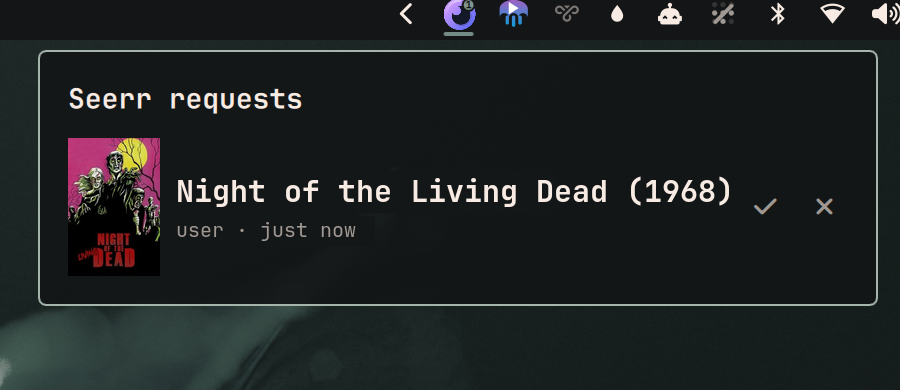
Omarchy bar widget for the Seerr approval queue. Notifies when a request arrives, shows what is waiting, and approves or declines it without opening a browser.
Hidden while the queue is empty, so it costs no bar space on a quiet day.
Install
omarchy plugin add https://github.com/Kyrunner/omarchy-seerr-requests.git --enable
Setup
Create ~/.config/omarchy-seerr/config.json:
{
  "url": "http://192.168.1.10:5055",
  "api_key": "PASTE_KEY_HERE",
  "web_base": "https://seerr.example.com",
  "public_url": "https://seerr.example.com"
}
Replace only the values on the right of each colon — the field names must stay exactly as written. Get the key from Settings → General → API Key in Seerr.
chmod 600 it — the API key can approve requests.
| Key | Meaning |
|---|---|
url |
API endpoint. Keep this on the LAN; it is polled all day. |
api_key |
Seerr API key. Needs approve/decline rights. |
web_base |
Address used only for browser links, so a click works away from home. Defaults to url. |
public_url |
Optional. API address used only when url is unreachable, so the widget keeps working away from home. Must be https://: the key is never sent to a public address over plain HTTP, never follows a redirect, and replies over 4 MiB are refused. Defaults to web_base; set it to "" if Seerr must never be polled from outside the LAN. |
With a public address, the LAN one is tried first and the public one only on
failure. That order matters: this widget polls all day, and pointing that at a
public edge with a rate limiter or an IP-ban daemon is how you lock yourself out
of your own server. After a fallback it stays on the public endpoint for 10
minutes, then re-probes the LAN — so coming home restores the fast path on its
own. The popup shows remote while on that path. A wrong API key never fails
over: it is reported as auth failed from the first address that answers.
Then enable it:
omarchy plugin enable ky.seerr-requests
Using it
| Bar | Seerr logo with a count badge — how many need approval. Hidden at zero. |
Bar, red ! |
Dimmed logo, red badge: something has been wrong for 45s straight. Open the popup, it names which. |
| Click | Open the queue |
| ✓ / ✗ | Approve / decline, in place |
| Click a title | Open that request in Seerr |
| Middle-click | Refresh now |
r in popup |
Refresh now |
Esc |
Close |
A failure is silent until it has lasted 45 seconds. Inside that window the poll
retries every 5s and the widget keeps showing the last known queue, unmarked —
only the hover tooltip notes it's stale; if it has nothing yet — the usual case
at boot, since the bar starts before WiFi associates — it shows nothing at all.
Only 45s of continuous failure earns the red !, marks the popup itself
last-known, and one good poll clears it.
Settings
In the bar widget's settings (or bar.layout in shell.json):
| Key | Default | |
|---|---|---|
refreshIntervalSec |
60 | 15–600 |
notifyOnNew |
true | Desktop notification when a new request appears |
hideWhenEmpty |
true | Off keeps a dim widget in the bar at zero pending |
Dependencies
Everything here is already present on a stock Omarchy install:
| Seerr | The server this talks to. Developed against 3.4.1. Seerr is the merged successor to Overseerr and Jellyseerr; older Jellyseerr installs should migrate first. |
bash, curl |
Config parsing and every HTTP call |
python3 |
Poll logic and JSON. Standard library only — nothing to pip install. |
libnotify |
notify-send, for the new-request toast. Missing it degrades to no toasts rather than breaking the poll. |
The bar icon is an SVG, which needs qt6-svg — already a hard dependency of
quickshell, so if the Omarchy shell runs at all, this renders.
Removing it
omarchy plugin remove ky.seerr-requests
rm -rf ~/.config/omarchy-seerr ~/.local/state/omarchy-seerr
The plugin only ever writes inside ~/.local/state/omarchy-seerr/. It reads its
config and never edits it, and it touches no other file on your system.
Debugging
backend.sh is the only thing that talks to Seerr, so it can be run
directly over SSH:
./backend.sh              # poll; prints the state as JSON
./backend.sh --notify     # poll, and toast anything newly pending
./backend.sh approve 140  # approve request 140
./backend.sh decline 140
Failures are distinct on purpose — not configured, unreachable,
auth failed, http 500 — because a dead API key must never render as an
empty queue.
State lives in ~/.local/state/omarchy-seerr/:
seen.json— request IDs already announced. Delete it to re-announce the current queue once.titles.json— tmdbId → title/year/poster cache. Safe to delete; it refills.
Design
See DESIGN.md for why this is a bar widget rather than a service, how the two-tier polling works, and where the N+1 on title lookups comes from.
Icon
seerr.svg is from dashboard-icons
(Apache 2.0), where it is the seerr icon. The alternative jellyseerr icon in
that set is a purple jellyfish, near-identical to the Jellyfin widget sitting
beside it in this bar — and two purple jellyfish next to each other tell you
nothing apart. The orb is also the correct mark now that the project is Seerr.
Preview image
preview.png shows Night of the Living Dead (1968), which is in the public
domain in the US — its original release prints omitted the copyright notice, so
neither the film nor its poster art is under copyright. No studio artwork is
reproduced anywhere in this repository.