
Omahub
← All plugins
L

Sudoku

by l3aro

A polished, theme-aware Sudoku game for the Omarchy bar.

Security review

No obvious issues detected

Deterministic scan — not a security guarantee

None
Risk level
None
Analyzed commit
b48c210
Scanned
1 month ago

No potentially dangerous behavior detected in the analyzed commit.

Automated analysis only — not a security guarantee.

AI advisory review

No obvious issues detected

Language-model assessment · ~deepseek/deepseek-v4-flash-latest — advisory only

None
AI risk level
None
Recommendation
install
Model
~deepseek/deepseek-v4-flash-latest
Analyzed commit
b48c210
Reviewed
1 month ago

The plugin is a straightforward Sudoku game with no suspicious behavior. It only uses standard Omarchy APIs for UI, settings, and IPC, and contains no network, file, or obfuscated code.

How this check works

This review combines the deterministic scan (the rule-based results above) with an independent look at the plugin's code by a language model. The model reads a trimmed sample of the repository's files, the manifest, and the README, then gives a plain-language risk level and a recommendation: install (no notable danger), review (look closer first), or avoid (clearly dangerous).

It runs on the same analyzed commit as the deterministic scan and is strictly advisory — it is not a security guarantee and never blocks a plugin by itself. A human moderator still reviews plugins before they are listed.

AI advisory only — automated analysis, not a security guarantee.

Install
$ omarchy plugin add https://github.com/l3aro/omarchy-sudoku --enable
Other #quickshell #games

Sudoku

A polished, theme-aware Sudoku game for the Omarchy Quattro bar. Three difficulty levels with guaranteed-unique puzzles, pencil notes, mistake tracking, and persistent best times per difficulty.
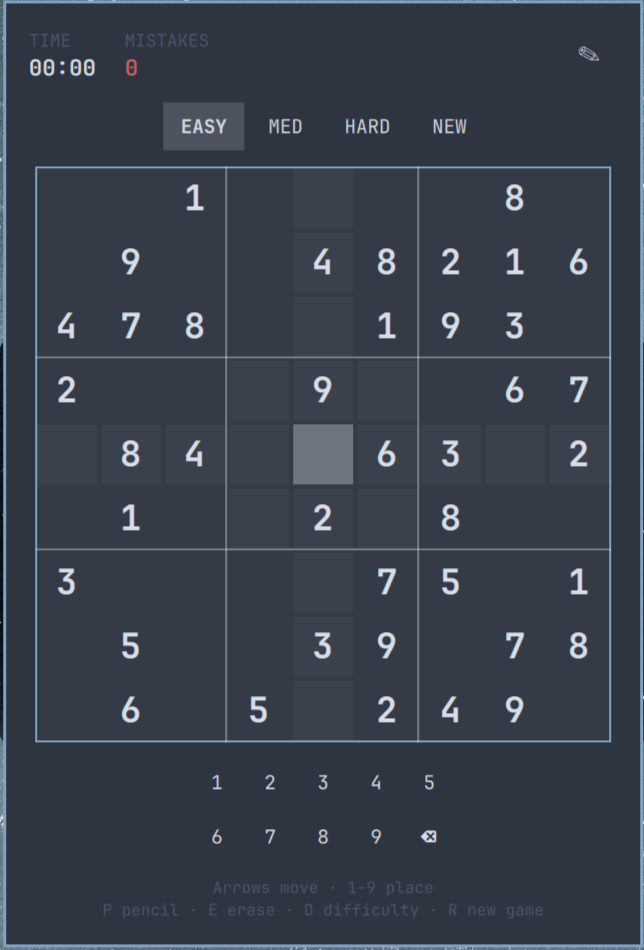
Sudoku game preview

Install

omarchy plugin add https://github.com/l3aro/omarchy-sudoku.git --enable

Usage

Click the grid icon to open or close the board. Left-click a cell to select it, then press a number key (1-9) or use the on-screen keypad to place a digit. Right-click erases a cell.

Key Action
Arrow keys / hjkl Move selection
1-9 Place digit in selected cell
Enter / Space Place the active keypad digit
P Toggle pencil (notes) mode
E or X Erase cell
R New game
D Cycle difficulty (Easy / Medium / Hard)
Shift + 1/2/3 (! @ #) Easy / Medium / Hard
Escape Close panel

Correct placements clear matching pencil notes from peers, entries are checked against the unique solution (mistakes turn red), and finishing a digit nine times dims its keypad button.

Configure

omarchy bar move l3aro.sudoku --section right

Remove

omarchy plugin remove l3aro.sudoku

License

This project is licensed under the MIT License.