
omarchy-n8n
n8n workflow monitoring in the Omarchy bar — no Electron, no browser tab.
Monitor executions and toggle workflows from a native Quickshell panel. Multi-instance support: track prod and local side by side.
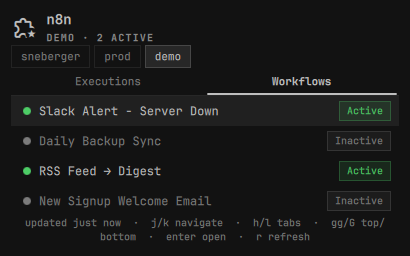
Features
- Bar pill — workflow icon with a live count badge. Red on failure, blue when running, quiet when all green.
- Executions tab — last N executions across all workflows with status, workflow name, mode, and relative time. Click → opens in browser.
- Workflows tab — full list with active/inactive indicator. Toggle active state inline without leaving the desktop.
- Multi-instance — configure prod, staging, local; switch between them inside the panel.
- Failure notifications — desktop alert on new failures (compares against last known state, per-instance). Click the notification to open the failed execution in your browser.
- Vim motions —
j/kmove the selection,h/l(or[/]) switch tabs,gg/Gjump to top/bottom,Enter/Spaceopens the selected item,rrefreshes,Esccloses.
Requirements
- Omarchy Quattro shell (Quickshell)
secret-tool(libsecret) with a running keyring service (gnome-keyring, kwallet, ...) — required for storing API keysdd(coreutils) — used by the widget itself for bounded, symlink-safe reads of its own config/state filesbash,curl,jq— only needed for theomarchy-n8n-setupCLI wizard, not for the running widget- An n8n instance with API enabled (n8n ≥ 0.188 for REST API; Settings → API → Enable)
Install
omarchy plugin add https://github.com/legendik/omarchy-n8n.git --enable
omarchy bar put legendik.n8n --after omarchy.weather
Uninstall
omarchy plugin remove legendik.n8n
rm -rf ~/.config/omarchy-n8n   # optional: also delete stored instances (keyring entries need: omarchy-n8n-setup remove <id> beforehand, or secret-tool clear service omarchy-n8n)
First-time setup
Run the setup wizard to add your first instance:
omarchy-n8n-setup
You'll be prompted for:
- Instance name (e.g.
prod,local) - n8n URL (e.g.
http://localhost:5678orhttps://n8n.yourcompany.com) - API key (n8n → Settings → n8n API → Create an API key)
If your n8n instance supports scoped API keys, the plugin only needs:
workflow:list, workflow:activate, workflow:deactivate, execution:list.
No credential, user, or write-access-to-workflow-content scopes are required.
Multiple instances
omarchy-n8n-setup add          # add another instance
omarchy-n8n-setup list         # show all configured instances
omarchy-n8n-setup remove prod  # remove by instance id
Optional hotkey
Add to your Hyprland bindings.lua:
o.bind("SUPER + SHIFT + N", "n8n", "omarchy-shell shell toggle legendik.n8n")
Hyprland float rule
windowrulev2 = float, title:^(n8n)$
windowrulev2 = size 460 640, title:^(n8n)$
windowrulev2 = center, title:^(n8n)$
Configuration
In the Omarchy shell settings panel:
| Key | Default | Description |
|---|---|---|
refreshIntervalSec |
30 | How often to poll n8n (seconds) |
maxExecutions |
20 | Max executions to fetch per instance |
notifyOnFailure |
true | Desktop notification on new failures |
How it works
The panel's Service.qml polls each configured instance directly via
XMLHttpRequest — GET /api/v1/workflows and GET /api/v1/executions —
in-process, in QML/JS. No curl/jq subprocess is spawned for the recurring
poll or the workflow toggle action. Results are aggregated in memory and the
failed-execution IDs are written to ~/.config/omarchy-n8n/.last-state.json
via Quickshell's FileView (atomic write: private temp file + rename) for
failure diffing between refreshes. Toggling a workflow issues a direct
POST /api/v1/workflows/:id/activate or deactivate request the same way.
instances.json and .last-state.json live at predictable, user-writable
paths, so reading their contents never goes through FileView (Quickshell's
reader follows symlinks and can block on a FIFO). Instead the widget spawns
dd iflag=nofollow,nonblock with a byte cap to read them, refusing anything
that isn't a plain, bounded, readable regular file — FileView is used only
to watch for changes on disk.
API keys are looked up from the system keyring via secret-tool for each
request; they are never written to disk. omarchy-n8n-setup remains a small
bash/curl/jq CLI wizard for interactively adding, listing, and removing
instances — it's the only place those tools are still used.
Releasing
Releases are automated by release-please
from Conventional Commits on master
(fix:, feat:, feat!:/BREAKING CHANGE:, etc.). It opens/updates a
release PR with the version bump and changelog; merging it tags the release,
publishes it on GitHub, and updates version in manifest.json.
License
MIT