
Lenovo Battery Conservation — Omarchy Power Panel
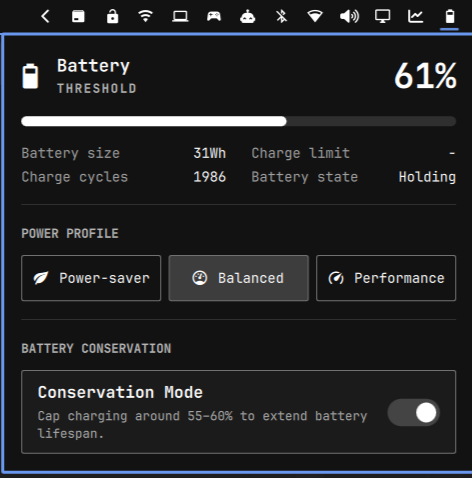
Adds a Battery Conservation toggle to Omarchy's built-in Power panel (the panel that opens when you click the battery icon in the bar), right below POWER PROFILE. It controls Lenovo IdeaPad's firmware-level conservation mode, which stops charging around 55-60% instead of 100% to slow long-term battery wear — the same feature Lenovo Vantage exposes on Windows.
This talks directly to the ideapad_acpi kernel driver's conservation_mode
sysfs attribute. No daemon, no third-party tool.
How this is built
Claude code was heavily used in making of this plugin
Omarchy doesn't support arbitrary "patch a built-in plugin" files — instead
you clone the built-in omarchy.power panel into your own config (which
replaces the built-in one 1:1, keeping the same bar position and IPC target)
and edit the clone. That's what this repo is: a clone of the built-in Power
panel (Panel.qml + Model.js, untouched) with:
- A Battery Conservation section added to
Panel.qml, right after the power-profile buttons — aTogglerow wired to real hardware state. conservation.sh— unprivileged status/control script the panel shells out to (readingconservation_modeneeds no privilege; writing it does).conservation-write.sh+setup.sh/teardown.sh— the privileged write path (see Privileged setup below).
Diff-wise, everything outside the "Battery conservation" comment blocks in
Panel.qml is stock Omarchy.
Installation on a new machine
This repo is the plugin (a full clone of the built-in omarchy.power panel,
edited in place — see How this is built below), so install it directly
from git — no manual clone-and-copy of the built-in panel needed:
omarchy plugin add https://github.com/LeonardoM011/omarchy-lenovo-battery-conservation.git --enable
This clones the repo straight into ~/.config/omarchy/plugins/leonardom011.lenovo-battery-conservation/,
registers it (replacing the built-in Power panel 1:1, same bar position and IPC
target), and enables it. Because it's a real git checkout, later updates are
just:
omarchy plugin update leonardom011.lenovo-battery-conservation
If you're iterating locally on this repo instead, point at your working copy's
path instead of the GitHub URL — omarchy plugin add /path/to/this/repo --enable —
and omarchy plugin update will pull from there.
Privileged setup (required to actually toggle)
conservation_mode is a root:root, mode 0644 sysfs attribute — readable
by anyone, writable only by root. Run setup.sh once with sudo:
cd ~/.config/omarchy/plugins/leonardom011.lenovo-battery-conservation
sudo ./setup.sh
This installs exactly two things:
/usr/local/lib/omarchy-lenovo-conservation-mode/conservation-write.sh— a root-owned script whose only job isprintf '%s' "$1" > conservation_mode, and which refuses any argument other than the literal0or1./etc/sudoers.d/omarchy-lenovo-conservation-mode— a rule letting members of thewheelgroup run only that exact helper with only those two exact arguments, without a password (NOPASSWD).
Nothing else gains any new privilege, and reading the current state never needs root. Until this is run, the toggle in the panel will show the real state but flip attempts will fail with a notification pointing back here.
To remove it later: sudo ./teardown.sh (from a copy of this repo, since
the plugin folder itself has no privileged contents to remove).
Usage & IPC
- Panel: Click the battery icon in the bar to open the Power panel, then click the Conservation Mode row.
- CLI / Keybinding:
or use the bundled wrapper:omarchy-shell omarchy.power toggleConservation omarchy-shell omarchy.power conservationStatus./toggle.sh [toggleConservation|conservationStatus].
Optional keybinding
Add to ~/.config/hypr/bindings.lua:
-- Toggle Battery Conservation Mode
o.bind("SUPER + SHIFT + B", "Toggle Battery Conservation", "omarchy-shell omarchy.power toggleConservation")
Removal
omarchy plugin remove leonardom011.lenovo-battery-conservation --yes   # restores the stock built-in Power panel
sudo ./teardown.sh                        # from a copy of this repo, undoes the privileged setup
Requirements
- A Lenovo IdeaPad with the
ideapad_acpikernel driver loaded (lsmod | grep ideapad_laptop). sudo.
License
MIT — see LICENSE.