
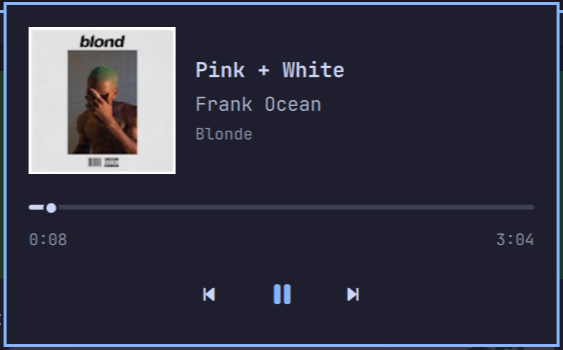
Omarchy YouTube Music
A YouTube Music controller for the Omarchy Quickshell bar.
The plugin reads the browser's live MPRIS player. It shows the current track, album art, artist, album, progress, and playback controls in a popup panel.
Requirements
- Omarchy Quattro with Quickshell
- YouTube Music open in Brave, Google Chrome, Chromium, Firefox, or Zen
- A browser that exposes the current media tab through MPRIS
The plugin does not start a background service, use browser automation, or
store account data. It activates when MPRIS identifies YouTube Music, reports a
music.youtube.com URL, or -- for browsers that expose neither, such as Google
Chrome -- when a browser player reports a non-empty xesam:album, which
YouTube Music sets and regular videos leave empty.
Install
omarchy plugin add https://github.com/levyvix/omarchy-youtube-music.git --enable
Place it in the bar if needed:
omarchy bar move levi.youtube-music --section left
Controls
- Left click the music icon to open or close the panel.
- Middle click toggles play/pause.
- Right click plays the next track.
Spacetoggles play/pause.nor Right arrow plays the next track.por Left arrow plays the previous track.- Drag the progress bar to seek.
Escapecloses the panel.
The panel keeps the last detected browser player while it remains connected and still reports YouTube Music, so pausing a track does not make the panel appear idle, while switching that tab to a regular video clears it. Long track labels are truncated in the bar and remain available in the tooltip and panel.
Validate locally
omarchy plugin validate .
qmllint -I "$OMARCHY_PATH/shell" Panel.qml
Remove
omarchy plugin remove levi.youtube-music
License
MIT. See LICENSE.