
Omoide
思い出 (omoide) is Japanese for a memory you keep.
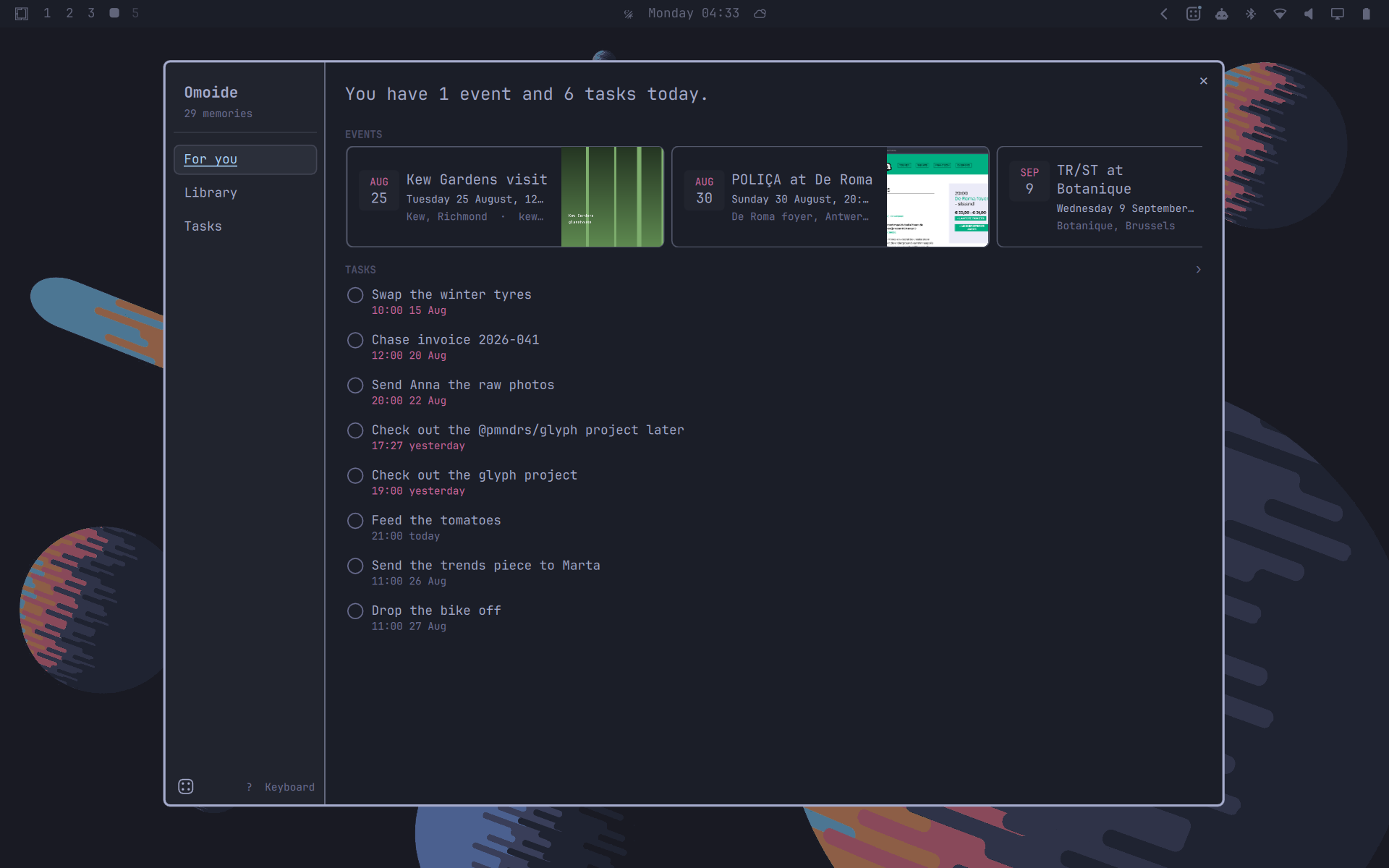
More in assets/: the library, the capture menu, agent settings.
The idea is Nothing's, from Essential Space on their phones. I wanted it on my computer, which is where I actually work, and Omarchy's plugin system is what made that possible. Grab a screenshot, type a note, or dictate one. An agent turns it into a memory with a title, a summary, key facts, dates and to-dos.
Everything runs on your machine. No account, no server, nothing syncing. Your memories are a SQLite file and a folder of images in your home directory. The only thing that ever leaves is what you hand to a cloud agent, and nothing at all if you run a local one.
Demo
https://github.com/user-attachments/assets/f6019266-45bc-47b5-b1b4-4b8119e7e821
Capturing
- Left-click the bar icon opens the menu.
- Right-click opens the library.
screenshot ──▶ pick a region ──▶ overlay opens with the shot, note optional
note ────────▶ overlay opens empty, text required
voice ───────▶ overlay opens already listening, transcript lands editable
Enter saves. Esc discards the draft and its image. The button at the end of the note field starts dictation in any mode, if Voxtype is installed.
Browsing
One dialog, three views.
For you is today: a count of events and open tasks, then both lists.
Library is every capture, newest first, in a masonry grid. Agent tags filter it. Search matches titles, notes, list items and OCR'd text, by prefix.
Tasks has three tabs, Upcoming, Past and Completed. Space ticks a row or accepts a suggestion.
Keyboard
The dialog works without a mouse. Ctrl 1 to 3 switch views, / searches, Space
ticks a task or accepts a suggestion, Enter opens what the cursor is on, Esc
steps back and then closes. ? shows the full map.
What a memory holds
A memory is an ordered list of typed blocks, and which blocks appear depends on what you captured. An article gives you a source, a summary and key points. A screenshot of a design board gives you an image and a list of names, nothing more.
Headings, list items and to-dos are editable, so you can fix what the agent got wrong. Related captures and collections are yours to link, never inferred.
Tasks, events and reminders
Open any task or event to edit it: title, date, time, and as many reminders on one item as you want. Nothing commits until Save, so closing the sheet drops a mistyped date.
Reminders are armed inside the shell from the database, so they survive a reboot and need nothing outside Omoide. One that came due while the machine was off still arrives, if it is less than half an hour late.
Anything the agent inferred rather than being told arrives as a suggestion, a
bullet with a + and no alarm until you accept it.
Install
omarchy plugin add https://github.com/leweyse/omoide.git --enable
It asks which bar section to put the icon in. The CLI is C, and there is no
binary in the repository: the shell builds it from cli/ the first time it
loads the plugin, with the clang and libraries Omarchy already has, in a second
or two. An update rebuilds it the same way. Screenshots need grim and slurp,
OCR needs tesseract, dictation needs voxtype (omarchy-voxtype-install).
To update, omarchy plugin update leweyse.omoide, then omarchy restart shell. The shell rescans plugins on update but keeps rendering from its cached
QML until it restarts, so without one you are still running the old version.
To remove it, omarchy plugin remove leweyse.omoide. Your memories stay on
disk. Run ~/.cache/omoide/bin/omoide uninstall --purge first if you want them
gone with it.
For keybindings, in ~/.config/hypr/bindings.lua:
o.bind("SUPER + CTRL + <YOUR_CHOICE>", "Omoide capture",
       "omarchy-shell -q omoide toggleChooser")
o.bind("SUPER + CTRL + <YOUR_CHOICE>", "Omoide library",
       "omarchy-shell -q omoide toggleSpace")
The capture binding opens the capture options in Omarchy's own menu, default action first and focused, so Enter starts it. No binding starts a capture directly.
Choosing an agent
Presets cover claude, codex, opencode, gemini, ollama and aichat. custom takes
any command that reads the prompt on stdin and prints the answer on stdout.
Screenshots reach the agent as OCR text by default, so the image itself stays here. "What the agent sees from a screenshot", in agent settings, switches that to the screenshot itself, which reads charts and dense pages far better. Only claude, codex, gemini and opencode take images, and the card says so for the rest.
Presets run with their tools switched off, in an empty working directory: a
capture is a transcription of whatever was on screen, which can include a
paragraph written to be read by whatever handles it next, and these are coding
agents with a shell. Omoide passes each CLI's own flag for this, so claude gets
no tools, codex its shell tool switched off inside a read-only sandbox, gemini
its read-only mode, and opencode a deny-all permission set merged over your
config. custom is run exactly as you
wrote it, by sh -c, so quotes and variables mean what they do in a terminal;
add your agent's own read-only flag to the command yourself. The prompt reaches
it on stdin, never on the command line.
With no agent you still get the capture, your note, search over OCR'd text, and a reminder from an explicit "remind me to call the vet tomorrow at 3pm".
Where things live
~/.config/omoide/config.json     the agent you chose
~/.local/share/omoide/           memories.db and blobs/, your captures
~/.local/state/omoide/           derived cache, rebuildable
~/.cache/omoide/bin/             the CLI, built from this checkout
The plugin writes nothing else, unless you run omoide install, which also
links ~/.local/bin/omoide to the CLI so you can run it by name. XDG_*_HOME moves the base directory, but the
omoide/ leaf is always hardcoded, so uninstall can only delete a directory
the plugin made itself. No environment variable hands it a path to remove.
TODO list
Voice dictation. Voxtype does the transcription and the wiring is in, but I have not put real use behind it. Next thing I want to fix.
Export memories. I still capture things on my Nothing phone and I want the two halves to meet without a cloud account in between. The phone end is the part I have not solved.
Calendar integration. Several providers, ideally, though it is low on my list.
Clipboard capture. It already shows in the menu, disabled.
IPC and trust
IPC opens windows, it does not act. A capture starts only from a click or Enter on a shell surface. Nothing runs OCR or reaches an agent until you press Save, IPC cannot start the microphone, and Esc deletes an unexpected capture, image included.
License
MIT, in LICENSE.