
Omarchy libvirt
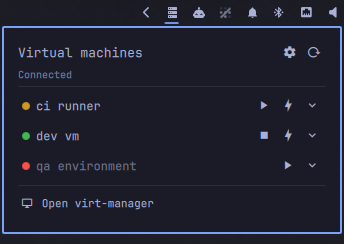
A libvirt frontend for the Omarchy bar. The bar item is a glyph, dimmed when nothing is running; the popup lists every domain on the connection with a state light, play/stop controls, and a click-to-open console. Expand a row for pause, reboot, save state and snapshots.
It drives domains and nothing else: it never starts libvirt, never touches networks, and never opens a connection to a guest. Creating, cloning and deleting domains stay with virt-manager, which the popup's footer opens.
Claude code was heavily involved in the creation of this widget.
Using it
Left click the bar item for the popup, right click to open virt-manager, middle click or scroll to refresh. The glyph turns amber while a domain is suspended and red while the connection is down; its tooltip names what is running.
- Green running, amber paused, red shut off. A row only shows the buttons its state allows.
- The play arrow starts a shut off domain, or resumes a paused one.
- The stop square is
virsh shutdown— a polite ACPI request the guest can ignore. - The lightning bolt is
virsh destroy. It cuts power and loses unwritten guest state, so it takes two clicks: the first arms it, the second does it, and it disarms itself after four seconds. - Clicking a domain's name opens its console in
virt-viewer, only while the domain is up. - The chevron expands the row for everything else.
- A shutdown the guest ignores turns the lightning bolt red after twenty
seconds, and its tooltip says how long it has been waiting.
virsh shutdownis only a request, and until now a guest with no ACPI handler looked exactly like a button that did nothing. - With eight or more domains a filter field appears above the list.
Keyboard
The popup takes keyboard focus, so it can be driven without the mouse — bind
omarchy-shell leyanora.libvirt toggle and never touch the pointer.
| Key | Does |
|---|---|
↑ ↓, k j |
Move the row cursor |
→ ←, l h |
Expand and collapse the row |
Enter, Space |
Start, resume or shut down — whichever the row's state means |
x |
Force off, or delete a snapshot. Still takes the second press |
s |
Snapshots for the row |
c |
Console for the row |
r |
Refresh |
, |
Settings |
/ |
Jump to the filter field |
Tab |
Step through the settings controls |
Esc |
Leave the field, then the sub-view, then the popup |
The cursor is shared with the mouse: hovering a row moves it, so there is only ever one highlight on screen.
In the expanded row
Expanding a row draws a border around it and fills it, so the name and its buttons read as one object; collapsing it takes both away again. The actions are a single line of icon pills — hover one to see what it does.
- Pause (
virsh suspend) freezes a running domain; the play arrow resumes it. - Reboot (
virsh reboot) is an ACPI request, the same class as shut down — a guest with no handler will ignore it. - Save state (
virsh managedsave) writes the memory image out and stops the domain. Its light goes hollow to say it is shut off but not blank, and the play arrow becomes a restore arrow: starting it puts the guest back exactly where it was. - Discard saved state throws that memory image away, so the domain boots cold next time. Two clicks, like force off — the armed pill turns red, and its hover label says what the second click will do.
- Snapshots opens the snapshot list for that domain.
Above the pills, the row reports the domain's vCPU count and memory, and for
a domain that is off, why — crashed, destroyed or shutdown. Those come
from virsh dominfo and virsh domstate --reason, asked only when the row is
expanded, never on the poll tick.
Snapshots
The back arrow returns to the domain list. A check mark against a name is the current snapshot — the one the domain is sitting on. Each snapshot has revert and delete; both take two clicks, because reverting throws away everything the domain has done since the snapshot was taken. The armed button draws the four-second window down as a bar, so the second click is not on a hidden timer.
The two fields at the bottom take a snapshot: an optional description, and the name — leave the name empty and libvirt names it after the epoch second.
Typed names are tidied first: whitespace and / collapse to single hyphens and
surrounding whitespace is dropped, so my snap is stored as my-snap. libvirt
itself only refuses / and a leading ., but it will happily store
my snap verbatim, and a name you cannot retype is a name you cannot
easily revert to. A name that tidies away to nothing gets libvirt's automatic
one. Existing snapshots are never renamed — only what you type is cleaned.
Internal snapshots need qcow2 disks. On a raw disk, or a domain with no
disk at all, virsh refuses and the popup shows you why.
The settings view
The cogwheel next to refresh opens a settings view, with the back arrow to return. It holds the settings worth changing from the bar rather than from a config file, in three boxes.
Connection — the libvirt URI, as a picker between qemu:///session and
qemu:///system (plus whatever you hand-edited into shell.json, if it is
neither), and the poll interval. Switching connection empties the list and
re-polls; the widget still never starts libvirt, so a connection that is not
running comes back Disconnected.
Behaviour — the running count on the bar glyph, the snapshot button in the expanded row, the three confirm switches, and suppressing QEMU crash toasts.
State light colours — the three lights. Each colour row shows a
swatch, the value in effect, and a palette button that expands the row into a
colour picker: drag in the saturation/value square, pick a hue on the strip
below it, or click one of the preset swatches. The value is shown as hex and as
R/G/B, and both are editable — type a hex value (#rgb, #rrggbb or
#aarrggbb) and press Enter, and anything else is refused with a message rather
than being stored. The circular arrow puts that one colour back to its default.
Only the end of a drag is saved, so the state lights in the list settle when you let go while the picker itself tracks the pointer.
Whatever you change here is written into the widget's shell.json entry, so it
survives a restart; everything else in Settings below stays
hand-edited. The URI is the one value the picker will not let you type: it ends
up in every virsh call, so it is chosen from a list rather than entered.
Under the title: Connected when libvirt answered the last poll, Disconnected in red with the error below it when it did not. The URI is on hover. The widget only reads and drives domains — it never starts libvirt, so a dead connection is yours to bring up from a terminal.
virsh shutdown and friends return when the request is queued, not when the
guest acts on it, so expect a row to change state a beat after you click.
Prerequisites
sudo pacman -S qemu-full libvirt virt-manager virt-viewer edk2-ovmf
| Package | Why |
|---|---|
libvirt |
Required. Provides virsh, the entire backend |
qemu-full |
The hypervisor, plus every guest architecture and its firmware |
virt-viewer |
Required for consoles — it is what clicking a domain name opens |
virt-manager |
Only the popup's footer button. Set "manager": "" to hide that row |
edk2-ovmf |
UEFI firmware for guests. Optional, but a modern guest usually wants it |
KVM needs no group membership on Arch — /dev/kvm is world-writable by udev
rule. Check with test -w /dev/kvm && echo ok.
The default connection, qemu:///session, needs no further setup: virsh
spawns virtqemud under your own user on first contact, guests get QEMU
user-mode networking, and definitions live in ~/.config/libvirt/. The
trade-off is no inbound connections to guests and no networking between them.
For host-wide qemu:///system instead:
sudo usermod -aG libvirt $USER           # then log out and back in
sudo pacman -S dnsmasq                   # the default NAT network needs it
sudo systemctl enable --now virtqemud.socket virtnetworkd.socket virtstoraged.socket
sudo virsh net-autostart default && sudo virsh net-start default
dnsmasq is only an optional dependency of libvirt, but without it the
default NAT network cannot hand out DHCP and refuses to start. Hosts on the
monolithic daemon use libvirtd.socket in place of the three units above.
Install
omarchy plugin add https://github.com/Leyanora/omarchy-libvirt.git --enable
The widget expects the connection to work without a password prompt. If
virsh -c <uri> list --all works in a terminal it works here; if it does not,
the popup shows you the same error.
Uninstall
omarchy plugin remove leyanora.libvirt
That is the whole thing. It asks once (--yes skips), unloads the widget,
deletes ~/.config/omarchy/plugins/leyanora.libvirt, and drops the widget's
entry — and with it every setting you put there — out of
~/.config/omarchy/shell.json.
Nothing of yours is touched: the widget only ever shells out to virsh, so
your domains, disks, networks and libvirt config are exactly as you left them.
The packages above stay installed.
The one thing that outlives the command is the crash-toast drop-in — and only if
you turned it on, and only until you next log in, since it lives in
$XDG_RUNTIME_DIR, which is wiped with the session. To be rid of it right now,
either switch it off before removing the plugin, which deletes it on the spot,
or clean up by hand afterwards:
rm -f "$XDG_RUNTIME_DIR/systemd/user/omarchy-crash-watch.service.d/50-leyanora.libvirt.conf"
systemctl --user daemon-reload
systemctl --user restart omarchy-crash-watch.service
Silencing the shutdown crash toast
Stopping a VM tends to raise an Omarchy "Process crashed: qemu-system-x86_64"
notification. That is not this plugin, and not virt-viewer either: libvirt
SIGTERMs QEMU, and QEMU segfaults inside its own SPICE teardown on the way out.
The guest has already stopped by then, so nothing is lost — it is an upstream
bug with no consequence beyond the toast. But you press the button that
triggers it here, so this is where it gets handled.
It is therefore offered as a setting, reachable from the cogwheel in the popup
header — or as suppressCrashToasts in shell.json, which is the same key.
Flipping the switch writes it back to shell.json, so it sticks.
It is off by default. Turned on, the widget writes a drop-in at
$XDG_RUNTIME_DIR/systemd/user/omarchy-crash-watch.service.d/50-leyanora.libvirt.conf
that sets OMARCHY_CRASH_IGNORE for Omarchy's crash watcher — the supported
filter, nothing patched — then reloads and restarts it. An unchanged file is
left alone.
That path is the runtime unit directory, not ~/.config, deliberately: Omarchy
has no uninstall hook for plugins, so a drop-in under ~/.config would outlive
the plugin and go on silencing QEMU crashes on a system that no longer has the
widget. In the runtime directory it is rewritten on every start and gone at the
next login. (Upgrading from an earlier version also sweeps the old ~/.config
drop-in away.)
Turn it on from the cogwheel, or with:
{ "id": "leyanora.libvirt", "suppressCrashToasts": true }
Two things worth knowing:
- The watcher filters on the executable name only, so this also silences a QEMU crash that happens mid-run — a VM dying under you goes unannounced. That is the reason it is off by default.
- The widget will only ever delete a drop-in carrying its own marker comment, so a file you wrote by hand at either path is left alone.
omarchy-toggle-crash-capture remains the way to turn crash announcements off
wholesale, if you would rather not filter per-binary.
Settings
Every key goes in the widget's entry in ~/.config/omarchy/shell.json, keyed
by the plugin id — not the display name:
{
  "bar": {
    "layout": {
      "right": [
        { "id": "leyanora.libvirt", "uri": "qemu:///system", "interval": 5 }
      ]
    }
  }
}
| Key | Default | What it does |
|---|---|---|
uri |
qemu:///session |
libvirt connection URI. Also selectable from the cogwheel |
interval |
10 |
Poll seconds; floored at 2. Also editable from the cogwheel |
icon |
|
Bar glyph |
showCount |
false |
Show the running count next to the glyph. Also editable from the cogwheel |
confirmForceOff |
true |
Require the second click on force off. Also editable from the cogwheel |
confirmDiscardSaved |
true |
Require the second click on discard saved state. Also editable from the cogwheel |
confirmSnapshotRevert |
true |
Require the second click on snapshot revert and delete. Also editable from the cogwheel |
showSnapshots |
true |
Show the snapshots button in the expanded row. Also editable from the cogwheel |
console |
virt-viewer --connect {uri} {name} |
Console command; {uri} and {name} are substituted shell-quoted |
manager |
virt-manager -c <uri> |
The popup's footer action; "" hides the row |
onRightClick |
same as manager |
Right click on the bar item |
colorRunning |
#3fb950 |
State light, running. Also editable from the cogwheel |
colorPaused |
#d29922 |
State light, paused. Also editable from the cogwheel |
colorStopped |
#f85149 |
State light, shut off. Also editable from the cogwheel |
suppressCrashToasts |
false |
Filter QEMU crash toasts, see above. The one key the popup can also write, from its cogwheel |
crashIgnore |
^qemu-system- |
Regex of executable names to filter when the above is on. A % is passed through literally; a value containing a quote or newline, or ending in a backslash, is refused with an error in the popup, because it cannot survive the systemd drop-in intact |
IPC
omarchy-shell leyanora.libvirt toggle     # also: open, close, show, hide
omarchy-shell leyanora.libvirt refresh    # re-poll on every monitor
Bind either in ~/.config/hypr/bindings.lua.
Changelog
See CHANGELOG.md.
License
MIT — see LICENSE.