
Plugin containers
Group bar widgets into named containers so the Omarchy bar stops filling up.
A container is one icon in the bar. Click it and the plugins inside it appear, fully interactive — the same widgets, the same menus, the same settings, just somewhere else. Nothing about a plugin changes when it goes into a container.
Claude code was heavily involved in the creation of this plugin.
Requirements
Omarchy 4 with the Quickshell bar.
How it fits in
This plugin is the bar. It does not draw one of its own: it loads the bar Omarchy ships, unchanged and from its installed path, and hands it a layout with the contained widgets taken out and a container button put in their place. An Omarchy update to the bar lands here with it.
It has to be the bar. Since Omarchy 4.0.0.alpha a third-party bar widget is given capability facades that expose neither the widget catalogue nor a writable bar config, and a container needs both to draw another plugin's widget. Only a full bar plugin receives them.
The cost is the one the shell imposes on every replacement bar: a third-party
widget that pairs a bar widget with a service is handed a service-less shell
facade, so shell.serviceFor() returns null for it. Widgets that use it — the
Spotify and Detailed Weather plugins among them — lose that object while this
bar is the active one. First-party widgets are unaffected: the built-in bar
gives them a service-less facade too.
Install
omarchy plugin add https://github.com/Leyanora/omarchy-plugin-containers.git
omarchy plugin enable leyanora.plugincontainers
The second command makes it the active bar — that is what enabling a bar plugin
means. Go back to the stock bar at any time with
omarchy plugin enable omarchy.bar; every contained widget reappears in the bar
by itself, because it never left the layout.
Update with omarchy plugin update leyanora.plugincontainers, then
omarchy restart shell.
Upgrading from 1.x
Nothing to do. The first time the new bar runs it reads the 1.x state out of the manager's bar entry, writes it beside the layout, and hands every contained plugin its own entry back — with the settings it had, at the position it had. The invisible placeholders 1.x used are gone, and the absolute path 1.x wrote into each container entry goes with them.
Using it
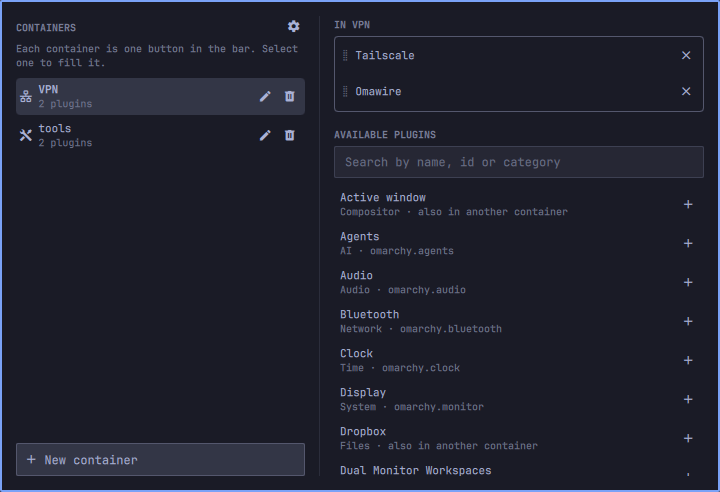
Click the box icon in the bar to open the manager.
- New container — name it and pick an icon. Only the icon goes in the bar, so pick a distinct one; the name is its tooltip. The grid offers thirty, and the field under it takes any glyph you paste.
- Select a container on the left, then fill it on the right: drag a plugin from the catalogue, or press its +. A plugin can be in several containers.
- The catalogue lists every installed plugin with a bar widget, switched on or
not, plus your own custom qml bar modules. Command modules (the ones with an
exec) are not listed: this plugin runs no commands. - > moves a plugin to another container. × takes it out and puts it back on the bar where it was — nothing is uninstalled or disabled. Deleting a container does the same for everything it held.
- Reorder plugins by dragging them. Reorder containers with the up and down buttons, or by dragging their icons in the bar like any other widget.
- The bar is left alone until you close the manager, so an editing session costs one rearrangement rather than one per click. A new container's icon appears then too.
Right-click a container to open the manager; right-click the box to close whatever is open.
Two ways to open
By default a container opens into a strip below the bar. It can instead expand in the bar, its plugins taking their own space where the icon sits and folding back when you close it. Set the default in settings, or per container.
Settings
The cog beside CONTAINERS opens the settings view. These apply to every container.
| Option | What it does |
|---|---|
| Icons per row (1–10) | Where an open container wraps onto another row |
| Hide the container name | Drops the name pill; the bar tooltip still shows it |
| Expand containers in the bar | Open in place rather than into a strip |
| Open a container on hover | Opens on pointer-in, closes shortly after it leaves |
| Hide a container while it is empty | It gives its bar slot back until you fill it |
| Hide the plugin containers icon | Frees the box's slot without disabling anything |
Hiding the box leaves the plugin running and the containers working. Get back in
by right-clicking a container, or with
omarchy shell leyanora.plugincontainers showIcon. Both hiding options are
refused when they would leave nothing of this plugin in the bar to click.
Per container: the pencil on a container's row offers to take it off the globals. It then decides its own icons per row, name pill and open mode; everything else stays global.
What it does to your bar
Containing a plugin does not move it. Its bar.layout entry stays exactly
where it is, with the settings it has, so Omarchy still considers it enabled and
keeps its service, panel and overlay entry points loaded. All that changes is
what the bar is asked to draw: this plugin projects the layout it hands the bar,
leaving out anything a container holds. Nothing is enabled, disabled, moved or
copied to achieve it, and there is nothing to undo — switch back to the stock
bar and every widget is drawn again from the entry it never lost.
Each container gets a bar.layout entry of its own, so it is a bar module like
any other: its own slot, its own open-panel mark, and its own place you can drag
anywhere, including a different section from the box. It holds nothing but its
id; the module that draws it is supplied per render, so no path to this
installation is ever written to your config.
{ "id": "leyanora.plugincontainers.c1" }
State lives beside the layout, under the plugin's own id in the bar subtree,
so editing a container never rewrites bar.layout and never rebuilds the bar:
"bar": {
  "leyanora.plugincontainers": {
    "version": 2,
    "settings": { "iconsPerRow": 10, "hideTitle": false },
    "containers": [
      { "id": "c1", "name": "Network", "icon": "\udb80\udf17",
        "members": ["omarchy.bluetooth", "omarchy.tailscale"] }
    ]
  }
}
A container may carry a settings object of its own holding iconsPerRow,
hideTitle or mode ("strip" or "inline"); a key it does not name is
inherited. Container order comes from the bar, not from this list. Editing by
hand works — the plugin reconciles whatever it finds.
Uninstall
Nothing has to be undone first. A contained widget never left bar.layout, so
the moment this plugin stops being the bar, the stock bar draws it again.
omarchy plugin enable omarchy.bar
omarchy plugin remove leyanora.plugincontainers
That leaves the container marker entries and the state block behind as inert config. To take those out too, run the cleanup while this is still the bar:
omarchy shell leyanora.plugincontainers prepareUninstall
# prints: ok
prepareUninstall makes one shell.json write: it removes the container marker
entries and the state block, and touches nothing else.
restoreAll is different: it empties every container, keeping the containers
themselves and their bar slots.
IPC
omarchy shell leyanora.plugincontainers manage              # open the manager
omarchy shell leyanora.plugincontainers openContainer NAME  # open one by name
omarchy shell leyanora.plugincontainers toggle
omarchy shell leyanora.plugincontainers close
omarchy shell leyanora.plugincontainers restoreAll          # empty every container
omarchy shell leyanora.plugincontainers prepareUninstall    # deterministic pre-remove cleanup
omarchy shell leyanora.plugincontainers refresh             # re-check against the bar
omarchy shell leyanora.plugincontainers showIcon            # or hideIcon
What it touches
Writes only the bar subtree of ~/.config/omarchy/shell.json, through the
capability-scoped mutateShellConfig the host grants a bar plugin — which cannot
reach any other part of the config. Reads the bar Omarchy ships and the qml file
of a custom module it hosts, both the same files the shell itself would load. No
other files, no commands, no subprocesses, no network requests, nothing
privileged.
A hosted plugin is handed the host's own per-widget shell facade, scoped to its id, and a bar facade whose popout coordinator and click-target registry belong to the container — so a popup opened inside a container cannot close it.
Contained plugins are ordinary Omarchy plugins running unchanged — this plugin does not sandbox them, and they keep whatever access they already had.
License
MIT — see LICENSE.