
Backdrop
Different walls for every display.
Backdrop is a multi-display wallpaper service for the Omarchy Quattro shell. It replaces Omarchy's stock background renderer while preserving the standard background IPC target and global wallpaper fallback.
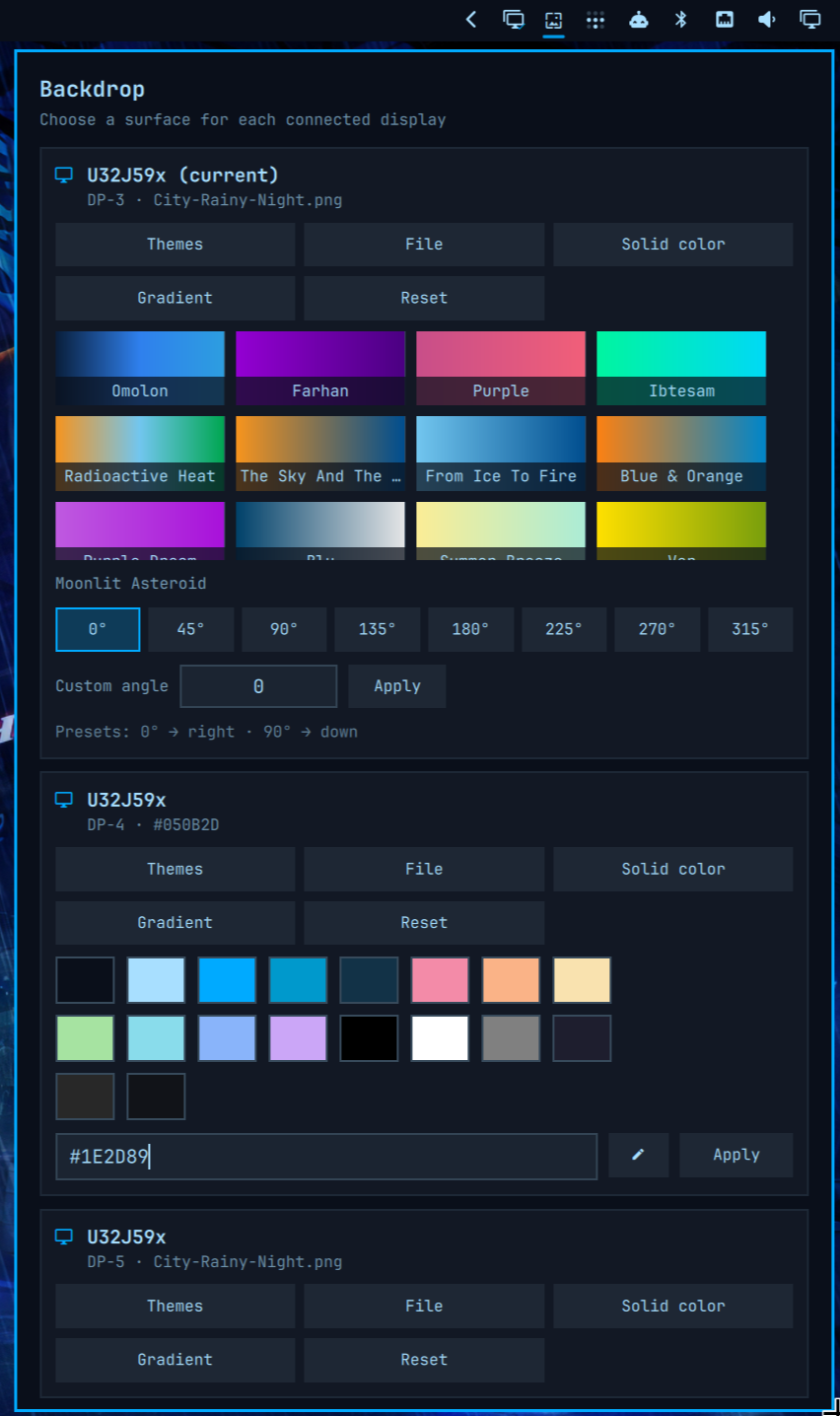
Current features
- Manage every connected display from an Omarchy bar widget.
- Assign a different image to each connected display.
- Browse backgrounds from every installed stock and user theme.
- Pick custom image files outside the Omarchy theme library.
- Assign solid colors using presets, custom hex values, or an on-screen color picker.
- Use any of the 382 uiGradients presets with a custom angle.
- Remember displays by manufacturer, model, and serial number when available.
- Fall back to the connector name and Omarchy's current global background.
- React to monitor hotplug through
Quickshell.screens.
Install
omarchy plugin add https://github.com/lgse/backdrop.git --enable
Plugins run as unsandboxed code inside omarchy-shell. Review third-party plugin code before enabling it.
Use
Click the Backdrop icon in the Omarchy bar. Its panel lists every connected display with five actions:
- Themes browses backgrounds from all installed Omarchy themes.
- File opens an isolated native GTK file picker with filesystem navigation and image previews.
- Solid color offers presets, custom hex colors, and a screen picker powered by
hyprpicker. - Gradient provides an in-panel, scrollable gallery of all 382 uiGradients, common angle presets, and a custom-angle fallback.
- Reset returns that display to Omarchy's global background.
Assignments are stored in:
~/.config/omarchy/backdrop/assignments.json
The plugin never modifies files under /usr/share/omarchy.
IPC
Backdrop retains Omarchy's background IPC target and adds these methods:
omarchy-shell -q background setForScreen DP-3 /path/to/wallpaper.png
omarchy-shell -q background setColorForScreen DP-4 '#111318'
omarchy-shell -q background clearForScreen DP-3
omarchy-shell -q background assignments
A serial-backed key shown by assignments is preferred over a connector such as DP-3 because connector names may change.
Compatibility behavior
omarchy theme bg setchanges the fallback used by displays without an explicit assignment.- Theme changes preserve explicit per-display assignments.
- The lock screen continues to use Omarchy's global current background.
- Disabling or removing Backdrop restores the stock
omarchy.backgroundservice.
Roadmap
- A spatial display-map editor.
- Group wallpaper results by theme.
- Optional hyprmoncfg profile and hotplug integration.
- Profile-specific wallpaper sets.
- Animated background transitions.
Development
Requirements: Node.js and an installed Omarchy system for QML integration testing.
npm test
omarchy plugin validate .
License
MIT. Gradient names and colors are sourced from the MIT-licensed uiGradients project; see third-party notices.