
Omahub
← All plugins
S

Tasks & Time Tracker

by Sheikh Limon

Native task tracker, live stopwatch timer, and Markdown notes widget for the Omarchy bar

Security review

No obvious issues detected

Deterministic scan — not a security guarantee

None
Risk level
None
Analyzed commit
8fe0920
Scanned
1 month ago

No potentially dangerous behavior detected in the analyzed commit.

Automated analysis only — not a security guarantee.

AI advisory review

No obvious issues detected

Language-model assessment · ~deepseek/deepseek-v4-flash-latest — advisory only

Low
AI risk level
Low
Recommendation
install
Model
~deepseek/deepseek-v4-flash-latest
Analyzed commit
8fe0920
Reviewed
1 month ago

The plugin is a straightforward task/note widget that writes to ~/.local/share/to-do/ and uses wl-copy for clipboard. The helper script safely handles arguments and file permissions, with no evidence of malicious behavior or command injection.

  • Writes to user home directory (~/.local/share/to-do/) but with secure permissions (0600/0700).
  • Uses wl-copy for clipboard operations, which is standard and expected.
How this check works

This review combines the deterministic scan (the rule-based results above) with an independent look at the plugin's code by a language model. The model reads a trimmed sample of the repository's files, the manifest, and the README, then gives a plain-language risk level and a recommendation: install (no notable danger), review (look closer first), or avoid (clearly dangerous).

It runs on the same analyzed commit as the deterministic scan and is strictly advisory — it is not a security guarantee and never blocks a plugin by itself. A human moderator still reviews plugins before they are listed.

AI advisory only — automated analysis, not a security guarantee.

Install
$ omarchy plugin add https://github.com/sheikhlimon/omarchy-todo --enable
Productivity #bar

◩ Tasks & Time Tracker

A native Omarchy bar plugin for task management, live stopwatch tracking, and Markdown notes.
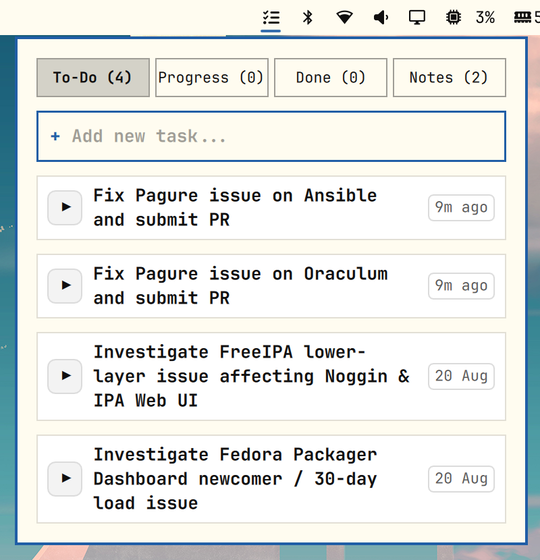
Tasks & Time Tracker Preview

Features

  • 3-Stage Workflow: to-do, progress (live stopwatch), and done (total time spent).
  • Markdown Notes: Fast scratchpad with interactive checkboxes and one-click copy.
  • Smart Hover: Contextual actions (Play, Pause, Complete, Reset, Copy, Delete) reveal on hover.
  • Theme Adaptive: Automatically matches your active Omarchy color scheme and typography.
  • Zero Overhead: Native in-process Quickshell layer with persistent storage in ~/.local/share/to-do/.

Dependencies

This plugin requires the following standard Omarchy CLI tools to be installed on your system:

  • jq: Required for reading and formatting JSON and Markdown data.
  • wl-clipboard: Required for the one-click copy functionality in notes.

Install

The recommended way to install and enable the plugin:

omarchy plugin add https://github.com/sheikhlimon/omarchy-todo.git --enable

(For manual installation: clone this repository to ~/.config/omarchy/plugins/limon.todo and add "limon.todo" to ~/.config/omarchy/shell.json).

Uninstall

To cleanly remove the plugin and disable it from your shell:

omarchy plugin remove limon.todo

(For manual uninstallation: remove "limon.todo" from your ~/.config/omarchy/shell.json and delete the ~/.config/omarchy/plugins/limon.todo directory).

License

MIT