
Omado
A minimal todo list bar widget for Omarchy.
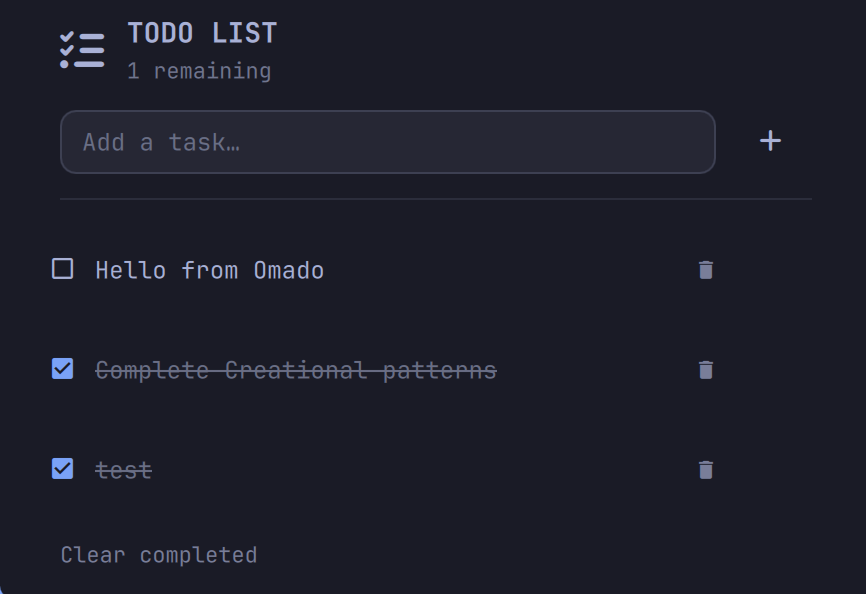
Add, complete, and clear tasks right from your bar. Tasks are stored locally in
~/.local/state/omarchy/settings/maduki-tech.todo.json — no accounts, no network.
Features
- Add tasks from the bar popup (Enter to confirm)
- Toggle and remove individual tasks
- Clear all completed tasks in one click
- Live "remaining" counter in the panel header
- Keyboard friendly: Esc closes, Tab switches panels
Installation
Omado is a bar widget for the Omarchy shell (Quickshell). Install with the Omarchy CLI:
omarchy plugin add https://github.com/Maduki-tech/Omado --enable
Or clone it manually:
git clone https://github.com/Maduki-tech/Omado ~/.config/omarchy/plugins/maduki-tech.omado
omarchy plugin enable maduki-tech.omado
Removal
omarchy plugin remove maduki-tech.omado
This removes the plugin and its bar entry. Your saved tasks live in
~/.local/state/omarchy/settings/maduki-tech.todo.json; delete that file to clear
your data.
Requirements
- Omarchy (Quickshell shell). No other external dependencies.