
Omatulli
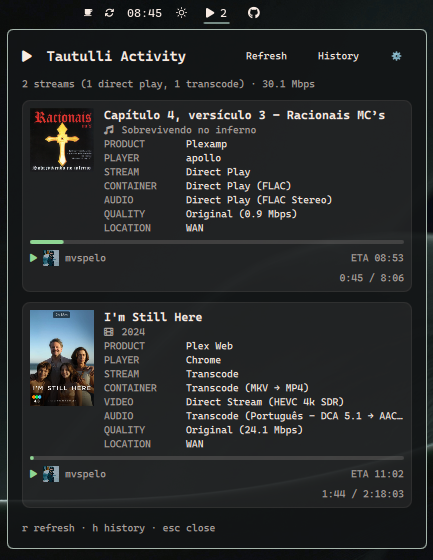
An Omarchy bar widget for Tautulli, the Plex Media Server monitoring tool. See what's currently playing across your Plex server — movies, TV episodes and music — as stacked cards with posters, stream details, progress and ETA.
Features
- Bar chip — play icon + active stream count, with a tooltip summary (direct play/transcode split, total bandwidth)
- Stacked cards — one card per active session, adapted per media type:
- Movies: title + year
- TV episodes: show + episode title,
S{season} · E{episode} - Music: track + artist, album
- Poster / album art — fetched from Tautulli's
pms_image_proxyAPI command and cached locally under~/.cache/omatulli/ - Full stream detail — product, player, stream decision (Direct Play/Direct Stream/Transcode), container, video, audio, subtitle and quality lines, mirroring Tautulli's own Activity view
- Progress bar with elapsed/total time and ETA (wall-clock finish time)
- User avatar + name per session
- Location privacy — shows
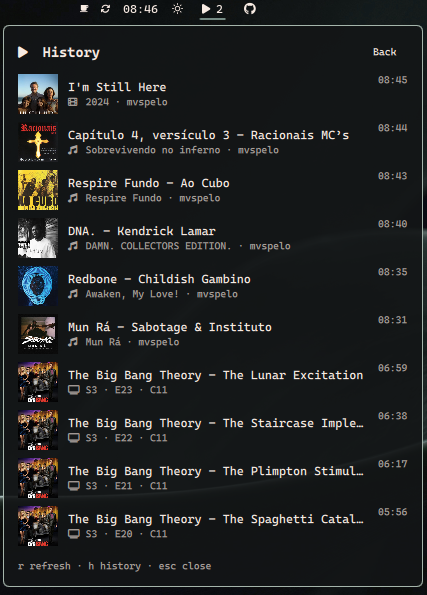
WAN/LANonly by default instead of the public IP (toggle in settings) - History — last 10 played items (title, poster, user, time), one click/keypress away from the activity view
Requirements
- A running Tautulli instance monitoring your Plex server
- A Tautulli API key (Settings → Web Interface → API in the Tautulli web UI)
Install
omarchy plugin add https://github.com/marcuspelo/omatulli.git
Setup
- Create
~/.config/omatulli/.envwith your Tautulli API key:
Keeping the key in this file (outside the plugin folder) instead ofAPI_KEY=your-tautulli-api-key URL_BASE=http://your-tautulli-host:8181shell.jsonkeeps it out of any config you might sync or share.URL_BASEis optional but recommended:omarchy plugin disable/enabledrops the widget's bar-layout entry (including whateverbaseUrlwas set via the panel oromarchy bar set), so a value in.envis what keeps working across that reset. - Enable the widget and point it at your Tautulli instance:
This step is optional ifomarchy plugin enable marcuspelo.omatulli omarchy bar set marcuspelo.omatulli baseUrl "http://your-tautulli-host:8181"URL_BASEis already set in.env.
Security
The Tautulli API key never appears in process arguments or request URLs:
- The
get_activitycall is acurlPOST with the key sent over the child process's stdin (--data @-), not as a-H/URL argument — so it's invisible tops/process inspection and to any HTTP access logs that record URLs. - Poster and album art images go through the same stdin-authenticated
curlrequest into a local cache (~/.cache/omatulli/), thenImage.sourcepoints at the cached file. This avoids putting the key in a plainImage { source: url }binding, which QML has no way to attach auth headers to. ~/.config/omatulli/.envis set to mode0600automatically every time the plugin reads it. You can also set this yourself:chmod 600 ~/.config/omatulli/.env.
Configuration
Available settings (shell.json, or omarchy bar set marcuspelo.omatulli <key> <value>):
| Setting | Type | Default | Description |
|---|---|---|---|
baseUrl |
string | http://localhost:8181 |
Base URL of your Tautulli instance (no trailing slash). Falls back to URL_BASE in ~/.config/omatulli/.env when unset. |
refreshIntervalSec |
integer | 10 |
Seconds between background refreshes (5–300) |
maskLocation |
boolean | true |
Show only WAN/LAN instead of the full public IP address |
Keyboard shortcuts
| Key | Action |
|---|---|
r |
Refresh |
v |
Open history |
esc |
Close the panel |
Remove
omarchy plugin remove marcuspelo.omatulli
License
MIT