
OmaTV
Search Movies, TV shows and People on TMDB from the Omarchy bar, with your account's Favorites and Watchlist and a local history of what you last looked at.
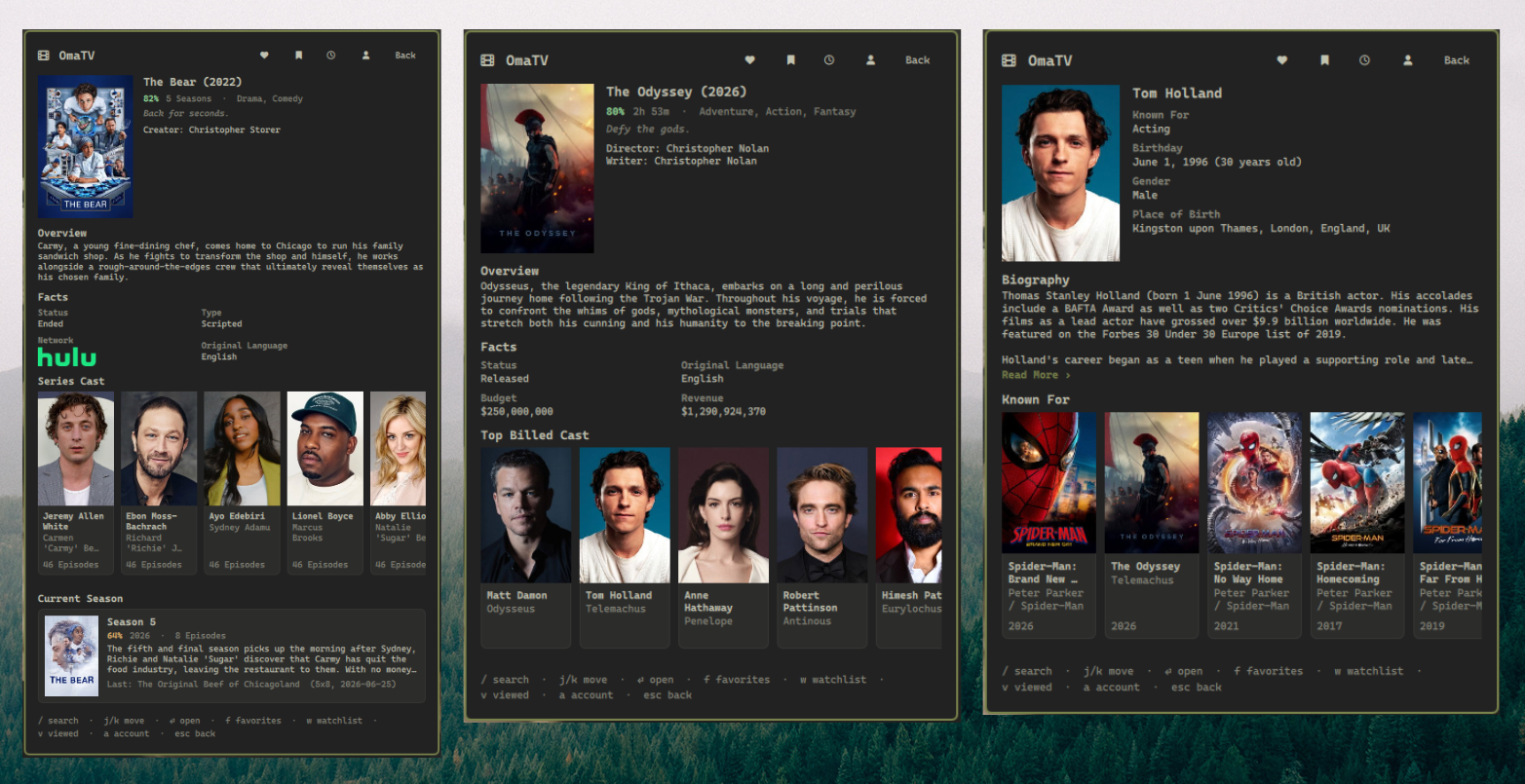
Features
- Search movies, TV shows and people in one query, filterable by type
- Movie details — score, runtime, genres, tagline, overview, director and writers, plus Status / Original Language / Budget / Revenue
- TV details — score, seasons, creators, overview, Status / Type / Network (as the network's logo) / Original Language, and a Current Season card with the next or last episode to air
- People — biography, birthday with age, gender, place of birth, and the eight titles they are best known for
- Everything is cross-linked: tap an actor to open their page, tap one of their credits to open that movie or show, and Escape walks back the way you came
- Favorites and Watchlist from your TMDB account, split by Movies and TV, with heart / bookmark buttons on every Movie and TV screen to add or remove the title you're looking at
- Open on TMDB — a button on every Movie, TV and Person screen opens that title's public page on themoviedb.org in your default browser
- History of the last 10 items you opened, kept across restarts
- Cached on disk and refreshed only when you ask, so the plugin stays well clear of TMDB's rate limit
Requirements
- Omarchy with the Quickshell bar (
omarchy-shell) curl- A TMDB API key (free — see Setup)
- A Nerd Font in the bar for the icons
Install
omarchy plugin add https://github.com/MarcusPelo/omatv.git
omarchy plugin enable marcuspelo.omatv
Setup
Create ~/.config/omatv/.env:
mkdir -p ~/.config/omatv
printf 'API_KEY=your_tmdb_key_here\n' > ~/.config/omatv/.env
chmod 600 ~/.config/omatv/.env
Get the key from TMDB → Settings → API. Either credential works:
| Credential | Where TMDB calls it | Notes |
|---|---|---|
| API Read Access Token (v4) | "API Read Access Token" | Preferred — sent as an Authorization header, so it never touches a URL |
| API Key (v3) | "API Key" | Works too, but TMDB only accepts it as a query parameter |
OmaTV detects which one you pasted and picks the matching auth method.
Optional keys:
| Key | Meaning |
|---|---|
LANGUAGE |
Fallback language tag, e.g. pt-BR. The widget setting wins if set. |
Connecting your account (optional)
Favorites and Watchlist are private, so they need a TMDB session. Open the panel,
press a, click Connect TMDB, approve OmaTV in the browser tab that opens,
then click Continue.
TMDB sessions do not expire, so this is a one-time step. The session id is stored
in ~/.config/omatv/session.json (mode 0600). Disconnect invalidates it on
TMDB's side as well as deleting it locally.
Search and the detail screens work fine without connecting.
Configuration
omarchy bar set marcuspelo.omatv language pt-BR
| Setting | Type | Default | Meaning |
|---|---|---|---|
language |
string | en-US |
Language for titles, overviews and biographies |
Keyboard shortcuts
The panel opens with shortcuts live, so navigation keys work immediately. Press
/ when you want to type a query.
| Key | Action |
|---|---|
/ |
Focus the search field |
j / k or Down / Up |
Move the selection through the list |
Enter |
Open the selected entry |
f |
Favorites |
w |
Watchlist |
v |
Recently viewed (history) |
a |
Account |
r |
Refresh the current list (Favorites / Watchlist), or re-run the search |
Tab |
Move to the neighbouring bar panel |
Esc |
Leave the search field, then go back a screen, then close |
While the search field has focus, letters go into the query rather than acting as
shortcuts; Escape leaves the field. Changing screen always returns focus to the
panel, so the shortcuts cannot get stuck.
History is bound to v rather than the more obvious h because Omarchy's
PanelKeyCatcher reserves h, j, k, l and x for list movement before a
plugin ever sees them.
Rate limiting
Search and detail screens are fetched on demand and memoised for the session.
Account lists are different: they are never polled. They load from
~/.cache/omatv/account.json and only hit TMDB when you press Refresh or r,
and the panel shows how long ago that was. One refresh costs four requests, one
per list, issued sequentially rather than in a burst.
The heart / bookmark buttons on a Movie or TV screen are the one exception: each click sends TMDB a single request to add or remove that title, and patches the cached list in place so the change shows immediately instead of waiting on a full refresh. If the request fails, the patch is rolled back and the button reverts to what your account actually has.
Security
- The API key lives in
~/.config/omatv/.env, outside the plugin directory, and the plugin re-applies mode0600every time it reads it. - Credentials are handed to
curlas a config file on stdin (curl -K -), never as command-line arguments — so they cannot be recovered fromps,/proc/<pid>/cmdline, or process-inspection tooling. Requests that need a body (adding or removing a Favorite/Watchlist entry) send it the same way, as adata =line in that same stdin config. - With a v4 read token the credential is sent as an
Authorizationheader and never appears in a URL at all. A v3 key has to travel as a query parameter because TMDB offers no header form for it; stdin still keeps it out of the process table. - The session id gets the same treatment on the wire, and is created at
0600rather than corrected afterwards: it is written underumask 077to a temporary file that is then renamed into place, so a readable copy of the credential never exists on disk, not even briefly. An existing file — one left by an older version, or written by hand — is also re-tightened every time it is read, since creating new files safely does nothing for a file that already exists. - The only external command run outside
curlisxdg-open, and only for two URLs the plugin builds itself: the TMDB approval URL (which carries the short-lived request token, never the API key or the session id) when you click Connect TMDB, and a plainhttps://www.themoviedb.org/<type>/<id>page when you click Open on TMDB. Both go through the same helper, which regex-allowlists thethemoviedb.orghost before ever launching the browser. .envandsession.jsonare gitignored and are never written inside the plugin directory.- Poster and profile images come from TMDB's public image CDN and need no credential, so they are loaded directly with no proxying.
Remove
omarchy plugin disable marcuspelo.omatv
omarchy plugin remove marcuspelo.omatv
rm -rf ~/.config/omatv ~/.cache/omatv
License
MIT — see LICENSE.