
Git Pulse
A bar widget for Omarchy that shows the git state of the focused terminal's working directory: the branch plus staged, modified, untracked and conflict counts. It appears in the bar only while the focused window is inside a git repository, and hides again outside one.
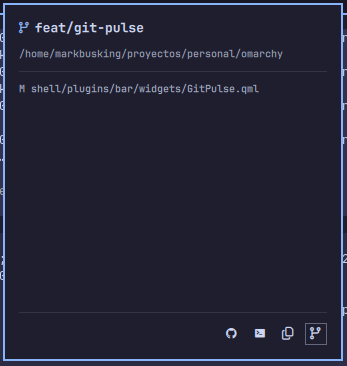
What you see
- Pill — the branch name and count chips for dirty files. Click it to open the popup.
- Popup — the repository path, the count chips, a scrollable
git status --shortlist, and actions: open lazygit, copy the branch name, open a terminal in the repository, and open the repository on GitHub.
The widget tracks focus churn cheaply: each toplevel's state is cached for a few seconds, so switching between windows never re-runs the git pipeline for one measured within the cache window. While the popup is open or the pill is hovered, the pill stays on its last repository instead of flickering away.
Install
omarchy plugin add https://github.com/markbus-ai/git-pulse --enable
The widget joins the bar's default layout at the next shell reload
(omarchy-restart-shell). Remove it with:
omarchy plugin remove markbusai.git-pulse
Requirements
- Omarchy with a bar (Quickshell)
gitin the runtime PATHhyprctl(Hyprland) to resolve the focused terminal's working directory- Optional:
lazygitfor the "Open lazygit" action - Optional:
wl-clipboardfor the "Copy branch" action
The widget ships its own omarchy-git-status and
omarchy-cmd-terminal-cwd equivalents under scripts/; it does not depend on
any Omarchy core command beyond the bar itself.
Settings
Settings live in the widget's entry in ~/.config/omarchy/shell.json. Set
them with omarchy bar set markbusai.git-pulse <key> <value>:
| Key | Default | Description |
|---|---|---|
showUntracked |
false |
Append ?N for untracked files to the label. |
showAheadBehind |
false |
Append up/down arrows for commits ahead/behind upstream. |
ttl |
10000 |
Cache time-to-live in milliseconds for a measured toplevel. |
maxWidth |
160 |
Upper bound for the pill label width before it elides. |
How it works
The focused window's process tree is walked to find a terminal shell (or a
tmux client, when the terminal runs tmux) and its working directory is read
from /proc. A small git status --porcelain=v1 -b query produces the
stable four-line state the widget parses:
<repo top-level>
<branch or "detached <sha>">
ahead <n> behind <m>
staged <n> modified <n> untracked <n> conflict <n>
License
MIT — see LICENSE.