
omawall
Folder-backed wallpapers for Omarchy Quattro. Every display gets its own image, its own settings if you want them, and your whole desktop theme can follow along.
Written by Claude, Anthropic's coding agent. Tested on real hardware, but tested isn't proven — and Omarchy plugins run unsandboxed inside your shell process, with your permissions. Read the source first. No promises about your cat.
Features
- Per-display configuration — each screen gets its own folder, mode and scaling, or share one configuration across all of them.
- Shuffle or pin — rotate a folder, or hold one image chosen from a thumbnail grid. Mix the two across screens.
- Four scaling modes — zoom, fit height, fit width, or actual size.
- Every image before any repeat — picks come off a shuffled queue that only reshuffles when it empties.
- Shuffle on a timer, on unlock and screensaver exit, or by hand.
- Recursive scan of
.jpg.jpeg.png.gif.bmp.webp. - Skips files it can't decode and re-deals that display.
- Theme from wallpaper — recolors everything Omarchy themes. Needs matugen.
- Bar widget for all of it. Middle-click the icon for the next image; hover it to see thumbnails of what each display is about to get.
With no folder set it behaves like the built-in background service, so you can install it and decide later.
Install
omarchy plugin add https://github.com/matjam/omawall.git --enable
Put the widget on the right when prompted. This disables the built-in
omarchy.background — they would fight over the wallpaper — and removing
omawall restores it.
Theme generation needs matugen, which omawall does not install for you:
sudo pacman -S matugen # Arch extra repo, no AUR helper needed
Everything else works without it, and the panel tells you when it's missing. Add it whenever; nothing needs reinstalling.
omarchy plugin update matjam.omawall    # update
omarchy plugin remove matjam.omawall    # remove, leaves nothing behind
Settings
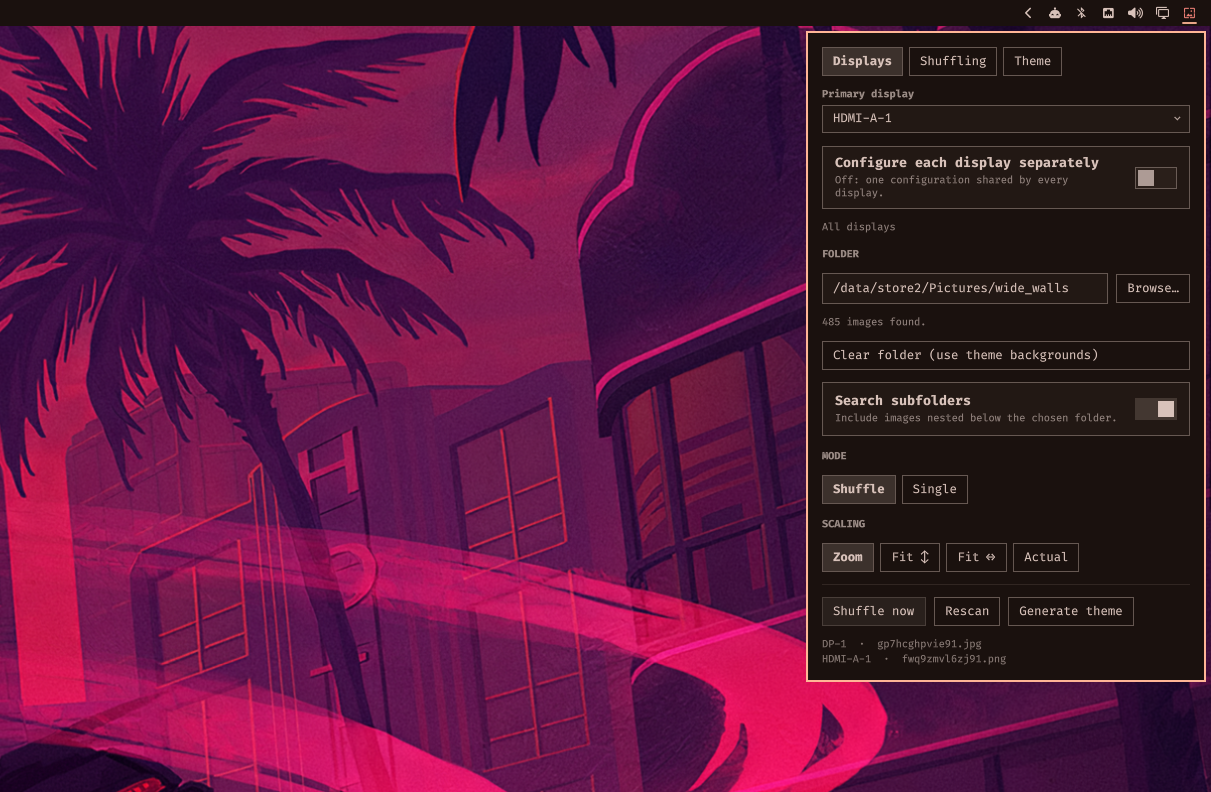
Click the wallpaper icon in the bar. Three tabs: Displays, Shuffling, Theme. Actions and what's on each screen stay visible below them.
Displays — per display, or shared by all of them:
| Setting | Default | Does |
|---|---|---|
| Primary display | auto | Whose image drives the generated theme. Marked ★ in the tabs. |
| Configure each display separately | off | On: a tab per display. Off: one shared configuration. |
| Folder | empty | Where images come from. Empty = theme backgrounds. |
| Search subfolders | on | Scan recursively. |
| Mode | Shuffle | Single pins one image, chosen from a thumbnail grid. |
| Scaling | Zoom | Zoom, Fit ↕, Fit ↔, or Actual. |
Shuffling — global:
| Setting | Default | Does |
|---|---|---|
| Auto-shuffle every | 0 |
Seconds. 0 is off. |
| Shuffle on unlock or wake | off | Shuffle on unlock or screensaver exit instead. |
| Different image per display | on | Off mirrors one image across displays sharing a folder. |
Theme — global: generate from wallpaper, and light or dark. See Theme from wallpaper.
Mixing displays
Set one display to Single and another to Shuffle and you get exactly that: the pinned one never moves while the other rotates. Displays pointed at the same folder share a pool and a deal queue, so they never show the same image at once and still see every image before repeating; displays on different folders rotate independently.
The four scaling modes only differ when the image and the screen disagree about shape. A 3440×1440 wallpaper on a 3440×1440 screen looks identical under Zoom, Fit ↕ and Actual, because it is.
Next image
The pool is dealt from a shuffled queue that only reshuffles once it empties, so there is always a next image waiting rather than a fresh roll of the dice. Next image hands it out — to every display set to Shuffle, leaving the pinned ones alone. With every display pinned there is no next image and the button is not shown.
Middle-click the bar icon for the same thing. Hovering it shows a thumbnail of what each display is about to get.
Keys while the panel is open: n next image · r rescan · b browse ·
t generate theme
omarchy-shell background next           # next image (shuffle is an alias)
omarchy-shell background generateTheme  # rebuild the theme
omarchy-shell background rescan         # re-read the folder
omarchy-shell background status         # JSON state

# hyprland bind
bind = SUPER SHIFT, W, exec, omarchy-shell -q background next
Theme from wallpaper
Derives a palette from the primary display's image, writes
~/.config/omarchy/themes/omawall/colors.toml, and applies it — bar,
terminals, btop, neovim, browser, VS Code. Leave the toggle off and press t
to do it by hand instead.
Your wallpaper is never touched: the theme is applied with
OMARCHY_THEME_SKIP_BACKGROUND=1, which also stops a shuffle triggering a
theme triggering another shuffle. While the toggle is on, switching to another
theme won't stick.
It stalls the session for a moment. omarchy-theme-set retints every
themed app, and the compositor stops accepting input while it does — the
pointer freezes, and a held key can repeat. That's the cost of any Omarchy
theme change; omawall just triggers it more often. So don't pair it with a
short interval. Either turn on Shuffle on unlock or wake and set the
interval to 0, or keep the interval and generate by hand. If you game,
prefer neither.
matugen supplies Material You tonal palettes. Its surface and on-surface tiers become Omarchy's background and foreground ramps, and its primary the accent.
The eight ANSI colors can't come from matugen: Material harmonises a scheme
around one seed hue, so its base16 output is a monochrome ramp — every "color"
a different lightness of the same hue — and a terminal needs red to be red.
Each is synthesised instead, starting at its canonical hue, nudged up to 15°
toward the image's hue, at a saturation taken from the image and clamped to a
band so a near-grey wallpaper still gives colors you can tell apart. The
mapping is bin/omawall-colors.jq.
Run the generator directly:
bin/omawall-generate-theme --image ~/Pictures/wall.jpg --mode dark [--no-apply]
Requirements
Omarchy Quattro · zenity for the Browse button (ships with Omarchy) ·
matugen for theme generation only.
matugen is GPL-2.0 and omawall is MIT; omawall only executes it as a separate
process, so the licenses stay independent. No network access, and nothing is
written outside ~/.config/omarchy.
Credits
Extends Omarchy's built-in omarchy.background
(basecamp/omarchy, MIT).
MIT — see LICENSE.