
Calendar Clock for Omarchy
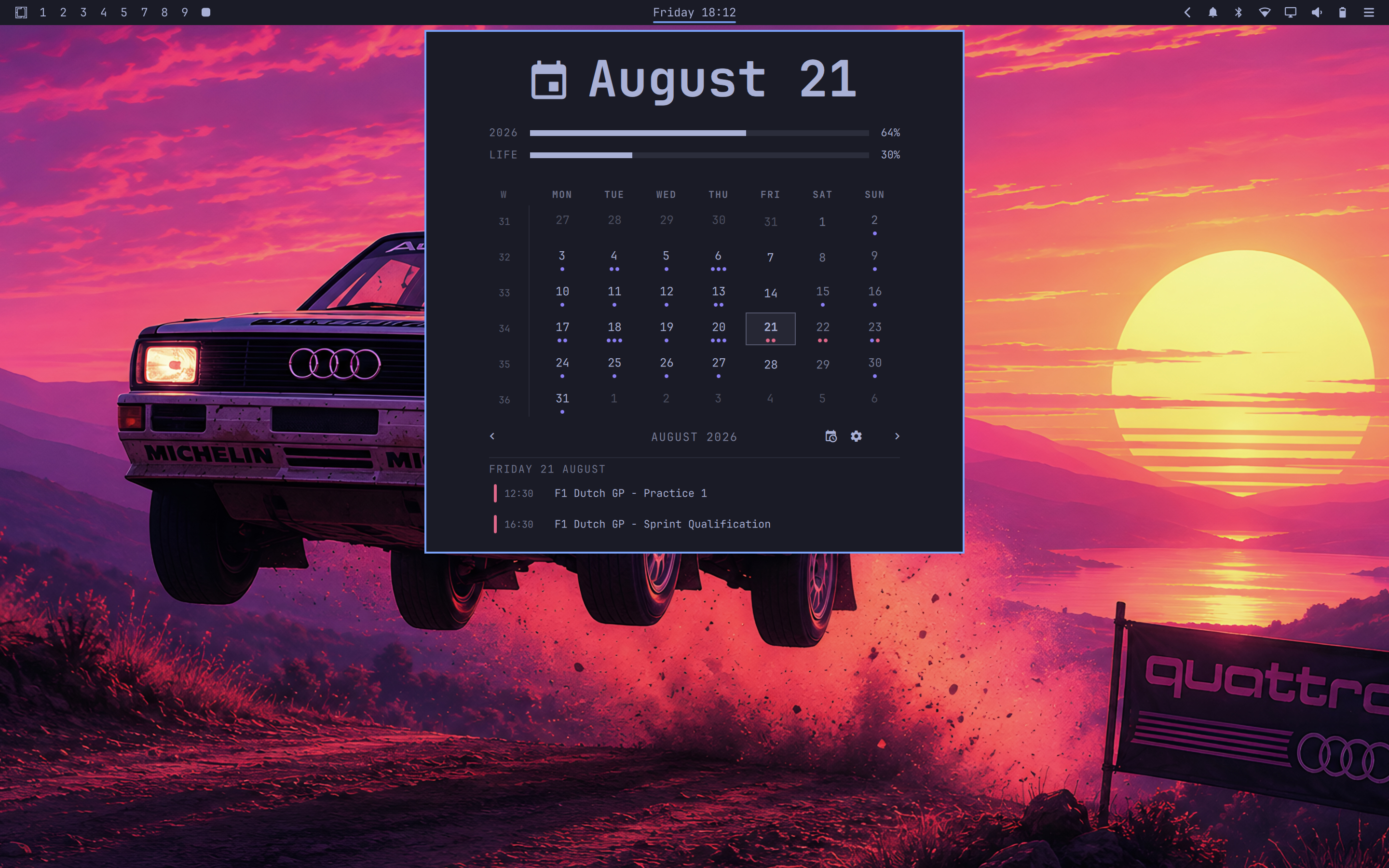
The Omarchy bar clock, upgraded: date and time on the bar, and a popup with a month calendar, year/life progress bars, and your upcoming events from any iCalendar (.ics) feed.
This exists because I liked the design of Omarchy's default clock and its calendar popup — the hero date, the quiet month grid, the progress rails — and wanted that exact look to also show my real events. So this is the stock design, kept as-is, wired to live calendars.
Features
- Bar — date/time label (formats configurable), vertical-bar mode for thin setups
- Popup
- Big hero date; click it or the month header to jump back to today
- Month grid with ISO week numbers and event dots per day
- Year progress ("2026 · 64%") and life progress (editable birth year / expectancy, double-click the year row)
- Upcoming list and selected-day events from your calendars
- Calendars — paste any shared iCalendar link (Proton, Google, Nextcloud, Fastmail, self-hosted…). Reorder feeds with the arrows, recolor them by clicking a feed's dot. Recurring events expand correctly across DST changes; one broken event in a feed can't sink the rest.
- Private by default — feed URLs never appear in process arguments or logs; feeds and caches are owner-only
Requirements
sudo pacman -S --needed python-icalendar python-recurring-ical-events
Install
omarchy plugin add https://github.com/matteodevenuto/omarchy-calendar-clock --enable
It replaces the stock clock widget in place. Click the clock to open the panel; Escape closes it.
Keyboard
| Key | Action |
|---|---|
←/→ |
Previous / next month |
↑/↓ |
Previous / next year |
t / enter |
Back to today |
s |
Show/hide calendars |
u |
Toggle upcoming list |
w |
Toggle week start |
esc |
Close |
Settings
| Key | Type | Default | Meaning |
|---|---|---|---|
format |
string | locale | Bar date/time format (Qt format string) |
weekStartDay |
string | locale | First day of week |
birthYear |
integer | — | Life-progress start year |
lifeExpectancy |
integer | 90 | Life-progress span |
refreshIntervalSec |
integer | 900 | Calendar feed poll interval |
feedsFile |
path | — | Defaults to ~/.config/omarchy/calendars/feeds.json |
Omarchy Quattro
On Quattro, third-party plugins talk to the bar through a facade. The
centerHoverRevealSuppressed flag is read-only. Assigning it on panel
open/close throws TypeError and freezes the shell until restart.
Use the setter, like stock omarchy.clock:
function setCenterHoverRevealSuppressed(value) {
  if (root.bar && typeof root.bar.setCenterHoverRevealSuppressed === "function")
    root.bar.setCenterHoverRevealSuppressed(value)
  else if (root.bar && "centerHoverRevealSuppressed" in root.bar)
    root.bar.centerHoverRevealSuppressed = value
}
Already applied in 1.0.3. Existing installs:
omarchy plugin update matteodevenuto.clock
Credits
Built on the stock Omarchy clock plugin (MIT, by the Omarchy authors). The calendar feed integration is based on Proton Calendar for Omarchy by itsmoorgrove (MIT), generalized to any iCalendar source. See LICENSE.
Removal
omarchy plugin remove matteodevenuto.clock
rm -rf ~/.config/omarchy/calendars ~/.cache/omarchy/calendars
Removing the clone restores the stock clock.