
F1 Sessions for Omarchy

A status-bar widget for Omarchy that counts down to the next Formula 1 session and lists every upcoming race weekend with full session schedules.
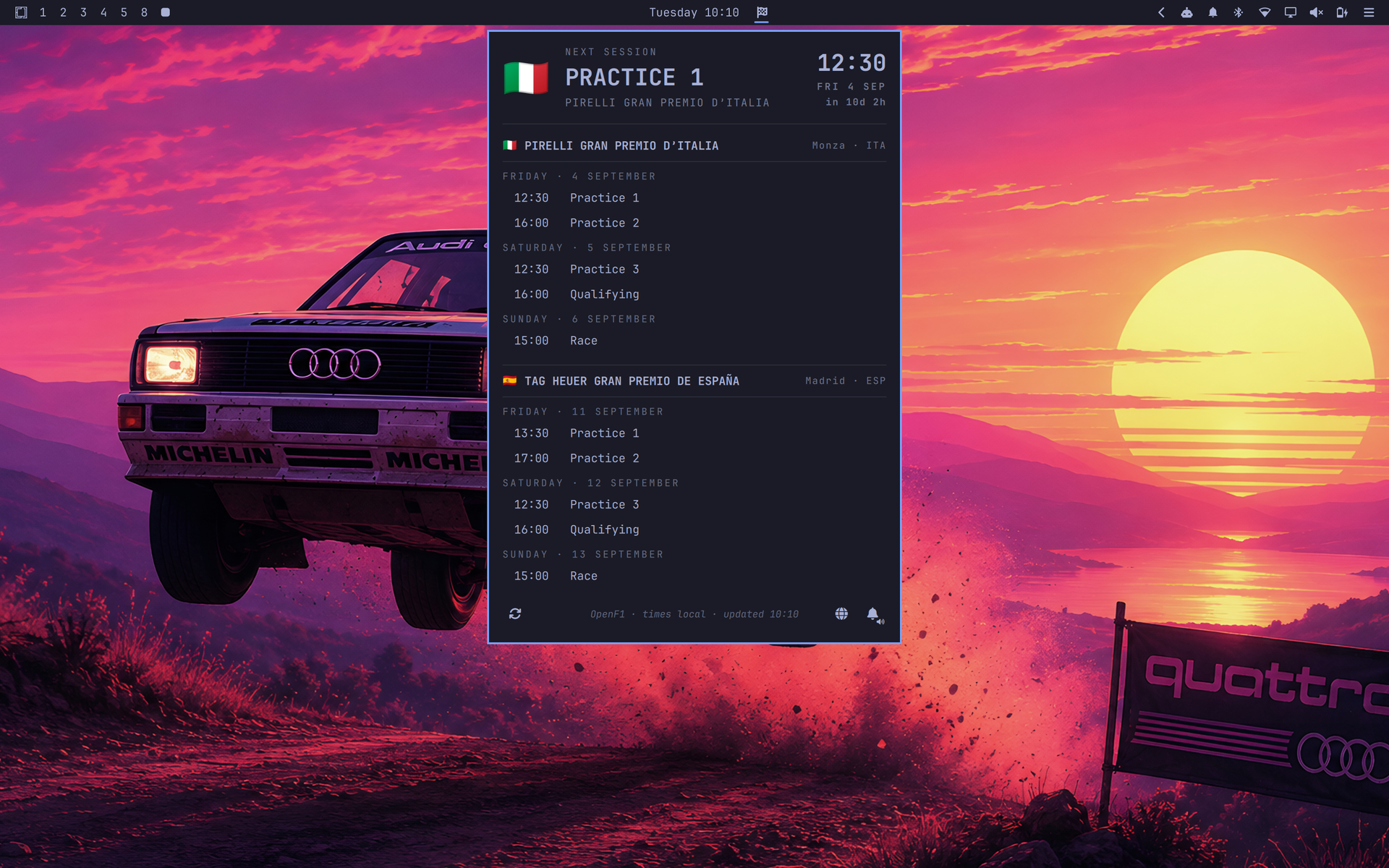
Features
- Bar countdown to the next F1 session — right-click cycles what it shows:
next session (
SPRINT 12:00), time-only, race-weekend view (NED GP Sat), a compact checkered-flag icon, or the wide F1 logo. - Schedule popup listing all upcoming GPs grouped by weekend and day, with
emoji flags, city/country, live highlighting (
● LIVE), and the next session pinned at the top. - Session alerts — toggle the bell in the panel footer to get a desktop notification and short radio-style cue 5 minutes before each session starts. A test notification and sound fire when you enable it. Alerts are deduplicated across monitors and can cover all sessions, competitive sessions, or races and sprints only.
- Resilient data — pulls from OpenF1 and falls back to Jolpica automatically if OpenF1 is unavailable. The latest successful schedule is cached for instant startup and offline use; the footer shows refresh progress and failures.
- Timezone aware — all times render in your local timezone and re-render when it changes.
- Automatic season rollover — after the final session ends, the next refresh checks the following year's OpenF1 calendar automatically.
- Bounded API handling — response sizes, item counts, and remote display strings are limited before they reach the panel or tooltip.
Install
omarchy plugin add https://github.com/matteodevenuto/omarchy-f1-sessions.git
Then open the Plugin Manager and enable F1 Sessions on the bar — or:
omarchy plugin enable matteodevenuto.f1-sessions right
Remove
Remove the plugin and its bar configuration through Omarchy:
omarchy plugin remove matteodevenuto.f1-sessions
Usage
| Input | Action |
|---|---|
| Left-click | Open/close the schedule panel |
| Right-click | Cycle bar display mode |
| Middle-click | Refresh schedule now |
| Alert button (panel footer) | Cycle off → notifications with sound → notifications muted |
| Alert-filter button (panel footer) | Cycle all sessions, competitive sessions, or races + sprints |
| Refresh button (panel footer) | Refresh the schedule immediately |
IPC
omarchy-shell matteodevenuto.f1-sessions toggle    # open/close panel
omarchy-shell matteodevenuto.f1-sessions refresh   # refetch schedule
omarchy-shell matteodevenuto.f1-sessions cycleDisplay
omarchy-shell matteodevenuto.f1-sessions status    # data/cache/error status as JSON
Settings
Settings live in the widget entry of ~/.config/omarchy/shell.json
(bar.layout.* → the widget object):
| Key | Default | Description |
|---|---|---|
refreshMinutes |
60 |
Schedule refresh interval (minutes) |
daysAhead |
21 |
Days of upcoming sessions to show |
hideWhenQuiet |
false |
Hide the bar widget when nothing is scheduled in range |
use24h |
true |
24-hour times |
displayMode |
"icon" |
Bar display mode (next, time, weekend, icon, logo) |
notifications |
true |
Alert 5 minutes before each session |
notificationSound |
true |
Play the radio-style cue with session alerts |
notificationSessions |
"all" |
Alert for all, competitive (no practice), or race (Grand Prix + Sprint) sessions |
Alert sound
The radio cue plays through PipeWire using pw-play. Preview the bundled
sound with:
pw-play ~/.config/omarchy/plugins/matteodevenuto.f1-sessions/assets/radio-alert.wav
Set notificationSound to false to keep the five-minute desktop alert but
disable its audio. The combined footer alert button cycles off → notifications
with sound → notifications muted; enabling alerts plays the same sound as a
test, while muting or disabling them is silent.
The last successful schedule is stored at
$XDG_CACHE_HOME/omarchy-f1-sessions/schedule.json (or
~/.cache/omarchy-f1-sessions/schedule.json when XDG_CACHE_HOME is unset).
Cached sessions that have already ended are discarded when the plugin starts.
The bundled cue is “f1_radio_sound” by u_dn8ylcpe3v via Pixabay, used under the Pixabay Content License. It is incorporated into this plugin and is not offered as a standalone sound.
Data sources & disclaimer
Schedule data comes from OpenF1 with automatic failover to the Ergast-compatible Jolpica API. Thanks to both projects. When the current OpenF1 calendar has no remaining sessions, the plugin checks the next calendar year automatically before using Jolpica. Jolpica data is available for non-commercial use under CC BY-NC-SA 4.0, and requests identify this plugin with a custom user agent as required by Jolpica.
OpenF1 sessions use the API's scheduled start and end timestamps. Jolpica does not provide end timestamps, so fallback durations are estimated as 60 minutes for practice, 45 minutes for sprint qualifying, 60 minutes for qualifying and sprints, and 150 minutes for a race. A session leaves the schedule immediately after that end time; there is no post-session grace period.
This plugin is unofficial and not associated with Formula 1, the FIA, or any of their subsidiaries. F1, FORMULA ONE, FIA FORMULA ONE WORLD CHAMPIONSHIP, GRAND PRIX and related marks are trademarks of Formula One Licensing B.V. The bundled logo is used solely for identification and comes from Wikimedia Commons.

The MIT license covers the plugin code. The bundled radio cue remains subject to the Pixabay Content License; see assets/LICENSE.md.
Development
Omarchy runs the installed copy at
~/.config/omarchy/plugins/matteodevenuto.f1-sessions/. Edits made directly
there hot-reload. A separate Git checkout is not linked automatically; sync
its runtime files and rescan the shell with:
rsync -a BarWidget.qml Model.js Panel.qml f1-logo.svg manifest.json assets \
  ~/.config/omarchy/plugins/matteodevenuto.f1-sessions/
omarchy-shell shell rescanPlugins
Validate the project checkout with:
omarchy plugin validate .
Run the parser, input-boundary, and manifest-contract tests with:
node --test tests/*.test.js