
Scene Switcher
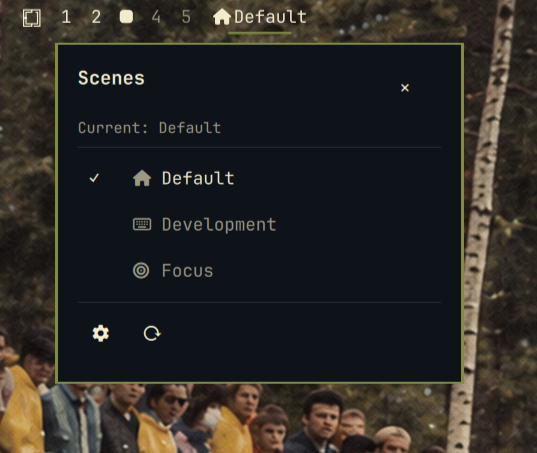
Show the current omarchy scene in the bar with an icon, click to switch scenes, and manage per-scene plugin sets from a centered configuration panel.
Scenes let you switch your bar/plugin set by occasion — Development at a
cafe, Focus at a desk — with one click or keypress instead of editing
shell.json every time.
Screenshots
Features
- Bar widget — current scene icon + label; left click opens the switch popup
- Scene switching —
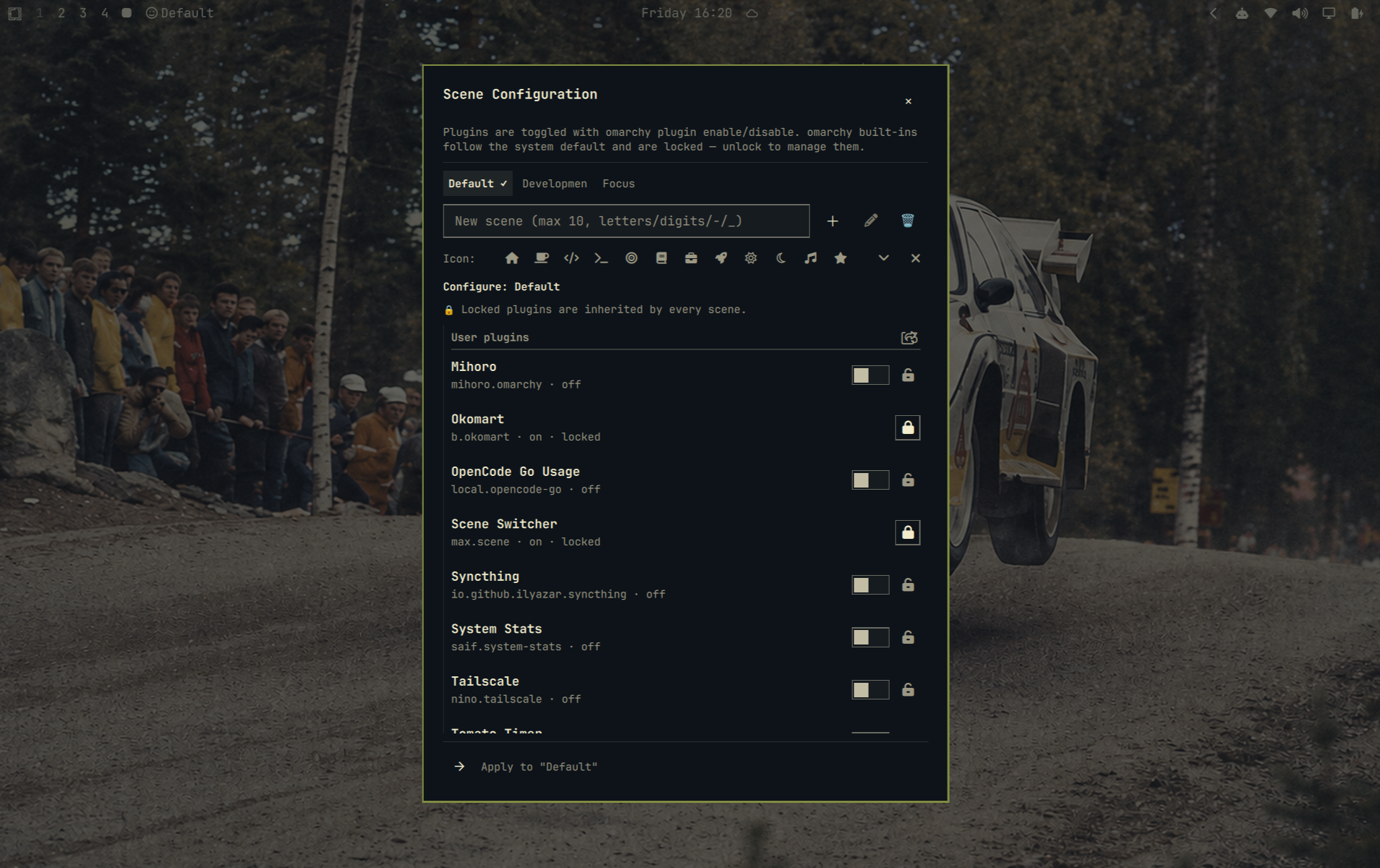
omarchy-scene set <scene>applies a scene by atomically rewriting~/.config/omarchy/shell.json(positions/settings of enabled plugins are cached and restored on re-enable). The default set is the base: its plugins stay enabled in every scene, and every scene runs default + locked + its own plugins. Plugins in no scene are unmanaged and never touched — including omarchy built-ins, which follow the system state. - Config panel — lazy-loaded centered overlay (destroyed on close): scene tabs, create/rename/delete (max 5 custom scenes, names ≤10 chars), per-scene plugin toggles, lock/unlock buttons, and a preset icon picker (30 icons) for each scene. Plugin toggles are marks: they take effect together when you press Apply & switch (marked rows show a "pending" suffix; switching scene tabs or data refreshes discard unapplied marks)
- Refresh plugins — a ⟳ button at the bottom-left of the panel
rescans the plugin registry, so plugins newly installed through
omarchy plugin add/cloneappear immediately. It keeps the panel open after the rescan (the widget is rebuilt in the background and the panel reopens automatically) - Refresh plugin cache — the ⟳ button in the switch popup runs the same rescan but only refreshes the cache: it does not open the config panel. Only the panel's Refresh plugins reopens the dialog after refreshing
- Status echo — each row shows the plugin's effective state: locked plugins and omarchy built-ins follow the system default; plugins in a scene show the scene switch state; unmanaged (new) plugins echo their system default on/off. Disabling an unmanaged plugin (e.g. herdr) sticks across Apply & switch — the stale per-scene layout snapshot no longer resurrects it, so unmanaged plugins truly follow the system state
- Locked plugins — locked plugins are inherited by every scene (always on), on top of the default base set; omarchy built-ins are listed after user plugins, locked by default and following the system state — unlock them to manage manually. A locked built-in that is currently off (e.g. a disabled Tailscale) stays visible in every scene tab instead of being hidden, so you can always find and re-enable it
- Keybinding —
SUPER + SHIFT + Tcycles scenes (SUPER + SHIFT + Sis omarchy's default screenshot/Google-Maps shortcut, so the scene binding deliberately avoids it; change the line in~/.config/hypr/bindings.luaif you prefer another key) - Menu integration — optional "Scenes" submenu in the omarchy menu
Install
Requires python3 (stdlib only — used for the descriptor-bound secure I/O core).
The repository ships an idempotent install.sh that installs the plugin, the
companion CLI at the path the widget calls, and bootstraps the scene config
(init runs only when scenes.json does not exist yet — existing config is
always kept). Either:
# One command, straight from the marketplace (install.sh ships inside the
# cloned plugin, so no repo checkout or curl|bash needed):
omarchy plugin add https://github.com/gmaxxxie/Scene-Switcher.git --enable \
  && "$HOME/.config/omarchy/plugins/max.scene/install.sh"
# …or from a clone of this repository:
git clone https://github.com/gmaxxxie/Scene-Switcher.git
cd Scene-Switcher && ./install.sh
Manual, the same three steps are:
# 1. Install the plugin (from the marketplace URL or this repository)
omarchy plugin add https://github.com/gmaxxxie/Scene-Switcher.git --enable

# 2. Install the companion CLI from the cloned plugin folder.
#    The bar widget calls it at exactly $HOME/.local/bin/omarchy-scene — the
#    file was cloned with the plugin, so take it from there (not from the
#    current directory, which is not the repository).
install -Dm755 "$HOME/.config/omarchy/plugins/max.scene/omarchy-scene" "$HOME/.local/bin/omarchy-scene"

# 3. Bootstrap the scene configuration (snapshots your currently enabled set)
omarchy-scene init
After init, ~/.config/omarchy/scenes/scenes.json holds the scene
definitions, entries.json caches plugin entry snapshots, and
ui-state.json is the rendered state the panel's FileView watches.
To update a previous install, run the plugin-folder install.sh --update
(one command: git-pulls the new plugin files and reinstalls the CLI; see
Update), or run ./sync.sh from a fresh clone of this repository — it
deploys the plugin folder and reinstalls the CLI in one step (see
Development).
The bar widget and config panel only ever consume the CLI-validated
ui-state.json payload — never the raw scenes.json directly. edit
revalidates and refreshes that state when you close the editor; any other
change to scenes.json shows up on the next omarchy-scene command that
regenerates it (add/set/label/icon/refresh/…).
Update
An existing install is updated in one command (your scenes.json config
is never touched):
"$HOME/.config/omarchy/plugins/max.scene/install.sh" --update
--update first runs omarchy plugin update max.scene to git-pull the new
plugin files into the git-managed plugin folder, then falls through to the
same idempotent steps as a fresh install — skipping add (already
installed), re-installing the companion CLI from the updated folder, and
skipping init because scenes.json already exists. Devices that haven't
pulled the new install.sh yet can run the equivalent one-liner:
omarchy plugin update max.scene \
  && "$HOME/.config/omarchy/plugins/max.scene/install.sh"
Scene semantics (default base / locked inheritance) apply to existing scenes
automatically — no migration needed. If your scenes.json was created by an
older init and still lists omarchy built-ins in default, re-snapshot it
once with omarchy-scene init --force (the old file is backed up first).
Update with an AI agent
Managing this machine with an AI coding agent (pi, OpenCode, Codex, …)? Paste
the block below — it runs the exact one-command update above, keeps your
scenes.json, and verifies the result. The two hard constraints are in the
prompt on purpose: never remove & reinstall the plugin, and stop and
report instead of guessing.
Update the omarchy plugin
max.scene(Scene Switcher) to the latest version.
- Check current state: run
md5sumon~/.config/omarchy/plugins/max.scene/omarchy-sceneand~/.local/bin/omarchy-scene, andgrep versionon~/.config/omarchy/plugins/max.scene/manifest.json.- Update the plugin files:
omarchy plugin update max.scene --yes.- Reinstall the companion CLI:
"$HOME/.config/omarchy/plugins/max.scene/install.sh"(idempotent — skipsaddandinit, never touchesscenes.json).- Re-run the checks from step 1 and confirm the two md5s match and the version is the latest; report both outputs back.
Constraints: never remove/reinstall the plugin (
omarchy plugin removeis forbidden), preservescenes.json, and if any step errors, stop and paste the error instead of guessing. No shell restart is needed unless the update touchedScene.qml/ConfigPanel.qml.
A standalone copy with the same prompt (plus a 中文 version) lives in
docs/update-prompt.md — handy for forwarding or
linking.
Usage
- Click the bar widget (or press
SUPER + SHIFT + T) to switch scenes - Click the ⚙ button in the popup to open the configuration panel
- Pick the scene tab, toggle plugins, lock/unlock, set an icon, then press Apply & switch — toggles are only marks until then
How scenes compose
- default is the base set —
initsnapshots your currently enabled user plugins (omarchy built-ins are never snapshotted; they stay unmanaged and follow the system state). The default set's plugins stay enabled in every scene. - locked plugins are inherited everywhere too (always on) — lock a plugin to pin it to all scenes, on top of the default base.
- scene-specific plugins belong to one scene and switch with it.
- unmanaged plugins (in no scene, not locked — including omarchy built-ins) are never touched by scene switches; they keep whatever state they have. A widget you enable or install after a scene's layout was snapshotted is never dropped: switching scenes preserves any known widget that is currently in the bar, even if the scene's saved layout predates it (ghost widgets that are no longer in the plugin catalog are not carried into other scenes).
So switching to a scene runs default + locked + that scene's plugins.
To stop a plugin everywhere, remove it from the default set
(omarchy-scene rm-plugin default <id>) and disable it at the shell level.
If a bar widget you expect everywhere (e.g. the Tailscale icon) disappears when you switch scenes, it was probably unlocked and added to one scene only — the panel's default-scene view is the place to manage built-ins: keep it locked to make it follow the system state (always in the bar while enabled at the shell level, in every scene).
Toggling a plugin switch in the config panel only marks it (row shows a
(pending) suffix). Apply & switch commits all pending marks in one
transaction via omarchy-scene apply <scene> --on <ids> --off <ids>:
enable/disable, scene membership, then switch. Marks are discarded when you
switch scene tabs or the panel data refreshes.
Configure
omarchy-scene list                                    # scenes + members
omarchy-scene set <scene>                             # switch (drop --dry-run to apply)
omarchy-scene apply <scene> --on <ids> --off <ids> # apply marked toggles + switch (panel)
omarchy-scene add <name> --label <label> --icon <glyph>
omarchy-scene rename <old> <new>                      # rename a scene (keeps its label)
omarchy-scene toggle-plugin <scene> <plugin-id> on|off
omarchy-scene lock/unlock <plugin-id>                 # inherit everywhere / release
omarchy-scene icon <scene> <glyph>                    # empty glyph clears the icon
omarchy-scene status                                  # per-plugin current vs target state
omarchy-scene refresh [--no-reopen]                # re-snapshot managed plugin entries
                                  # (--no-reopen: refresh only, don't reopen the config panel)
omarchy-scene menu-add / menu-remove                  # bar menu submenu
Keybinding
The widget installs SUPER + SHIFT + T -> omarchy-scene cycle in
~/.config/hypr/bindings.lua (it is the one non-conflicting SUPER + SHIFT
slot; omarchy uses SUPER + SHIFT + S for screenshots/Google Maps). Remove
that line to uninstall the binding, or edit the key to your preference.
Remove
omarchy plugin remove max.scene
rm -rf ~/.config/omarchy/scenes           # scene config (optional)
rm -f ~/.local/bin/omarchy-scene          # companion CLI (optional)
Security
The plugin and its CLI run unsandboxed with your user permissions. The CLI
only calls omarchy plugin enable/disable, rewrites ~/.config/omarchy/
files atomically (backing up shell.json before each switch), and issues a
reload query to the running shell. It never uses sudo, starts no extra
Quickshell process, and sends no network traffic.
All file I/O is descriptor-bound — there is no check-then-open anywhere:
- Every read opens the path once via
openat(2), walking each path component withO_NOFOLLOW(O_DIRECTORYon intermediate directories), then validates withfstat(2): regular file, owned by the current user, size ≤ 8 MiB. Reads useO_NONBLOCK+S_ISREGso a hostile FIFO at a config path can never block the CLI. A symlink pointed at a config path (or any component of it) is refused withELOOP, and the validated bytes are captured from that descriptor — later tools (jq/awk/sed/grep) only ever consume the in-memory content via stdin, never the mutable pathname. - Writes create a random temp file in the same directory as the target
with
O_CREAT|O_EXCLand keep its descriptor open for the whole create → write → validate →fchmod→fsync→ atomicrename(2)sequence (rename bound to the validated parent-directory descriptor, so a directory switch mid-operation cannot redirect the publish). The temp pathname is never reopened bycat/stat/chmod/sync. - Backups copy descriptor-to-descriptor into a random
O_EXCLname in the same directory (timestamp + random suffix) — no predictable paths, no collisions — and auto-prune in place: each switch keeps only the newest$OMARCHY_SCENES_BACKUPS(default 10) of its ownshell.json.bak.*backups. Files belonging to other tools (e.g.shell.json.bak.opencode.*) are never touched. - Mutating commands hold an
flock(2)-based mutex whose lock file is opened atomically (O_CREAT+O_NOFOLLOW) and whose holder dies with its parent (PR_SET_PDEATHSIG), so a crashed CLI never leaves a stale lock. - Structural limits are enforced on the validated read before anything is
emitted to QML: 8 MiB byte cap, JSON depth ≤ 32, strings ≤ 4096 chars,
array/object member counts ≤ 65536;
scenes.json— at most 12 scenes, scene keys ≤ 10 chars ([a-zA-Z0-9_-]), labels ≤ 64 chars, icons ≤ 4 chars, plugin lists ≤ 256 entries, plugin ids^[a-zA-Z0-9][a-zA-Z0-9._-]{0,63}$;entries.json≤ 4096 records; catalog-derived fields (name≤ 128,id≤ 64,kinds≤ 16×32); menu actions are bounded by the scene-key limit. - The
.reopen-configrefresh marker is written through the same descriptor-bound core (O_EXCL temp + atomic rename): a pre-placed symlink is refused, never followed or truncated.refresh --no-reopen(used by the switch popup's cache button) writes the marker back to0, clearing any stale1so only the panel's Refresh plugins ever reopens the dialog after a rescan. It is cleared byomarchy-scene reopen-done, which writes0back through the same core (the marker stays a 1-byte regular file so the widget never sees a missing-file read; a hostile symlink/FIFO marker is instead unlinked, link-only) — neither the CLI nor the widget ever uses shell redirection on that path. - Each scene remembers its exact bar layout (
_layoutssnapshots), so switching default ↔ dev restores the arrangement precisely every time and unmanaged built-in widgets (wifi/ai/audio/monitor/power, …) are never pushed out of place by index drift.
Development
This repository is the source of truth. The live plugin folder
(~/.config/omarchy/plugins/max.scene) is a deployed copy — edit here, then
deploy, then restart the shell once so the running bar widget reloads the new
Scene.qml (rescanPlugins re-walks the plugin dirs but does not rebuild an
already-running bar widget):
./sync.sh          # deploy the plugin folder + reinstall the CLI to ~/.local/bin
omarchy-restart-shell   # reload the bar widget from disk (needed once per deploy)
bash tests/run-tests.sh   # security/regression suite
omarchy plugin validate .   # spec validation before pushing
The test suite covers symlink rejection, TOCTOU swap races, FIFO
non-blocking, oversized files, concurrent writers, backup collisions, menu
shell-injection attempts, structural limit enforcement, lock safety,
byte-level round-trips, layout stability, and reopen-marker symlink
safety — all in a sandboxed fake $HOME with stubbed
omarchy/omarchy-shell binaries.
License
MIT — see LICENSE.