
Darky
Your Omarchy theme and wallpaper, following the sun.
Darky is an Omarchy (Quattro) shell plugin. Pick a theme and a background for day and another pair for night, tell it where you live, and it swaps them at sunrise and sunset — no systemd service, no shell script glued to a timer.
| Night | Day |
|---|---|
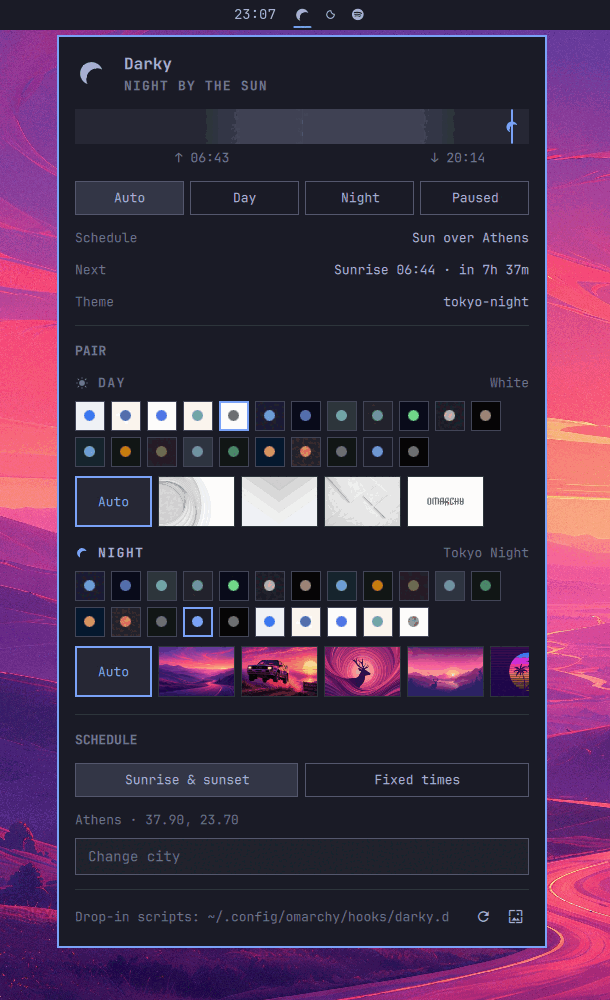 |
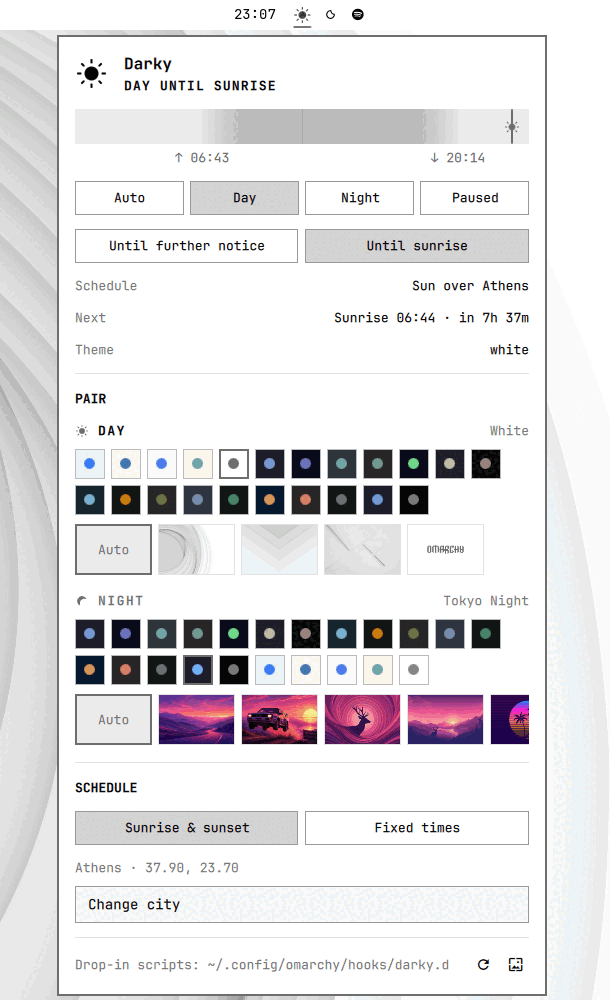 |
Why this exists
Omarchy 4 moved the whole desktop into one Quickshell process with a plugin
system. Day/night theming was the last piece still living outside it: a
darkman systemd service, a script in
~/.local/share/darkman/, a theme pair in one config file and a wallpaper choice
nowhere in particular.
Darky is a friendly attempt to make that unnecessary on Omarchy. darkman is a
fine, portable daemon and Darky borrows its ideas outright — including its
light-mode.d / dark-mode.d script contract, so anything you wrote for it
keeps working. Darky just moves the job inside the shell, where the themes and
wallpapers already live, and puts all of it behind one panel.
Requirements
- Omarchy 4 (Quattro) or newer, with the Quickshell plugin system
jq,curl,flock,gsettings— all present on a stock Omarchy installomarchy-theme-set,omarchy-theme-bg-set,omarchy-theme-color,omarchy-hook— shipped with Omarchy
Nothing else. The sun math runs locally, so the schedule keeps working offline; the network is touched only while you type in the city search.
Install
omarchy plugin add https://github.com/mehiel/mehiel.darky.git --enable
Then add the Darky widget to your bar from Setup > Plugins, or click the
sun/moon that appears in it. The panel is the whole configuration surface.
To remove it:
omarchy plugin remove mehiel.darky
Your settings stay in ~/.local/state/darky/ so a reinstall picks up where you
left off. Delete that directory to forget them.
First run
Darky seeds itself from whatever you already have:
- location from
~/.config/darkman/config.yaml - theme pair from
~/.config/omarchy/light-dark.conf - otherwise
white/tokyo-nightand 07:00 / 19:00
If darkman is still running, retire it — two schedulers fighting over one theme is a bad time:
systemctl --user disable --now darkman.service
mv ~/.config/omarchy/hooks/post-boot.d/darkman-theme.sh{,.sample}  # if you have one
Using it
The bar icon is a sun during the day and a crescent at night, dimmed when the schedule is paused, so you can read the state without opening anything. Click it for the panel, middle-click to toggle.
- Auto follows the schedule. Day and Night pin the desktop. Paused stops Darky touching anything.
- Pinning asks whether you mean it until further notice or only until the next sunrise/sunset. Temporary choices survive a shell restart and expire on their own.
- Pair is two rows of theme chips — every installed Omarchy theme, light ones
offered for day and dark ones for night — with the backgrounds of the selected
theme underneath.
Autoleaves the wallpaper to the theme. - Schedule is sunrise/sunset for a city, or fixed times. City search is type-ahead; the coordinates and timezone are stored once and used offline afterwards.
- The ribbon across the top is the local day, night shaded, with a marker at now.
Missed transitions are caught up on login and after suspend, so a laptop that slept through sunset wakes up dark.
Bind a key
-- ~/.config/hypr/bindings.lua
o.bind("SUPER + ALT + T", "Toggle day/night",
  os.getenv("HOME") .. "/.config/omarchy/plugins/mehiel.darky/bin/darky-toggle")
darky-toggle asks the shell first and falls back to darky-apply when the
shell is not running, so the bind also works from a TTY.
Command line
omarchy-shell mehiel.darky status    # JSON: mode, appearance, next event, pair, errors
omarchy-shell mehiel.darky toggle    # flip until the next transition
omarchy-shell mehiel.darky light     # or: dark — temporary, same as toggle
omarchy-shell mehiel.darky auto      # drop the override, return to the schedule
omarchy-shell mehiel.darky modeDay   # or: modeNight, modePaused, modeAuto — persistent
omarchy-shell mehiel.darky apply     # re-apply the current mode
omarchy-shell mehiel.darky refresh   # rescan installed themes and backgrounds

omarchy-shell mehiel.darky.panel open    # or: close, toggle — the panel window
Configuration
Everything the panel writes lives in ~/.local/state/darky/settings.json. Edit
it by hand if you prefer; Darky watches the file and repaints the desktop the
moment it changes.
{
  "mode": "auto",
  "schedule": "solar",
  "dayStart": "07:00",
  "nightStart": "19:00",
  "location": {
    "name": "Athens",
    "latitude": 37.9,
    "longitude": 23.7,
    "timezone": "Europe/Athens"
  },
  "light": { "theme": "white", "background": "" },
  "dark":  { "theme": "tokyo-night", "background": "" }
}
| Key | Meaning |
|---|---|
mode |
auto, day, night or paused |
schedule |
solar (needs location) or fixed; falls back to fixed without a location |
dayStart, nightStart |
HH:MM, used by the fixed schedule and whenever solar data is unusable |
location |
name, latitude, longitude, IANA timezone |
light, dark |
theme slug and absolute background path; empty background means the theme's own |
Other files:
| Path | What it is |
|---|---|
~/.local/state/darky/mode |
the last applied mode, one word, for scripts that want to ask |
~/.local/state/darky/override.json |
the current temporary choice, if any |
~/.config/omarchy/light-dark.conf |
kept in sync so Omarchy's own tooling agrees with the panel |
Hooks
Anything in ~/.config/omarchy/hooks/darky.d/ runs after the desktop already
looks right, with the mode, theme slug and background path as arguments:
# ~/.config/omarchy/hooks/darky.d/50-editor
mode="$1" theme="$2" background="$3"
sed -i "s/^set background=.*/set background=$mode/" ~/.vimrc
A single ~/.config/omarchy/hooks/darky script works too — that is Omarchy's
convention, and omarchy-hook darky is what Darky calls.
darkman's directories still run as well, after the hooks above:
~/.local/share/light-mode.d/   ~/.local/share/dark-mode.d/
/usr/share/light-mode.d/       /usr/share/dark-mode.d/
Without the shell
bin/darky-apply light|dark [theme-slug] [background-path]
That is the whole transition — theme, background, color-scheme,
light-dark.conf, hooks — in one script. With no arguments beyond the mode it
reads settings.json, which is what makes it a working fallback when the shell
is down.
Privacy
City search sends what you type to Open-Meteo's geocoding API, and only while the field has two or more characters. Nothing else leaves the machine: no IP geolocation, no telemetry, and sunrise and sunset are computed locally with the NOAA solar algorithm. Open-Meteo's free API is non-commercial; see their terms.
Development
git clone https://github.com/mehiel/mehiel.darky ~/.config/omarchy/plugins/mehiel.darky
omarchy-restart-shell

node tests/model.test.js                          # solar math and settings logic
omarchy plugin validate .
/usr/lib/qt6/bin/qmllint *.qml                    # the Qt5 qmllint in PATH says nothing useful
| File | Role |
|---|---|
Model.js |
solar math (NOAA), schedule resolution, settings normalization — plain JS, runs under Node |
Service.qml |
state, timers, file watching, IPC |
Panel.qml |
the configuration panel |
BarWidget.qml, DarkyIcon.qml, DayRibbon.qml, ThemeSlot.qml |
bar icon, sun/moon mark, day ribbon, theme picker |
bin/darky-scan |
theme catalog and first-run seed |
bin/darky-apply |
the apply path |
bin/darky-toggle |
the keybinding entry point |
Pull requests welcome. If something about the schedule looks wrong, the fastest
useful bug report is omarchy-shell mehiel.darky status plus your timezone.
Credits
- darkman by Hugo Barrera, for the model and the script contract this keeps compatible.
- NightMan, for showing what a well-behaved appearance plugin looks like on Quattro.
- Open-Meteo for city search, CC BY 4.0.
License
MIT — see LICENSE.