
Scores widget for Omarchy
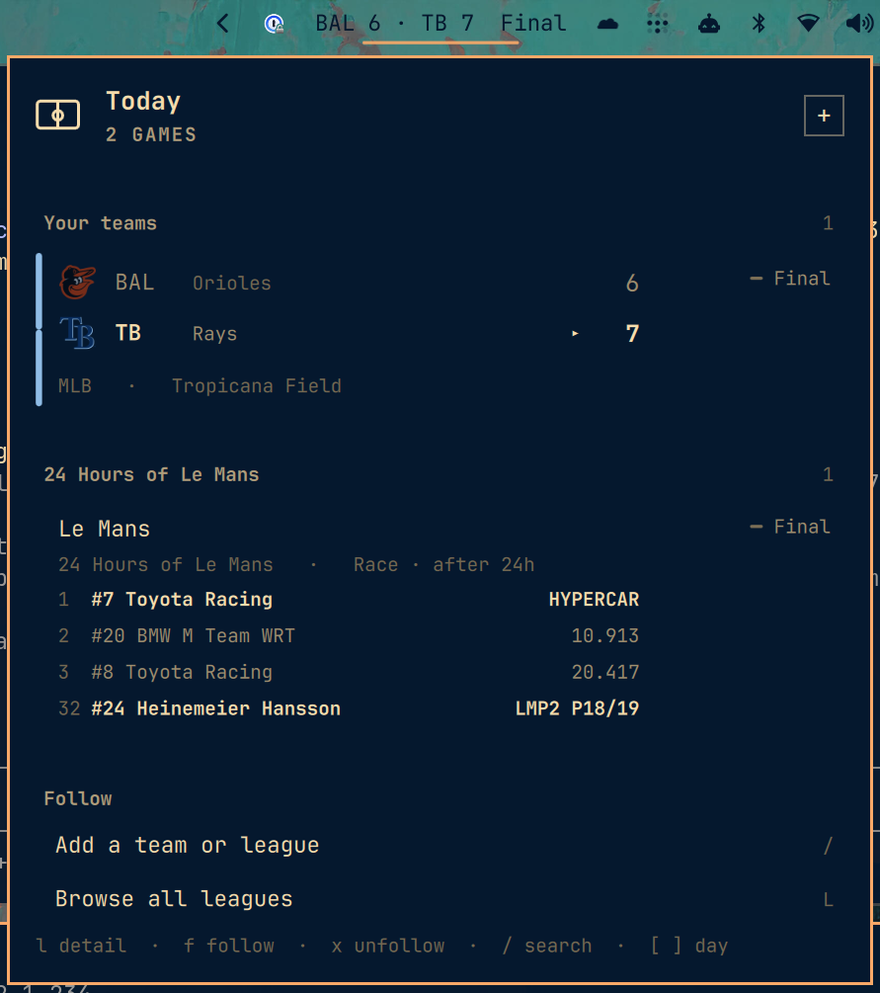
Live sports scores in the Omarchy bar. One line while a game you follow is on, a countdown to the next one when it is not, and a keyboard-driven panel behind it with today's card, league scoreboards, standings and per-game detail.
Built for Omarchy 4 (shell/plugins, manifest.json, ~/.config/omarchy/plugins/).
Install
omarchy plugin add https://github.com/meirdick/omarchy-scores.git
omarchy plugin enable meirdick.scores
omarchy bar move meirdick.scores --section right   # optional, to place it
Plugins land disabled so you can read the code first. Removal is
omarchy plugin remove meirdick.scores — the plugin is a plain git checkout
and installs nothing outside its own directory: no hooks, no sudo, no files
elsewhere on the system. It writes exactly two things: its own entry in
~/.config/omarchy/shell.json when you follow a team, and HTTP ETags under
~/.cache/omarchy/meirdick.scores/.
Requirements
curl. Nothing else, and no API key — see Where the data comes
from.
Follow teams and leagues
Nothing is followed on a fresh install, so the widget starts as a dim mark and the panel leads with Add a team and Add a league. Both are listed actions, not just keybinds.
You can follow at two levels, and they are separate lists:
- A team —
mlb:BOS. Its games are yours wherever they appear. - A league —
eng.1. Every game in the competition is yours.
# In the panel
#   +  the button in the header, from any view
#   /  search teams and leagues together, then enter or f to follow
#   L  browse every league, then f to follow the whole competition
#   f  follow whatever is under the cursor
#   x  unfollow it

# From the shell
omarchy-shell meirdick.scores follow mlb BOS
omarchy-shell meirdick.scores unfollow mlb BOS
omarchy-shell meirdick.scores followLeague eng.1
omarchy-shell meirdick.scores unfollowLeague eng.1
omarchy-shell meirdick.scores following        # what is followed, as JSON

# By hand
omarchy bar set meirdick.scores followedTeams "mlb:BOS, nfl:NYJ, eng.1:ARS"
omarchy bar set meirdick.scores followedLeagues "nfl, eng.1"
Following a league is not the same as following all its teams
They answer different questions, and the plugin treats them differently in three places:
| Follow a team | Follow a league | |
|---|---|---|
| Panel | its games lead the card, under Live and Your teams | a section named after the competition, below your teams |
| Bar | wins the slot | fills the bar only when none of your teams are playing |
| Notifications | alerts, when you turn them on | silent, until you also set notifyLeagues |
A team follow is an alerting relationship: you want to know. A league follow is
a viewing one: you want the card. Following the Premier League to see the
weekend's fixtures should not buzz for every goal in every match, so it does
not — notifyLeagues true opts in if you want that.
Following a club shows that club, not its division. The league still gets
fetched, because that is how its game is found, but nothing else from it is
rendered. Follow the league too, or set showAllGames true, if you want the
rest.
f only ever adds and x only ever removes. There is deliberately no
single key that does both: a toggle removes a team the moment you press it
twice or once by accident, and nothing on screen tells you a follow just
disappeared. Pressing f on something you already follow says so and changes
nothing.
Only leagues you follow, or that contain a team you follow, are polled. Opening a league you do not follow fetches it for as long as you are looking at it.
There is one source of truth — the widget's entry in shell.json — so a
keypress in the panel and a hand edit cannot disagree.
What the bar shows
| State | Bar |
|---|---|
| A followed game is live | BAL 6 · TB 7 Bot 8th |
| Several are live | the same, rotating, with 1/3 — scroll the widget to step through |
| Somebody scored | the line flashes |
| Nothing live | NYJ @ BUF · 2h 14m, counting down to the next one |
| Nothing today | a dim scoreboard mark |
| The fetch is failing | the mark, in the urgent colour |
Click opens the panel, right-click forces a refresh, middle-click opens the
current game on the web, scroll cycles between live games. barFormat narrows
it to compact or icon for a busy bar.
The bar always shows today, whatever day the panel is browsing. The widget is sized to its own text, so letting it follow the panel's date meant paging to tomorrow resized it and shoved every other widget in the bar sideways. Today's games are fetched and diffed on their own schedule; the browsed day is a separate set that only the panel reads.
The panel
Opens on today, and shows only what you follow: your teams' live games first, then their other games, then one section per league you follow holding that competition's remaining card.
Each game is two lines, one per team, with the club's own badge. The team that is ahead is bold and bright and the one behind recedes, so who is winning is readable without reading the numbers. A finished game marks the winner with a caret rather than a colour, so the result survives a monochrome theme.
A game involving a club you follow carries a spine in that club's colour — only a club, not a league, or a followed competition would mark all ten of its fixtures identically and bury the one you care about. Follow both clubs in a derby and the spine splits in two.
Club colours are checked against the panel before being drawn. Two thirds of
teams publish a near-black primary and three are literally #000000, so the
club's own bright alternate is used instead where the primary would be
invisible; if neither reads, the more colourful of the two is lifted toward
white until it does, which keeps the hue rather than falling back to a generic
accent.
State is signalled the same way everywhere: a breathing dot for live, a hollow ring for a game that has not started, a flat bar for one that is over, and a pulsing ring in the urgent colour for a delay. Live games also carry a progress bar for how far through the game is, and the row sweeps briefly when a play happens and washes when somebody scores — so movement in the corner of your eye means something actually happened.
Keys
| Key | Does |
|---|---|
j k |
move |
l enter |
open the game or league; on a standings row, follow that team |
h esc |
back, then close |
f |
follow the team or league under the cursor |
x |
unfollow it |
o |
open the game on the web |
/ |
search teams and leagues together |
[ ] |
previous or next day |
t |
back to today |
L |
the league list, where f follows a whole competition |
r |
refresh now |
g G |
top, bottom |
tab |
switch to the next bar panel |
Game detail adds the line score by period, every scoring play, and the leaders where the sport publishes them.
A league view is today's card plus the standings. Games alone left the view
empty for most of the year — the NBA in August has no fixtures at all — so the
table is the body of it and any games sit above. enter on a row there follows
that team, which is the quickest way to pick clubs out of a competition you are
looking at anyway.
Standings are ordered the way each sport is actually read: soccer by its
published rank, which already encodes goal difference and the rest of the
tiebreakers; the NBA and MLB by win percentage; the NHL by points, since it
publishes no win percentage and an overtime loss is still worth a point.
playoffSeed is available almost everywhere and is deliberately not used as
the default, because MLB seeds division winners first and that puts a 65-58 team
above a 69-55 one.
Notifications
All off. Turn on only what you want:
omarchy bar set meirdick.scores notifyFinal true --json     # quietest useful setting
omarchy bar set meirdick.scores notifyScore true --json     # every score, both teams
omarchy bar set meirdick.scores notifyStart true --json
omarchy bar set meirdick.scores notifyClose true --json     # close game, late
omarchy bar set meirdick.scores notifyLeagues true --json   # leagues too, not only your teams
Alerts cover your followed teams. Followed leagues are silent unless
notifyLeagues is on — see the table above.
Alerts are derived by diffing polls, not from anything a provider pushes, so they behave the same whichever provider served the data. The first poll after a shell restart is suppressed: otherwise every game already in progress would announce itself the moment you log in. A close game notifies once, not on every poll it stays close.
notifyScore is the loud one. A high-scoring basketball game will notify
dozens of times.
Polling
The refresh rate follows what is actually happening:
| Condition | Interval |
|---|---|
| A followed game is live | livePollSec, 25s by default |
| The panel is open | the same, regardless |
| A followed game starts within the hour | 5 minutes |
| Followed games later today | 15 minutes |
| Nobody you follow plays today | an hour |
Requests are conditional (ETag), gzipped, and capped at four concurrent, so a
day with nothing on costs almost nothing. A hung request is cleared by a
watchdog after 45 seconds rather than wedging its slot.
Leagues
NFL, NCAA football, NBA, WNBA, NCAA basketball, MLB, NHL, the top five European soccer leagues, Champions League, Europa League, MLS, both World Cups, F1, IndyCar, all three NASCAR series, UFC, PGA and ATP/WTA are named and browsable.
Racing, golf, tennis and MMA are events with a field rather than two-sided games, so they render as the event plus the top of the leaderboard — "FedEx St. Jude Championship · S. Scheffler −17" — instead of a scoreline.
Endurance racing — the WEC (and so Le Mans), the European Le Mans Series and IMSA — comes from a different source, because ESPN carries no sports car racing at all. See Endurance racing.
Anything else ESPN carries works too, without waiting for a release: a
sport/league path is passed through verbatim, and a bare ned.1-shaped slug
is assumed to be soccer, which is the only family using that form. ESPN
publishes over 200 soccer competitions alone.
omarchy bar set meirdick.scores followedLeagues "mlb, eng.1, ned.1, rugby/270557"
Endurance racing
wec, elms and imsa cover the FIA World Endurance Championship — which is
where Le Mans lives — the European Le Mans Series, and IMSA. Follow them like
any other league:
omarchy-shell meirdick.scores followLeague wec
These are results, not live timing, and that is deliberate. No free JSON API exists for sports car racing: ESPN carries five racing series and none of them are sports cars, and TheSportsDB's free key now answers with five soccer leagues and nothing else. What does exist is Al Kamel Systems, who time all three championships and publish the official classification of every session as CSV. This reads those, so you get the last completed session — after Le Mans, the Le Mans result.
Al Kamel's live timing is a Meteor application speaking DDP over a websocket. Every plausible JSON path returns the application shell rather than data, so live positions would mean reverse-engineering a private protocol that can change without warning. A finished race read from the official classification is worth more than a live feed that breaks mid-season.
Follow a specific car by its number and it is shown wherever it finished, alongside the podium — because 32nd overall is still the result you opened the panel for:
omarchy-shell meirdick.scores followLeague lemans
omarchy-shell meirdick.scores follow lemans 24
A followed entry is named by its number and its driver rather than its team,
and carries its class position. Sports car racing runs several classes at
once — at Le Mans, Hypercar, LMP2 and LMGT3 — and they are not racing each
other. An LMP2 car finishing 32nd overall is 32nd behind a faster class it was
never in; LMP2 P18/19 is the result that means something.
Discovery is the fragile part, and it is deliberately done once. The results
site keeps the selected event in a PHP session shared by every visitor — the
same PHPSESSID comes back for everyone — so which event a page describes is
global state that any other visitor can change, and asking for a past round can
return somebody else's race. The classification CSV it points at, though, is a
static file: byte-identical on every request and unaffected by that state. So
what discovery finds is written to ~/.cache/omarchy/meirdick.scores/endurance.json
and used directly from then on, and a page describing the wrong event is
rejected rather than displayed.
Two more things worth knowing if you touch this code:
- The columns differ by championship and by session. A WEC race publishes
POSITION;NUMBER;TEAM;DRIVER_1..4;VEHICLE, a WEC practice publishesPOS;NUMBER;LAP;TIME;…, and IMSA publishesPOSITION;NUMBER;STATUS;LAPS;TOTAL_TIME;GAP_FIRST;…. The parser reads by column name for that reason. The files are UTF-8 with a BOM, which otherwise becomes part of the first column name and makes every lookup miss. - A WEC race is published as one classification per hour, so the last hour is
the finishing order.
results.imsa.comanswers every file with a 302 whoseLocationis missing the slash between host and path, so the corrected host is requested directly.
Where the data comes from
ESPN's public JSON endpoints, by default. No key, no signup, no account. They are what espn.com's own front end calls. They are also not a documented or supported API, and can change without notice. That is the trade: it is the only free source that covers every league above and serves in-progress scores. Every commercial free tier either excludes live scores outright (TheSportsDB, football-data.org) or caps you low enough that live polling is arithmetically impossible — API-Football's free tier is 100 requests per day, which is one poll every 14 minutes across all leagues combined.
Two fallbacks are implemented, both first-party and both keyless:
statsapi.mlb.comfor MLB. MLBAM's terms explicitly permit "individual, non-commercial, non-bulk use", which is exactly this — the clearest legal footing of any source here.api-web.nhle.comfor NHL.
They exist so a break in one source is a config change rather than a rewrite:
omarchy bar set meirdick.scores providerChain '{"mlb":["mlb","espn"],"nhl":["nhl","espn"]}' --json
If a league's first provider fails, the next one is tried before anything is reported as an error.
A warning for contributors
site.api.espn.com returns 403 to browser-shaped User-Agents and 200 to
curl's own. Verified:
| User-Agent | Response |
|---|---|
curl/8.16.0 |
200 |
python-requests/2.32 |
200 |
Go-http-client/2.0 |
200 |
Mozilla/5.0 (X11; Linux x86_64) … Chrome/140 |
403 |
Wget/1.21 |
403 |
| (empty) | 403 |
This is backwards from the usual scraping instinct, and "helpfully" setting a
browser User-Agent is the single most likely way to break this plugin. The
default host, site.web.api.espn.com, has no such gate — but the fetcher still
sets no User-Agent at all, deliberately. Leave it alone.
Requests always send --compressed: it takes the MLB scoreboard from 214 KB to
20 KB, which is what makes a 25-second poll reasonable.
Settings
Set with omarchy bar set meirdick.scores <key> <value>, or by hand in the
widget's entry in ~/.config/omarchy/shell.json. Omarchy parses the manifest's
schema into its widget registry but ships no settings UI that renders it yet,
so those two are the way in for now. Booleans and JSON need --json; plain
strings must not have it.
| Key | Default | What |
|---|---|---|
followedTeams |
"" |
comma-separated league:ABBR |
followedLeagues |
"" |
comma-separated league slugs |
livePollSec |
25 |
refresh while a followed game is live |
idlePollSec |
900 |
floor when nothing you follow is on |
barFormat |
full |
full, compact, icon |
rotateSec |
6 |
seconds each live game holds the bar |
showSituation |
true |
count/outs/runners, down and distance |
showAllGames |
false |
games from leagues polled only for a team you follow |
finalWindowHours |
8 |
how long a final keeps the bar slot |
notifyStart |
false |
|
notifyScore |
false |
|
notifyFinal |
false |
|
notifyClose |
false |
|
notifyLeagues |
false |
alert for followed leagues too, not only your teams |
closeMargin |
1 |
score gap that counts as close; ~6 for football |
closeClockSec |
300 |
clock below which a close game qualifies |
providerChain |
"" |
JSON, per league |
espnHost |
"" |
host override; see the warning above |
IPC
omarchy-shell meirdick.scores toggle
omarchy-shell meirdick.scores refresh
omarchy-shell meirdick.scores follow mlb BOS
omarchy-shell meirdick.scores followLeague eng.1
omarchy-shell meirdick.scores following               # teams and leagues, as JSON
omarchy-shell meirdick.scores route standings:nfl    # "", leagues, league:mlb, standings:nfl, search
omarchy-shell meirdick.scores diagnose               # JSON: what the widget believes
omarchy-shell meirdick.scores state                  # JSON: route, cursor, focus
route is bindable, so standings:nfl or league:eng.1 can have its own
hotkey. diagnose and state are the debug hatches: QML load failures and bad
settings are both silent on screen, and between them they are the only
practical way to see what the widget thinks is true — diagnose for the data,
state for where the panel is and what has focus.
Development
Widget.qml       the bar slot: score line, rotation, flash, click routing
Panel.qml        the panel: routes, cursor, delegates, IPC
Service.qml      polling, the fetch pool, diffing, notifications
Providers.js     ESPN / MLB / NHL adapters -> one normalized Game
Model.js         formatting, sorting, row building, the diff
Leagues.js       canonical slug <-> each provider's own
Endurance.js     Al Kamel classification CSVs for the WEC, ELMS and IMSA
Indicators.qml   live / upcoming / final / delayed marks
TeamCrest.qml    club badge, with a monogram when there is no logo
ScoresMark.qml   the plugin's own mark, a pitch drawn from primitives
The three .js files are pure functions with a module.exports tail, so they
run under plain node with no compositor:
node test/providers.test.js    # parsing, across five leagues and both summary shapes
node test/fallbacks.test.js    # MLB and NHL fallbacks, cross-checked against ESPN
node test/model.test.js        # formatting, diffing, pacing, row building
node test/endurance.test.js    # index parsing and classification CSVs
fixtures/ holds real captured responses covering scheduled, live, delayed and
final games. The cross-provider test parses the same MLB slate through two
independent providers and asserts they agree — an abstraction with one
implementation is not an abstraction.
Three things that will cost you an hour if nobody tells you:
- Editing a
.jsfile does not hot-reload. Saving under~/.config/omarchy/plugins/reloads.qml, becauseQt.clearComponentCache()clears QML components and nothing else. Runomarchy-restart-shellafter touchingProviders.js,Model.jsorLeagues.js. In practice a restart is also the only reliable way to pick up a changed inline component type. - QML load failures are silent. The widget simply does not appear. Read the
reason with
quickshell log -i "$(quickshell list --all | grep -oP 'Instance \K\w+' | head -1)" -t 100. qmllinton Arch is a stub that exits 0 on a deliberate syntax error. Loading the plugin is the only real test.- The injected
settingsobject does not reliably followshell.json. Writing a newfollowedTeamsand reading it back returned the old value for as long as the shell stayed up;omarchy-shell shell reloadConfigdid not shake it loose, only a full restart did. Since following a team writes to that file, the plugin watchesshell.jsonitself with aFileViewand prefers what the file says. When the injection works, both agree and the watcher changes nothing.
Nerd Font codepoints are checked against the shipped font's charset before use.
The marks here are drawn from primitives instead, because the shell's font
family is the fontconfig alias monospace, which Qt does not reliably resolve
to the concrete Nerd Font — a private-use codepoint then renders as whatever
fallback owns it. This plugin shipped an integral sign as its icon exactly once.
Marketplace
Listed via omarchyplugins.com. Conformance:
- public repo with
manifest.jsonat the root - all eight required manifest fields:
schemaVersion,id,name,version,author,description,kinds,entryPoints README.mdandLICENSEpresent- safe install and removal — a git checkout with no install hooks
preview.pngfor the listing card- passes
omarchy plugin validate
Category: Widgets. Tags: Bar, Quickshell.
Scores, team names, badges and league marks come from ESPN and the leagues' own endpoints and belong to their respective owners. This plugin is not affiliated with ESPN, MLB, the NHL, or any league or club.