
Fast for Omarchy
A terminal-inspired Fast.com speed test for the Omarchy bar. It uses
Omarchy's own omarchy-network-speedtest backend for both on-demand and
passive scheduled tests.
Install
omarchy plugin add https://github.com/melonamin/omarchy-fast.git --enable
The widget is added to the right side of the bar. Remove it with:
omarchy plugin remove melonamin.fast
Use
- Left click: open the terminal panel
- Middle click: start a fresh terminal test
Enterorr: run againEsc: close and stop an active test
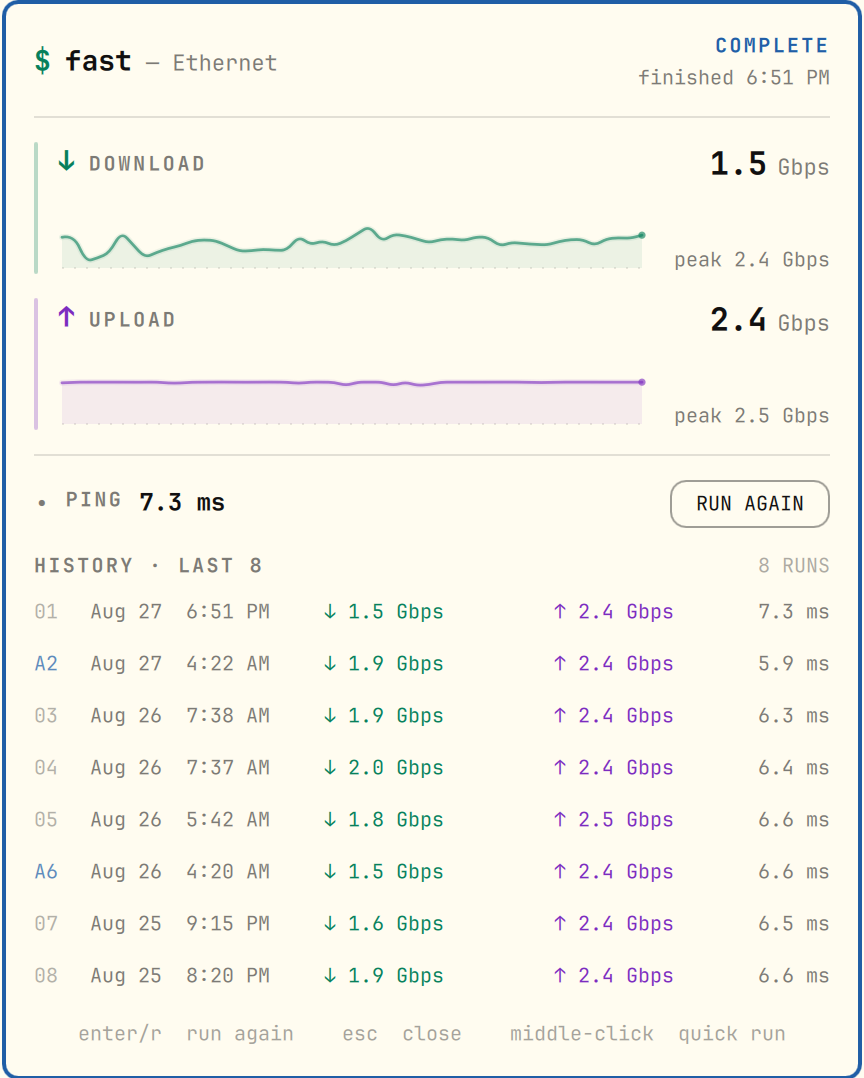
Download and upload run for five seconds each and are sampled ten times per
second from the active interface. The displayed result averages the settled
samples after the warm-up; peak remains the highest live reading. A
process-group guard ensures every transfer worker stops when its phase ends or
the panel is dismissed. One parent lock spans both interactive phases, so the
passive timer cannot slip between download and upload. Sampling begins only
after the Fast.com backend emits its first live reading and the active
interface records transferred bytes; endpoint discovery or traffic generation
that fails or stalls is reported as an error rather than being saved as a
near-zero result.
The live rate eases between samples while a glowing trace, speed-reactive directional streaks, scan flares, endpoint sparks, and a layered two-color completion burst add motion without abandoning the terminal look.
The latest eight completed runs are stored below XDG_STATE_HOME (falling
back to ~/.local/state/omarchy/plugins/melonamin.fast/history.json) and shown
newest first in the panel.
State access goes through the bundled safe-state helper. It walks the state
directory without following symlinks, keeps lock and temporary-file descriptors
open, accepts only user-owned regular files, caps history reads at 64 KiB, and
replaces history atomically. The long-lived shell never opens or watches the
history pathname directly.
Requirements
Omarchy 4 (Quattro) or newer, running omarchy-shell. Python 3 is required at
runtime for descriptor-safe local state access. The stock Omarchy installation
provides Python, the speed-test backend, and the other command-line tools used
by the plugin. Node is required only for the model test suite.
Passive monitoring
melonamin-fast-monitor.timer runs a quieter three-second-per-direction test
daily at 4:00 AM local time, with up to 30 minutes of randomized delay. The
timer is persistent, so a sleeping machine catches up after it wakes. Automatic
history rows use an A prefix; manual rows retain their numeric prefix. A
failed catch-up retries twice at one-minute intervals, allowing networking a
short window to reconnect after wake.
The monitor stays silent, skips if another test is already running, and records its result in the same eight-entry history. It is optional; install and enable the bundled user units with:
plugin_dir="${XDG_CONFIG_HOME:-$HOME/.config}/omarchy/plugins/melonamin.fast"
systemctl --user link \
  "$plugin_dir/systemd/melonamin-fast-monitor.service" \
  "$plugin_dir/systemd/melonamin-fast-monitor.timer"
systemctl --user enable --now melonamin-fast-monitor.timer
Inspect the next run with:
systemctl --user list-timers melonamin-fast-monitor.timer
Disable and unlink the monitor before removing the plugin:
systemctl --user disable --now melonamin-fast-monitor.timer
systemctl --user unlink \
  melonamin-fast-monitor.service \
  melonamin-fast-monitor.timer
Tests
bash -n run-interactive-test run-scheduled-test run-speedtest tests/*.sh
tests/failure.test.sh
tests/interactive.test.sh
tests/scheduled.test.sh
tests/integration.sh
python3 tests/state.test.py
node --test tests/model.test.js
qmllint BarWidget.qml Panel.qml SignalTrace.qml SparkBurst.qml SpeedRow.qml Model.js
omarchy plugin validate .
systemd-analyze --user verify systemd/*.service systemd/*.timer
The integration test performs a real three-second download measurement.
License
MIT