
Flare for Omarchy
Draw an animated highlight wherever you click, so an audience can see when and where the pointer went during a demo, screen share, or recording. Lives in the Omarchy bar, draws over everything on every display, and never intercepts a click.
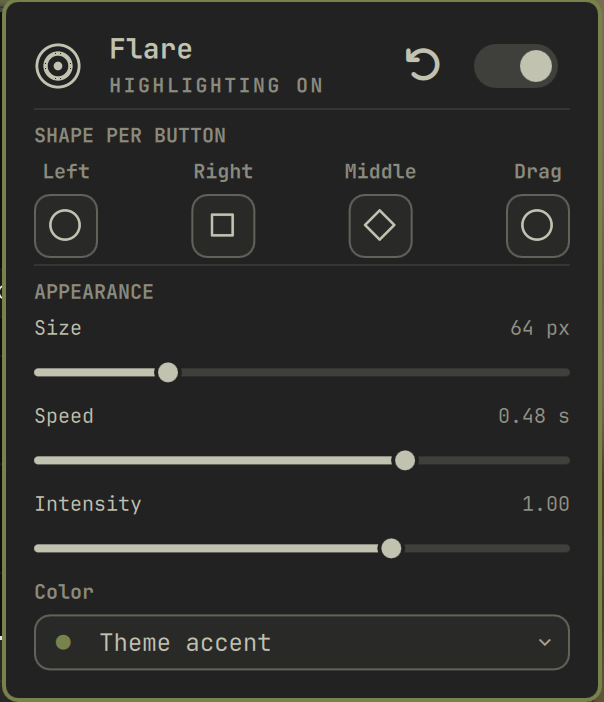
Features
- Highlights every press across every app, the desktop, fullscreen windows, and all displays — the overlay is click-through, so your clicks land normally and nothing is intercepted
- A different outline per button, so they read apart at a glance: left, right, middle, and the drag trail each pick from circle, square, diamond, triangle, star, or off
- Secondary clicks add a
+crosshair, middle clicks turn it 45° into an×— shape and motion carry the difference, not colour alone - Drag leaves an evenly spaced trail, spaced by distance so it looks the same however fast you drag
- Size, speed, and intensity sliders; colour follows the theme accent or picks from eight fixed tints
- Right-click the bar widget to toggle highlighting without opening anything
Install
omarchy plugin add https://github.com/melonamin/omarchy-flare.git --enable
That is the whole install. The shell picks the plugin up without a restart and puts the widget on your bar.
To remove:
omarchy plugin remove melonamin.flare
hyprctl reload      # drops the mouse binds
Nothing is written outside ~/.config/omarchy. Flare needs mouse binds inside
Hyprland to see clicks it does not have focus for, but rather than have you
paste a require into hyprland.lua, the plugin loads its own Lua through
hyprctl eval when the shell starts and again whenever Hyprland reloads.
Remove the plugin and your compositor config is untouched.
Requirements
Omarchy 4 (Quattro) or newer, running omarchy-shell on Hyprland.
No external dependencies: everything used -- hyprctl, mkfifo, cat, sh,
omarchy-shell -- ships with Omarchy. Nothing is downloaded at runtime and the
plugin makes no network connections. (node is used by the test suite only.)
Flare writes only to its own entry in ~/.config/omarchy/shell.json, and only
when you change a setting. It never edits your Hyprland config: the mouse binds
are registered at runtime with hyprctl eval and disappear on the next reload
once the plugin is gone.
Presentation mode
SUPER + ALT + P (also in the SUPER + K cheatsheet) puts a surface over
the screen that swallows every click. Clicks still highlight, but nothing
underneath reacts -- point at things without opening them. A badge across the
top says how to get out; Esc or the same shortcut ends it.
Rebind or disable it with the shortcut setting; an empty string registers
nothing. Hyprland silently refuses a keybind another bind already owns, so
omarchy-shell flare status reports shortcutRegistered and the shell logs a
warning when a chosen key collides. SUPER+SHIFT is nearly full in a stock
Omarchy -- SUPER+SHIFT+P is Google Photos -- which is why the default sits
on SUPER+ALT.
Presentation mode turns highlighting on for as long as it lasts, whatever the master switch says -- a mode that swallows every click while drawing nothing would be worse than useless. Your saved setting is not rewritten; it just takes effect again when you exit.
While presenting, everything is swallowed -- including the bar and Flare's
own widget -- so Esc is the way back.
Screen sharing
Share the whole screen, not a window or a browser tab.
| What you share | Capture path | Flare visible |
|---|---|---|
| Entire screen | zwlr_screencopy over the composited output |
yes |
| A single window | hyprland_toplevel_export, that window's own buffer |
no |
| A browser tab | the browser renders it; the compositor is never involved | no |
Flare draws on its own layer-shell surface, and only a full-output capture composites that in. One Wayland client cannot draw into another's buffer, so a window share can only ever contain that window — Meet, Zoom, Discord, and OBS window-capture all behave this way.
Screenshots differ: omarchy-capture-screenshot windows grabs a region of the
output, so Flare does appear there.
Settings
Click the bar widget to open the panel; the header carries the master switch
and a reset button. Everything writes to this plugin's entry in
~/.config/omarchy/shell.json, which you can also edit by hand or with
omarchy bar set — it hot-reloads on save.
| Key | Values | Default |
|---|---|---|
enabled |
true, false |
true |
primary |
none, circle, square, diamond, triangle, star |
circle |
secondary |
as above | square |
middle |
as above | diamond |
drag |
as above | circle |
releases |
quieter contracting echo on button-up; not in the panel | false |
size |
32–160, peak ring diameter in px | 64 |
speed |
0.16–1.20, pulse lifetime in seconds | 0.48 |
intensity |
0.20–1.40; the soft glow appears at 0.70 and above | 1.0 |
shortcut |
keybind for presentation mode; "" disables |
SUPER + ALT + P |
tint |
auto, blue, purple, pink, red, orange, yellow, green, graphite |
auto |
Setting a button to none switches it off; there is no separate enable flag
per interaction. All the presets and pulse geometry live in FlareModel.js.
IPC
omarchy-shell flare status     # JSON: enabled, appearance, live counts, transport tallies
omarchy-shell flare toggle     # master switch
omarchy-shell flare pulse primary-press 1280 720   # draw one, for testing
How it works
Wayland gives no client a way to observe input it does not have focus for, so the compositor does the observing:
click ──▶ non-consuming Hyprland mouse bind   (hypr/flare.lua)
             │  reads hl.get_cursor_pos() in-process
             ▼
          $XDG_RUNTIME_DIR/flare.fifo   (fallback: omarchy-shell flare pulse)
             ▼
          Service.qml ──▶ one click-through overlay per display
The binds are non-consuming: Hyprland runs the dispatcher and delivers
the click to the window under the pointer, so highlighting never costs you a
click. No elevated permissions, no input group, no reading /dev/input.
Events travel over a FIFO because shelling out per event costs ~19 ms, against ~0.02 ms for a FIFO write — affordable for a click, not for a 30 Hz drag trail. A FIFO write blocks once its buffer fills and the binds run on the compositor's thread, so the plugin stamps a counter from its own event loop and the Lua side abandons the FIFO after 200 unacknowledged writes (~5 KB against a 64 KB buffer), falling back to shelling out.
Notes
- Pointer-locked clients (games, some remote-desktop apps) grab the pointer, so binds may not fire there.
- Hyprland's Lua timers cannot be stopped once created, so the drag trail is a chain of one-shots retired by a generation counter.
- The overlay stays mapped while the plugin is loaded. Mapping it only while a pulse is alive reports success but never creates the layer surface.
Tests
node --test tests/model.test.js   # unit: presets, geometry, settings parsing
tests/integration.sh              # live: binds, FIFO delivery, pulses drawn
License
MIT