
AI Subs for Omarchy
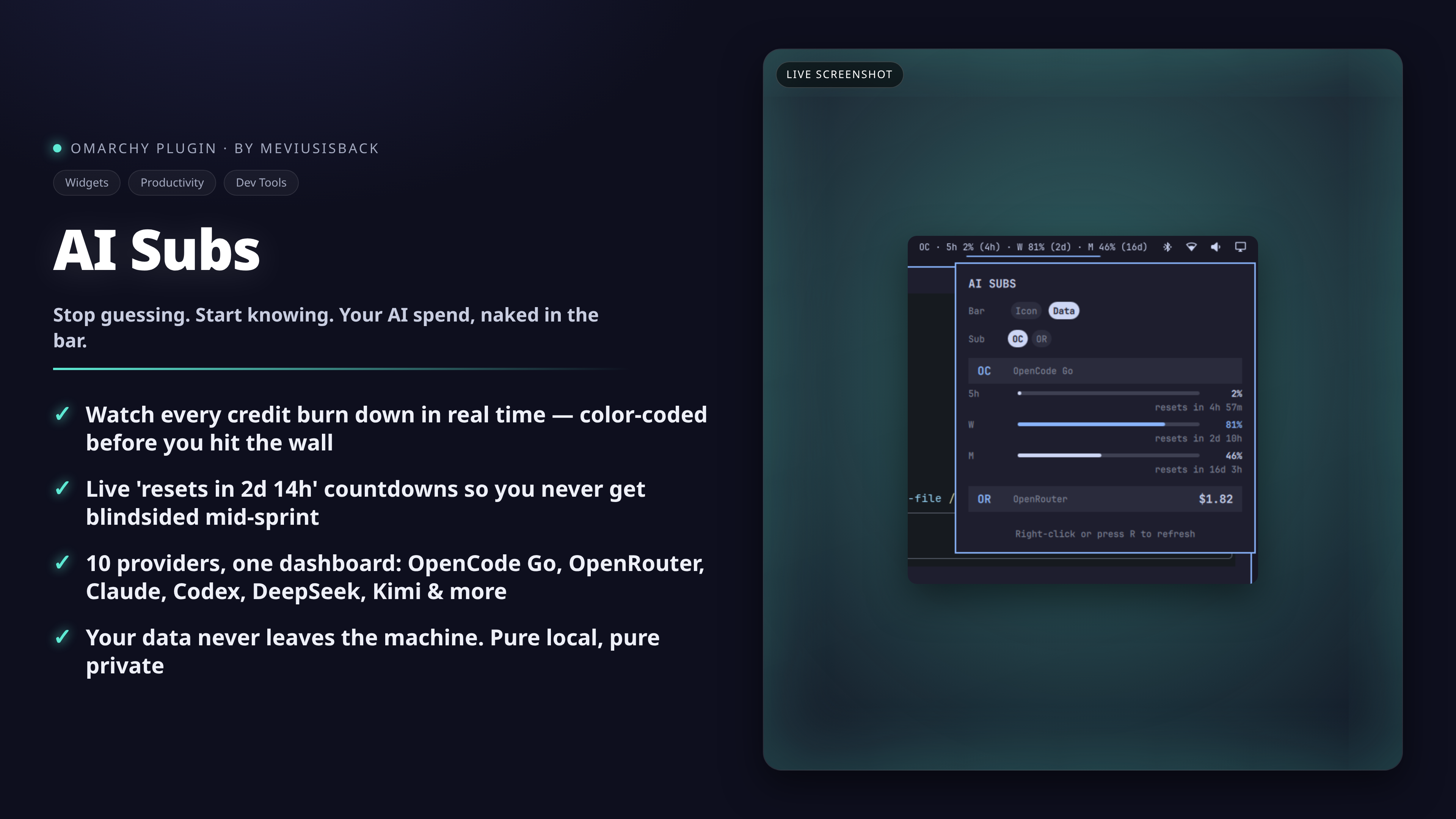
AI subscription usage and balance directly in the Omarchy bar — meter bars,
credit balances and live reset countdowns, for every provider you have
configured (API keys in ~/.hermes/.env, native config files, or OAuth tokens).
OC · 5h 0% [──] (4h) · W 79% [━━──] (2d) · M 46% [━───] (16d) (Data mode bar chip)
Features
- Meter bars per limit window — OpenCode Go's rolling/weekly/monthly windows and prepaid credit bars, with color thresholds (accent past 70%, urgent red past 90%).
- Live reset countdowns — "resets in 2d 14h" under each window, ticking
every second while the panel is open, and compact
(2d)hints in the bar chip. - Two bar display modes — a Sigma glyph or a compact one-liner for your
default sub; switchable from the panel, persisted in
shell.json. - Clean by default — providers without keys never show up; no greyed-out placeholders.
- Settings live in the panel — Bar Icon/Data toggle and default-sub
selector as segmented chips; no config files to hand-edit (but
omarchy bar setworks too).
Supported providers
| Display | Provider | Metric | Key (~/.hermes/.env) |
|---|---|---|---|
OC |
OpenCode Go (+ Zen) | % used (5h / week / month) + resets | OPENCODE_GO_API_KEY |
OR |
OpenRouter | USD credits remaining | OPENROUTER_API_KEY |
CL |
Claude Code | % used per limit window + resets | none — reads Omarchy agent usage records |
CX |
Codex | % used per limit window + resets | none — reads Omarchy agent usage records |
CC |
Command Code | % used (5h / week / month) + USD balance remaining | COMMANDCODE_API_KEY |
DS |
DeepSeek | USD balance | DEEPSEEK_API_KEY (or ~/.deepseek/config.toml) |
KI |
Kimi / Moonshot | USD balance | KIMI_API_KEY (or ~/.kimi-code/config.toml) |
NV |
NovitaAI | USD balance | NOVITA_API_KEY |
Z |
ZAI / Zhipu | CNY balance | ZAI_API_KEY |
AB |
Alibaba / DashScope | USD balance | DASHSCOPE_API_KEY |
AR |
Arcee AI | USD balance | ARCEE_API_KEY |
CP |
GitHub Copilot | % used (chat / completions) | none — reads from gh CLI or editor OAuth token (opt-in) |
CU |
Cursor | USD plan spend | none — reads from Cursor local state DB (opt-in) |
Claude and Codex need no API keys: the widget reads the usage records that
Omarchy's own agent collectors write to
~/.local/state/omarchy/agents/usage/. Run those agents through Omarchy and
their limits appear automatically.
DeepSeek and Kimi fall back to their native config files (~/.deepseek/config.toml
and ~/.kimi-code/config.toml) when the env var is not set.
Copilot and Cursor are opt-in OAuth providers (Tier 2): they read tokens from the agent's own credential store and use them read-use-discard (never cached). A one-time startup warning is logged when first activated.
Not supported: Gemini (no public usage API — Google Cloud billing only) and OpenCode Zen credits (balance endpoint requested upstream in anomalyco/opencode#10448; the shared Go key currently only exposes
/zen/go/v1/usage).
Install
omarchy plugin add https://github.com/meviusisback/omarchy-ai-subs.git --enable --yes
or interactively:
omarchy plugin add https://github.com/meviusisback/omarchy-ai-subs.git
Then add your API keys to ~/.hermes/.env:
OPENCODE_GO_API_KEY=...
OPENROUTER_API_KEY=...
# etc.
Providers appear as soon as their key exists — no restart needed (the fetcher
refreshes every 15 minutes; right-click the widget or press R in the panel
to refresh immediately).
Where the key file may live
Every credential file the fetcher opens is confined and validated first. The
.env file named in the settings must:
- live inside the Hermes profile directory —
$HERMES_HOME(only when it is inside your home directory) or the default~/.hermes; profile files such as~/.hermes/profiles/work/.envare fine; - be a regular file owned by you with no group/other permission bits
(
chmod 600), and no symlink at that exact path (a symlinked directory, e.g. dotfiles-managed~/.hermes, is fine); - be a single-linked file (no hard links) no larger than 256 KiB for the key file (64 KiB for the native config files, 10 MiB for the Cursor token store);
- sit behind directories nobody else can write to.
Anything else is refused: the widget keeps working, the affected providers
simply report "not configured", and the reason is logged for the key file
(journalctl --user -u omarchy-shell / the shell log). The same rules apply to
the native config files and OAuth token stores the fetcher reads.
Update & Remove
# Update a git-managed plugin
omarchy plugin update meviusisback.ai-subs --yes

# Remove the plugin entirely
omarchy plugin remove meviusisback.ai-subs --yes
Settings
Click the bar icon to open the panel:
- Bar —
Icon(Sigma glyph) orData(compact one-liner for the default sub, e.g.OC · 5h 0% (4h) · W 79% (2d) · M 46% (16d)). - Sub — which provider Data mode shows (only configured ones are listed).
Equivalent CLI:
omarchy bar set meviusisback.ai-subs barDisplay Data
omarchy bar set meviusisback.ai-subs defaultSub openrouter
omarchy bar set meviusisback.ai-subs refreshIntervalSec 300
How it works
A stdlib-only Python script (fetch_usage.py) queries each vendor's
usage/balance endpoint in parallel and prints one JSON document; the QML panel
(Panel.qml) renders it as meter bars and countdowns inside the Omarchy shell.
Credential sources (checked in order):
- Environment variables in
~/.hermes/.env - Native config files (
~/.deepseek/config.toml,~/.kimi-code/config.toml) - OAuth tokens from agent credential stores (Copilot, Cursor — read-use-discard, never cached)
- Omarchy collector records (
~/.local/state/omarchy/agents/usage/) for Claude and Codex
No data leaves your machine except the vendor API calls authenticated with your own credentials.
License
MIT — see LICENSE.