
Spotmarchy
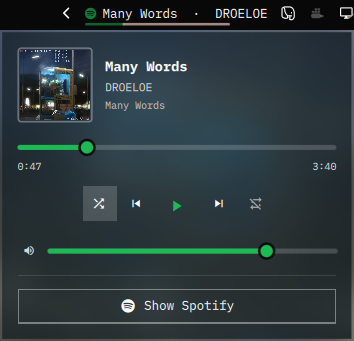
Spotify in the Omarchy bar.
The bar widget is the track, scrolling only as far as it has to, over a hairline of progress. The panel is the player: cover, seek, transport, shuffle, repeat, and volume — on a background made from the album cover itself, measured and scrimmed so the artwork comes through without the text paying for it.
Install
omarchy plugin add https://github.com/mich-nduka/spotmarchy.git --enable
Nothing else is required to play music. Spotify is reached over MPRIS
(org.mpris.MediaPlayer2.spotify) through Quickshell's own service, so there is
no playerctl polling and nothing to configure. The headless clients,
spotifyd and spotify-player, are matched too.
Cover art wants magick (the imagemagick package) and curl. Without them
the panel keeps its plain theme background and shows no cover at all — the
plugin never loads artwork itself, for reasons in the section below.
Usage
Click the track to open or close the panel. Right-click plays and pauses, middle-click skips, and scrolling over the widget moves through the queue.
| Action | Mouse |
|---|---|
| Open / close the panel | Click |
| Play / pause | Right-click |
| Next track | Middle-click |
| Previous / next | Scroll |
Scrolling is read as a gesture rather than as a stream of events, because those
are very different things on the two devices that produce them. A touchpad
swipe skips exactly one track however far the fingers travel, and the kinetic
tail after they lift is ignored; a mouse wheel skips one track per detent. Set
scrollAction to Volume and both go continuous instead, which is the point of
a volume gesture.
Left click is handled through the bar's own pointer layer. The bar overlays
every widget slot to support drag-to-reorder and forwards a left click only to a
slot exposing triggerPress(button) — the same check that decides whether the
cursor turns into a pointing hand. So the widget implements that rather than
catching left clicks in a MouseArea of its own. Right and middle clicks are
not accepted by the bar layer and fall through.
A title too wide for the bar rests at its start and pans only across the overflow, pausing at both ends, so a glance always catches the beginning of a track rather than whatever the middle of a scroll happens to be showing.
The album cover backdrop
The panel wears the current cover: blurred past the point where any edge in it competes with text, desaturated, and covered by a scrim that is the theme's own panel colour pushed a fifth of the way towards the cover's dominant hue.
The scrim is the adaptive part, and the reason this does not wreck legibility. A cover is not a known quantity — one sleeve is near-black, the next is near-white — so it is measured before it is used. Its mean luminance sets how opaque the scrim has to be and how far the artwork itself is dimmed; its dominant colour sets the tint, and can drive the accent as well. Across covers as different as DAMN., After Hours, Rumours and Random Access Memories, the panel's background luminance lands within about 0.19–0.30 while still looking unmistakably like the record that is playing.
The muted text tones adapt with it. A backdrop raises the darkest tone on the panel and the album line is what pays for that first, so those tones are pulled back towards the theme's full-strength foreground by the same measure. Blending towards the foreground rather than simply lightening is what makes this work on a light theme too, where the foreground is the dark one.
Qt can draw an image but cannot say what colour it is, so the measuring is one
curl and magick probe per cover, debounced by 250 ms so skipping through a
queue does not spawn a subprocess per track.
An art URL is metadata published by another process — any process on the
session bus can publish one — so it is treated as hostile from end to end, and
the probe is the only thing that ever acts on it. Only https:// on scdn.co — matched on a label
boundary, so evilscdn.co is not a subdomain of it — and local file:// paths
are probed at all, and the target reaches the script as an argument rather than
as part of a command string. Clearing that check is the start of the argument
rather than the end of it, because the response is still attacker-shaped: the
fetch does not follow redirects away from the host that was just checked, the
download is bounded by both the declared length and the bytes that actually
land, the format is decided from the magic bytes rather than by letting
ImageMagick dispatch on content, and the dimensions are capped while the header
is read, before any pixels are allocated — a 410KB PNG can declare 12000x12000
and ask for 430MB of them.
The cover on screen comes from that same gate. The probe re-encodes what it
measured into $XDG_CACHE_HOME/spotmarchy/covers, capped at 640px, and the
panel loads only that file — never the art URL. Handing a URL straight to a QML
Image would repeat none of the checks above: Qt fetches any origin, follows
redirects, and decodes whatever its image plugins handle, which on an Omarchy
install includes SVG and PDF, all inside the shell process that also draws your
bar and notifications. So nothing in the panel is allowed to see the URL, and
node test/model-test.js asserts that against Panel.qml rather than trusting
it to stay true. The cache keeps the last eight covers.
This is why ImageMagick is what stands between a cover and the panel: without it there is no vetted copy to show, so the panel shows none.
artIntensity is a starting point rather than a fixed opacity: bright covers are
still covered more heavily than dark ones from wherever it is set. Turn
artBackground off for a plain panel.
Configure
Every setting lives in the widget's settings panel.
| Setting | Default | Notes |
|---|---|---|
| Maximum label width | 200px | Wider titles pan instead of stretching the bar |
| Show artist | On | Appends · Artist to the title |
| Show progress | On | The hairline under the label |
| Hide when closed | On | Off leaves a dim icon that launches Spotify |
| Left click | Open panel | Or Play/pause, which moves the panel to right click |
| Scroll | Previous/next track | Or Volume, or Nothing |
| Accent colour | Spotify green | Or Album art, Theme accent, Bar foreground |
| Album cover backdrop | On | The blurred cover behind the panel |
| Cover showing through | 55% | Before the per-cover adjustment |
Album art takes the cover's dominant colour for the icon, the progress line and
the panel controls, lifted in lightness until it reads as an accent — so a sleeve
that is nearly black still yields a visible one, in its own hue.
To move the widget:
omarchy bar move mich.spotmarchy --section right
IPC
The widget registers the mich.spotmarchy target, which makes every action
available to a Hyprland binding:
omarchy-shell mich.spotmarchy playPause
omarchy-shell mich.spotmarchy next
omarchy-shell mich.spotmarchy previous
omarchy-shell mich.spotmarchy shuffle
omarchy-shell mich.spotmarchy loop
omarchy-shell mich.spotmarchy toggle      # the panel
omarchy-shell mich.spotmarchy launch      # focus or start Spotify
omarchy-shell mich.spotmarchy status      # JSON: track, position, shuffle, loop, cover colour
Two more exist for working on the plugin rather than using it: artDebug prints
what was measured and from where, and wheelDebug prints the last twelve wheel
events with the decision taken for each, which is how the scroll gesture gets
tuned against a particular device.
Remove
omarchy plugin remove mich.spotmarchy
Development
node test/model-test.js     # player matching, label, probe parsing, colour maths
sh test/probe-test.sh       # the probe against real covers and real bad input
omarchy plugin validate .   # manifest against the shell's schema
Model.js has no Qt in it — matching the player, building the label, parsing
the probe, choosing a dominant colour and every number the scrim depends on are
plain JavaScript, so the whole lot runs under node. Panel.qml only paints.
Editing this plugin needs a shell restart. The shell logs Local plugin changed, reloading on save, but that has not been enough to re-execute changed
QML here, and omarchy-shell shell rescanPlugins does not help either. Use:
omarchy restart shell
Two things about the backdrop are worth knowing before changing it. An offscreen QML harness silently drops shader effects — it will render the scrim and no artwork at all, which looks exactly like a blur parameter being wrong, so judge it on a real GPU. And blurring samples past the edges of its source: the cover is drawn larger than the card and masked back precisely so that fade lands outside the panel, and the mask needs a threshold, or its transparent margin passes and the blur spills over the border.
MIT. See LICENSE.