
Gitarchy
Git status for watched repos in the Omarchy bar: dirty counts, branches, stash, ahead/behind, and one-click access to lazygit.
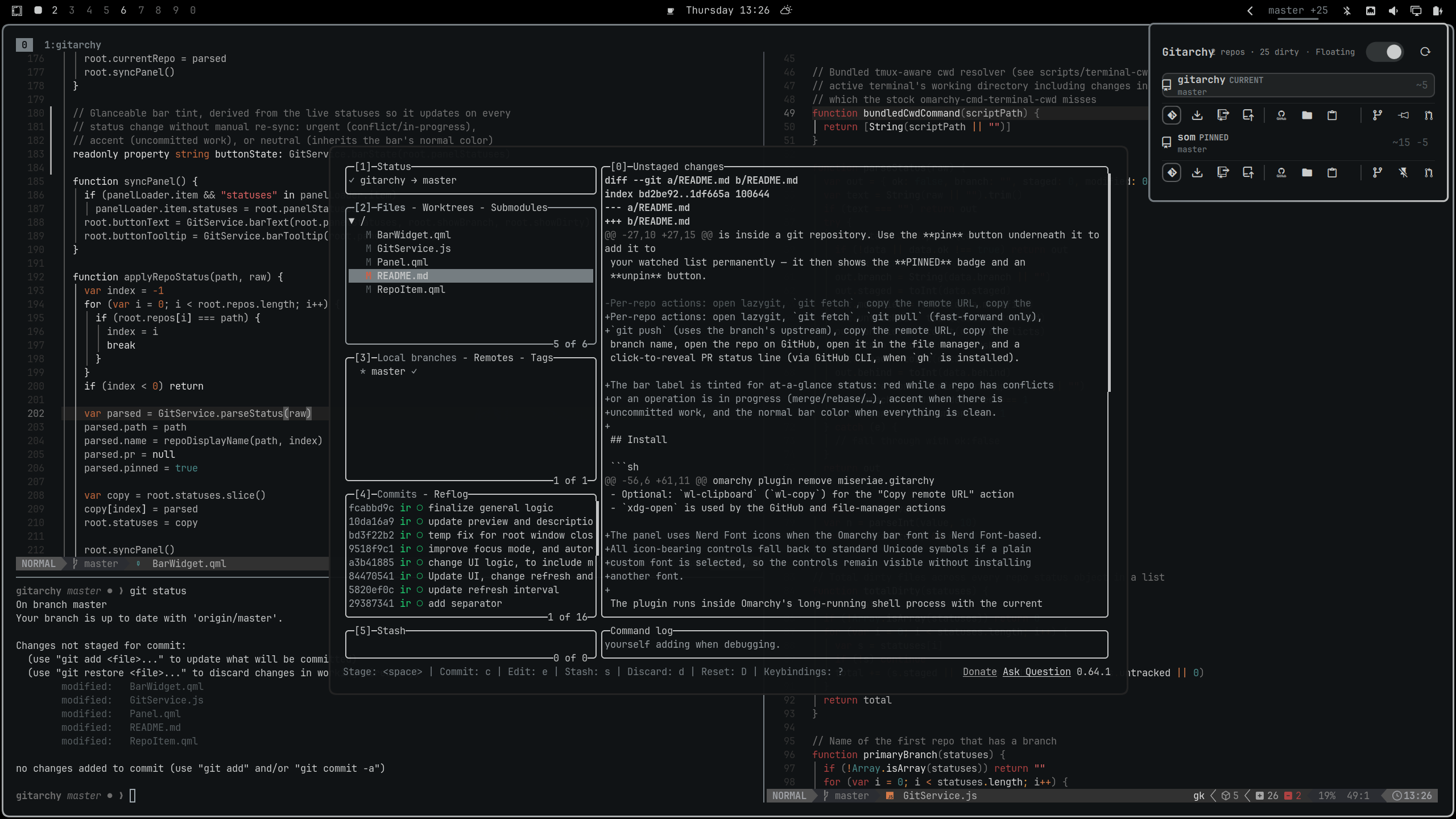
What you see
- Bar widget — the primary branch and the total dirty count across all
watched repos (
master +3). Its label is empty when there is nothing to show. The widget is hidden in that state. When the focused repo has conflicts or an operation in progress it shows a marker (master !2for conflicts,master · mergewhile merging/rebasing). Left-click opens the panel, right-click opens lazygit for the primary repo, middle-click refreshes immediately. - Panel — the git repo of the currently focused terminal first (marked
CURRENT, so the repo you are working in appears automatically), then one row per watched repo, each with branch, staged/modified/untracked counts, conflict count, stash count, and ahead/behind, with action buttons shown underneath; right-click or double-click opens lazygit directly.
The focused-terminal repo is detected via the bundled scripts/terminal-cwd.sh
(which also resolves working-directory changes inside tmux panes — the stock
Omarchy helper misses those). CURRENT only appears when the focused terminal
is inside a git repository. Use the pin button underneath it to add it to
your watched list permanently — it then shows the PINNED badge and an
unpin button.
Per-repo actions: open lazygit, git fetch, git pull (fast-forward only),
git push (uses the branch's upstream), copy the remote URL, copy the
branch name, open the repo on GitHub, open it in the file manager, and a
click-to-reveal PR status line (via GitHub CLI, when gh is installed).
The bar label is tinted for at-a-glance status: red while a repo has conflicts or an operation is in progress (merge/rebase/…), accent when there is uncommitted work, and the normal bar color when everything is clean.
Install
omarchy plugin add https://github.com/miseriae/gitarchy --enable
The widget joins the bar's right section at the next shell reload
(omarchy restart shell). Remove it with:
omarchy plugin remove miseriae.gitarchy
Requirements
- Omarchy with a bar (Quattro / Quickshell)
bash,git,jq,hyprctl, and standard POSIX utilities in the runtime PATH/procmounted and readable for focused-terminal detectionkitty/kittenandtmuxare used when available to resolve terminal and pane cwd; the helper falls back to the terminal process cwd when they are unavailable- Optional:
lazygitfor the "Open lazygit" actions - Optional:
gh(GitHub CLI) for the PR status line - Optional:
wl-clipboard(wl-copy) for the "Copy remote URL" action xdg-openis used by the GitHub and file-manager actions
The panel uses Nerd Font icons when the Omarchy bar font is Nerd Font-based. All icon-bearing controls fall back to standard Unicode symbols if a plain custom font is selected, so the controls remain visible without installing another font.
The plugin runs inside Omarchy's long-running shell process with the current
user's permissions. It can read terminal process information, execute git
commands, launch applications, and update the widget's own entry in
~/.config/omarchy/shell.json when you explicitly pin/unpin a repository or
change the lazygit mode. It does not install packages or run a remote build.
Configure
Watched repos live in the widget's entry in ~/.config/omarchy/shell.json.
Edit that entry directly to set the watched repo list:
{
  "version": 1,
  "bar": {
    "layout": {
      "right": [
        { "id": "miseriae.gitarchy", "repos": ["~/projects/a"], "pollInterval": 30 }
      ]
    }
  }
}
Use omarchy bar set for scalar settings (it does not handle multi-item
arrays reliably):
omarchy bar set miseriae.gitarchy pollInterval 60
omarchy bar set miseriae.gitarchy lazyGitMode floating
Settings
| Key | Type | Default | Description |
|---|---|---|---|
repos |
array | [] |
Repo paths (strings) or { "path": ..., "name": ... } objects. Paths may use ~. |
pollInterval |
int | 30 | Seconds between git status refreshes for watched repos. |
currentRefreshInterval |
int | 1 | Seconds between refreshes of the focused terminal's repo (kept short so the bar and CURRENT row stay live while you work). |
showBranch |
bool | true |
Show the primary branch in the bar. |
showDirty |
bool | true |
Show the total dirty count in the bar. |
lazyGitMode |
enum | focus |
focus: reuse/focus an open lazygit window. floating: always open and focus a new floating terminal. |
A repo entry's name overrides the display label; it defaults to the folder
name.
Usage
- Click the bar widget to open the status panel
- Hover the bar widget for a per-repo tooltip
- Use the action buttons shown underneath each repo row
- Right-click or double-click a repo row to open lazygit
- Right-click the bar widget to open lazygit for the primary repo
- Middle-click the bar widget to refresh now
- j/k (or arrow keys) to move between repo rows, Enter to open lazygit for the selected row, r to refresh the panel
The header toggle switches how lazygit is opened — Focus (reuse/focus an
open lazygit window) or Floating (always open a new floating terminal).
The choice persists and is the same lazyGitMode setting shown in the table
above.
How it works
Each watched repo is polled on the configured interval. A small bash script
runs git status --porcelain=v1, git stash list, and an upstream
ahead/behind count, emitting a single JSON line the widget parses. Bar text is
derived from those counts. Normal polling is local, but the explicit Fetch
action runs git fetch --all --prune and may contact every configured remote.
The Show PR action runs gh pr view on demand and may contact GitHub.
License
MIT — see LICENSE.