
Govee — Omarchy Shell Plugin
Control Govee smart lights and fans from the Omarchy desktop bar.
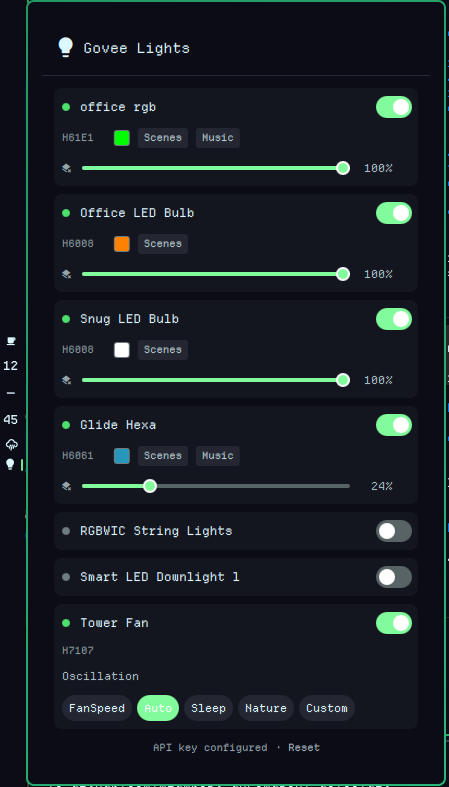
Features
Lights:
- Power on/off toggle per device
- Brightness slider
- RGB color picker (HSV hue bar + saturation/value grid)
- Color temperature slider (2000K–9000K)
- Dynamic scenes — 240+ scenes organized by category (Nature, Mood, Music, Gaming, Party, Holiday, Cinema, Space, Dynamic) with collapsible groups
- Music mode — visualisation modes (Energic, Rhythm, Spectrum, etc.), sensitivity control, auto-color toggle, and fixed color picker
Fans:
- Power on/off
- Oscillation toggle
- Work mode selector (FanSpeed, Auto, Sleep, Nature, Custom)
- Speed slider (1–12)
UX:
- Devices that are off show only name + power toggle
- Offline/unplugged devices greyed out with "Offline" label — power toggle disabled
- Expandable sections (color, scenes, music) have a collapse chevron for easy dismissal
- Smart refresh — no flicker, diff-only state updates, timer resets on interaction
- Device groups (BaseGroup, SameModeGroup) filtered out
- Auto-refresh every 30 seconds while panel is open
- Rate-limit detection with 5-second backoff and notification
- Middle-click bar icon to force refresh
Requirements
- Omarchy 4.0+ (Quattro) with Quickshell
bash(for subprocess orchestration)curl7.55+ (for API requests; uses-K -config-from-stdin)- A Govee Developer API key (free, see Setup)
Installation
omarchy plugin add https://github.com/mlambert-uk/omarchy-govee.git --enable
Removal
omarchy plugin disable mlambert-uk.govee
omarchy plugin remove mlambert-uk.govee
To also remove stored settings (API key):
rm -f ~/.local/state/omarchy/settings/govee.json ~/.local/state/omarchy/settings/govee-header
Setup
- Open the Govee Home app on your phone
- Go to your profile → Settings
- Tap About Us → Apply for API Key
- Copy the API key you receive via email
- Click the lightbulb icon in the bar — the plugin will prompt you to paste your key
The key is stored locally at ~/.local/state/omarchy/settings/govee.json.
Usage
- Click the bar icon to open the panel
- Middle-click the bar icon to refresh device states
- Toggle the switch next to each device to turn it on/off
- Drag the brightness slider to adjust
- Click the color swatch to open the color picker + temperature slider
- Click "Scenes" to browse dynamic scenes by category
- Click "Music" to activate music-reactive modes
- Reset link at the bottom clears your stored API key
Toggle via IPC/keybind:
omarchy-shell shell toggle mlambert-uk.govee
File Structure
mlambert-uk.govee/
├── manifest.json        # Plugin metadata
├── BarWidget.qml        # Bar icon entry point
├── Panel.qml            # Main panel (setup, device list, state management)
├── DeviceCard.qml       # Per-device card (power, brightness, color, fan, music)
├── ColorPicker.qml      # HSV color picker component
├── SceneSelector.qml    # Categorized scene browser with grouped variants
├── SliderControl.qml    # Reusable horizontal slider with animated knob
├── GoveeToggle.qml      # Small toggle switch component
├── GoveeApi.js          # API helpers (commands, parsing, color math)
├── LICENSE              # MIT License
└── README.md            # This file
API Reference
This plugin uses the Govee Developer API v2:
| Endpoint | Method | Purpose |
|---|---|---|
/router/api/v1/user/devices |
GET | List devices and capabilities |
/router/api/v1/device/state |
POST | Query device state |
/router/api/v1/device/control |
POST | Send commands |
/router/api/v1/device/scenes |
POST | Fetch dynamic scenes |
Rate limits: 30 req/min for device list, 10 req/min/device for control, 30 req/min/device for state.
Supported Devices
Any Govee device with a power switch is shown. Tested with:
- H61E1 — LED strip (full RGB, scenes, music mode)
- H6008 — LED bulb (color, scenes)
- H6061 — Glide Hexa panels (color, scenes, music mode)
- H70C4 — RGBWIC string lights (color, scenes, music mode)
- H7075 — Smart LED downlight (color, scenes, music mode)
- H7107 — Tower fan (oscillation, work modes, speed)
Known Limitations
- The Govee API does not expose which scene is currently active — only scenes set from this plugin are highlighted
- Some device features (e.g. H7107 night light) are not exposed by the Govee cloud API
- Offline devices are greyed out and non-interactive — commands cannot be sent to them
- Music mode uses the device's built-in microphone, not desktop audio
License
MIT