
Downlodarchy
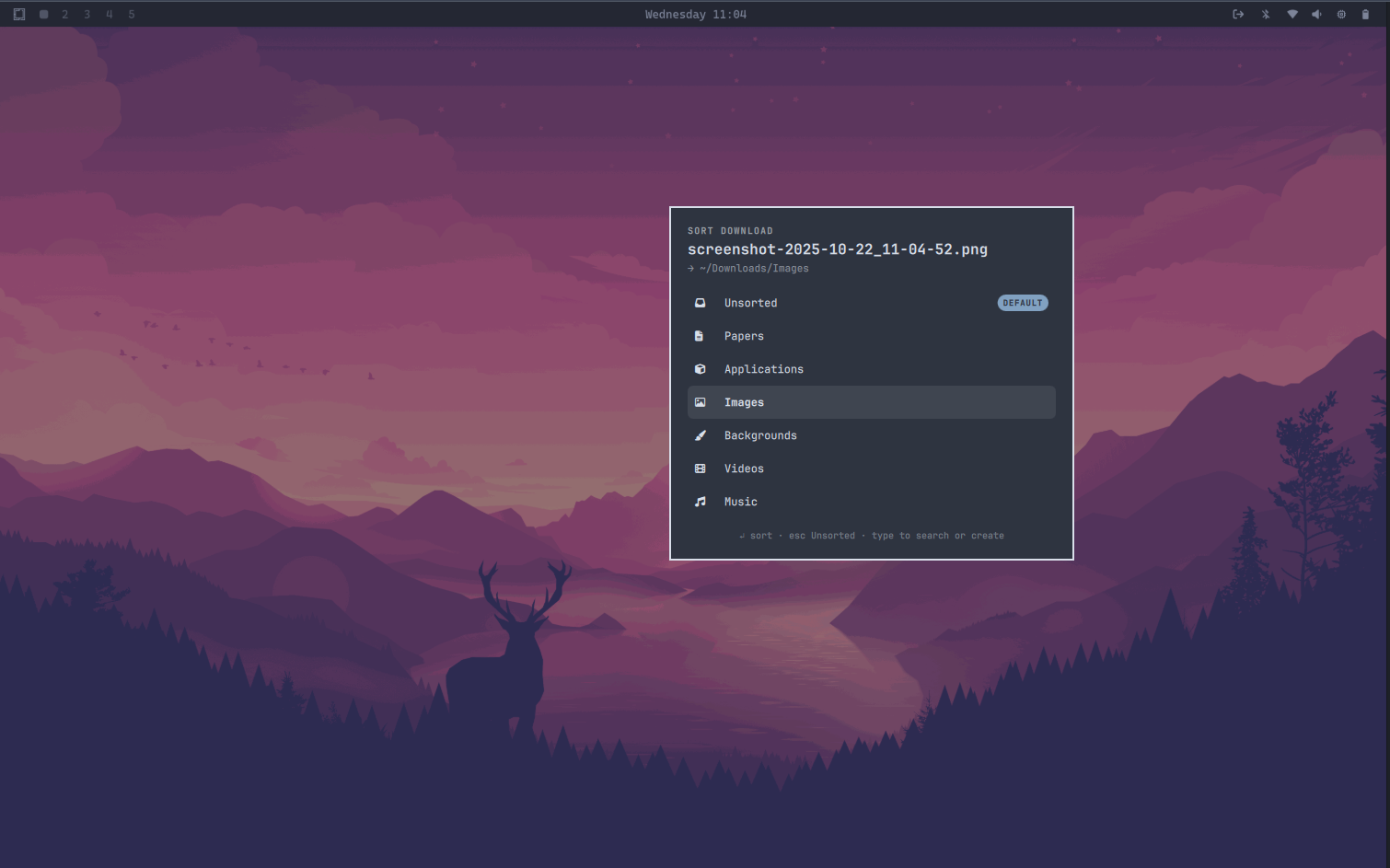
A download organizer plugin for Omarchy. Every new file
that lands in ~/Downloads pops up a small floating box asking which category
folder it belongs in — Papers, Applications, Images, Backgrounds, and so on.
Dismiss it (or just wait) and the file goes to your default category. No more
messy Downloads folder.
This is a simple download manager that helps users organize their downloaded files into categories that can be accessed and edited later.
Features
- Category box on every download — themed floating card with keyboard
navigation:
↑/↓to choose,Enterto sort, type-to-filter, and an inline "Create" row for brand-new categories. - Default category —
Esc, clicking outside, or 20 seconds of inactivity files the download into the default category (Unsortedout of the box; change it from the bar widget by clicking the star next to any category). - Bar widget — a download icon in the bar opens a menu of your categories: click one to open that folder, star it to make it the default. Also offers "Sort leftovers" to sweep stray files still sitting in the Downloads root, and "Open" for the root folder.
- Auto-created folders — categories map to subdirectories under
~/Downloads; missing directories are created on first use and name collisions are resolved asreport (1).pdf. - Browser-friendly — only watches completed files (
close_write/moved_to), ignoring.part,.crdownload, and other temp files.
Installation
omarchy plugin add https://github.com/mohpydev/Downlodarchy.git --enable
The plugin registers a bar widget; Omarchy asks where to place it during
enable (right section recommended). The service starts watching
~/Downloads immediately.
Removal
omarchy plugin remove mohpydev.downlodarchy --yes
Your category folders under ~/Downloads and settings in
~/.config/downlodarchy/config.json are left untouched; delete them manually
if you want a fully clean slate.
Usage
| Action | How |
|---|---|
| Sort a download | Pick a category in the box, or type to search/create one |
| Accept default | Enter (default is pre-highlighted) or just wait ~20s |
| Change default category | Bar icon → star next to a category |
| Open a category folder | Bar icon → click the category |
| Sort existing strays | Bar icon → "Sort leftovers", or omarchy-shell mohpydev.downlodarchy organize |
| Sort a specific file | omarchy-shell mohpydev.downlodarchy pick /path/to/file |
| Inspect current config | omarchy-shell mohpydev.downlodarchy status |
Categories live in ~/.config/downlodarchy/config.json:
{
  "version": 1,
  "defaultCategory": "Unsorted",
  "categories": [
    { "name": "Unsorted", "icon": "" },
    { "name": "Papers",   "icon": "" }
  ]
}
icon is any nerd-font glyph. Edits hot-reload; new categories can also be
created directly inside the sort box.
Dependencies
- Omarchy (Quickshell-based shell) — this is an Omarchy shell plugin
inotify-tools(inotifywait) — preinstalled on Omarchyxdg-open(fromxdg-utils) — preinstalled on Omarchy
Development
The repo root is the plugin: manifest.json plus QML/JS/shell sources.
Validate after changes with:
omarchy plugin validate .
If you cloned this repo directly into ~/.config/omarchy/plugins/,
saving any file hot-reloads the running shell.
License
MIT — see LICENSE.