
Plugin Settings
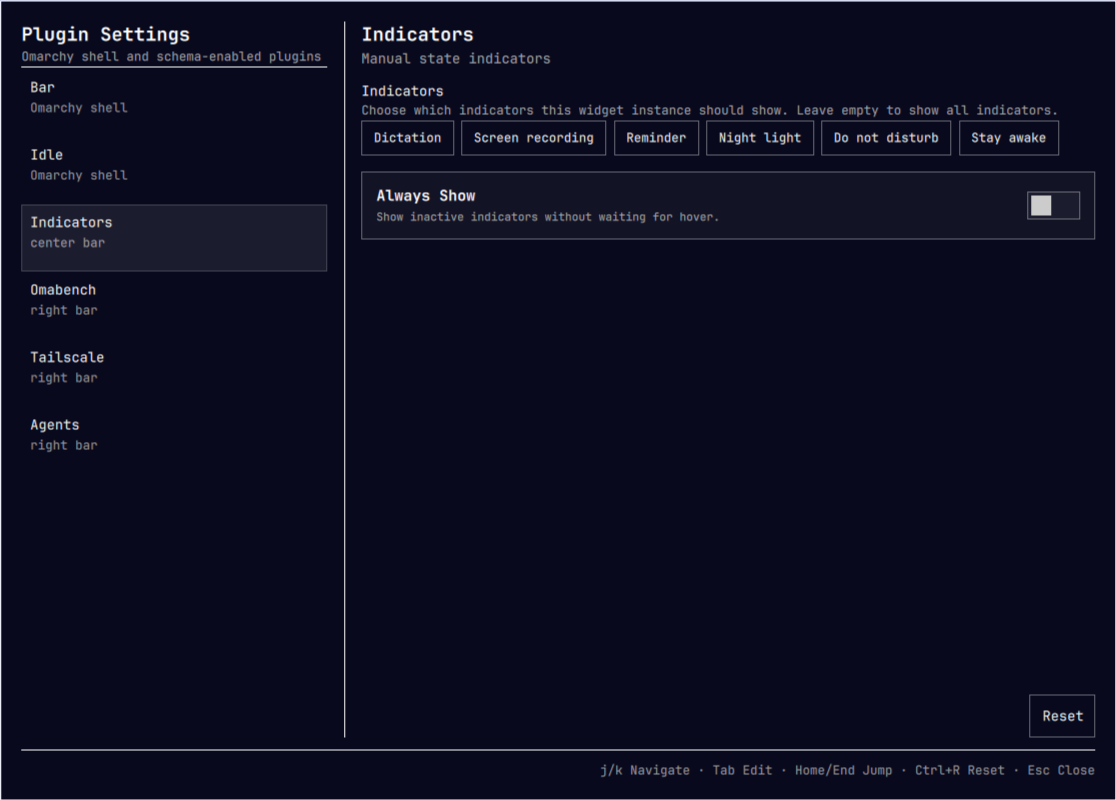
Schema-driven settings editor for the Omarchy shell and its plugins. It adds a gear button to the bar that opens a settings window where shell settings and supported plugin instances can be configured.
Features
- Provides forms for Omarchy bar appearance and idle timeouts.
- Lists enabled bar-widget instances, regular plugins, and the active full bar when they declare a supported manifest schema.
- Lists the Omarchy shell's Bar and Idle settings alongside configurable widgets and plugins.
- Writes changes to the selected item in
~/.config/omarchy/shell.json. - Renders
string,path,integer,number,boolean,enum, andmultiselectfields. - Enforces numeric
min,max, andstepconstraints. - Uses switches for booleans and two-option
Off/Onenums. - Saves toggles, choices, and numeric arrow-key changes immediately; text and numeric field edits are also saved when editing finishes.
- Provides a confirmed Reset-to-defaults action.
Interactions
- Bar gear: toggle the settings window.
Escape: close the window.Ctrl+S: save the current draft without moving focus.Ctrl+R: reset the selected item after confirmation.Ctrl+W: close the window.Up/kandDown/j, plusHome/End: navigate the focused item list.Tab/Shift+Tab: move between interactive controls;EnterorSpace: activate the focused control.Up/Downin a numeric field: adjust by its configured step (or 1).Page Up/Page Down: scroll the settings form.- Keyboard hints are shown in the window footer and adapt to the focused control.
Install
Install it with Omarchy's plugin manager:
omarchy plugin add https://github.com/mokkabonna/omarchy-plugin-settings.git
omarchy plugin enable mokkabonna.plugin-settings --section right
Omarchy plugins run as unsandboxed code inside the shell. Review a plugin's source before enabling it.
Dependencies
Plugin Settings requires Omarchy Quattro with shell plugin support. It has no external runtime dependencies beyond the Qt and Quickshell modules provided by Omarchy.
Removal
Disable and remove the plugin with:
omarchy plugin disable mokkabonna.plugin-settings
omarchy plugin remove mokkabonna.plugin-settings
Development
For a local checkout, link it into the user plugin directory, rescan, and enable it:
ln -s "$(pwd)" ~/.config/omarchy/plugins/mokkabonna.plugin-settings
omarchy-shell shell rescanPlugins
omarchy plugin enable mokkabonna.plugin-settings --section right
The same setup is available through Make:
make local
If an installed copy already occupies the plugin ID, make local moves it to
a timestamped hidden backup before creating the development symlink.
To download and use the repository version instead:
make install
The repository URL can be overridden, for example:
make install PLUGIN_REPO=https://github.com/your-fork/omarchy-plugin-settings.git
Omarchy automatically reloads changes made directly under its plugin
directory. Its watcher does not follow this development symlink, so reload
QML changes with make reload; use omarchy-shell shell rescanPlugins after changing the manifest.
Run the local checks before committing:
make check
This includes the QML behavior and Make integration tests. Run only the QML tests with:
make test
Run only the sandboxed Make workflow tests with:
make integration
The QML implementation is split by responsibility: Panel.qml owns the shell
window and focus flow, SettingsController.qml owns discovery and persistence,
and SettingsField.qml renders schema fields. BarWidget.qml contributes the
bar button that toggles the panel.
To run the GitHub Actions check workflow locally, install nektos/act and ensure Docker is running, then use:
make act
Create a release commit and annotated tag with:
make release VERSION=0.1.2
The release command requires a clean working tree, updates manifest.json,
runs all checks, commits the version, and creates tag v0.1.2. It does not
publish automatically; review the result and push it with the command printed
at the end.
Scope
The panel always includes built-in Bar and Idle forms. Their values are written
to the corresponding top-level bar and idle sections while preserving other
keys in those sections. Their reset values come from Omarchy's live defaults.
Bar widgets are included only when they are present in the current bar layout
and expose Omarchy's barWidget.schema metadata. Other plugins use this
plugin's lightweight settings convention:
"settings": {
  "displayName": "My Plugin",
  "defaults": { "enabled": true },
  "schema": [
    { "key": "enabled", "type": "boolean", "label": "Enabled" }
  ]
}
The convention applies to panel, overlay, menu, and service plugins;
their values are saved to matching entries in plugins[]. An enabled plugin
with a schema but no matching entry is shown as Plugin defaults, and a save
creates its entry. For a full bar plugin, the settings are shown only when it
is the active bar plugin and are saved to the active bar entry. In both cases,
the selected plugin entry is rebuilt from its id and schema values, so
unrecognized extra keys on that entry are not retained. The form format is
flat: nested values and plugin-owned settingsForm UIs are not rendered.
Only plugins with a non-empty schema are shown, and plugins with other kinds are
ignored. Plugin reset uses the manifest's defaults and field-level
defaultValue values; it does not read plugin-specific live defaults.