
Kaj
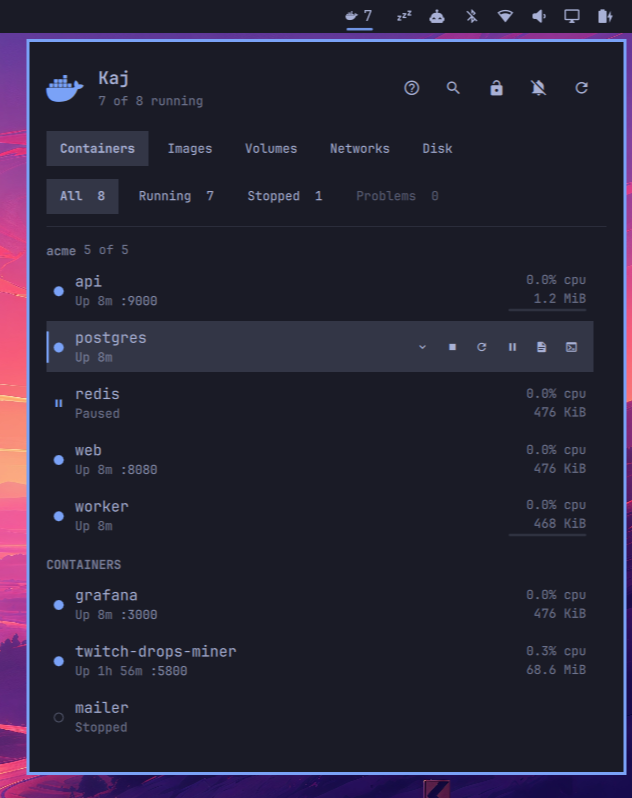
Docker containers in the Omarchy bar.
Kaj is Swedish for quay.
Install
omarchy plugin add https://github.com/leonlarsson/omarchy-kaj.git --enable
Requires the docker CLI and a socket you can open.
Omarchy 4.0.1 stopped adding users to the docker group, so on a stock machine
nothing can reach the daemon without a prompt. Kaj says so when it happens and
offers to open Setup > Security > Sudoless Docker, which warns that the
group is root-equivalent, asks, and then applies on the next boot. Rootless
Docker is the other way round; see Security.
To remove it:
omarchy plugin remove mozzy.kaj
Optionally bind the panel to a key:
-- ~/.config/hypr/bindings.lua
o.bind("SUPER + D", "Docker", "omarchy-shell mozzy.kaj toggle")
Keys
| Key | Action |
|---|---|
h / l |
Switch view |
j / k |
Move between containers, or scroll the other views |
f |
Cycle the status filter |
Enter |
Start or stop the selected container |
r |
Restart |
o |
Logs |
s |
Shell |
p |
Pause or resume |
x |
Remove (asks first) |
e |
Show environment variables |
Ctrl+F or / |
Search by name, service, project, or image |
? |
Show every shortcut in the panel |
Esc |
Clear the search, then close the panel |
Views
Containers, Images, Volumes, Networks, and Disk.
Containers shows live CPU and memory, with a bar against the container's memory limit when it has one.
Images lists what is on disk largest first and flags anything no container
uses. Volumes shows each volume's size and the containers using it. Networks
shows subnet and connected containers, with the built-in bridge, host, and
none kept at the bottom. Disk is docker system df, with whatever is
reclaimable called out.
Volumes and Networks are read-only, and update as containers start and stop.
Compose projects
Hovering a project header reveals start, stop, restart, and down, run as
real docker compose --project-name <name> <verb> commands rather than as a
loop over containers, so networks and dependency order are Compose's to handle.
down is confirmed first. up is not offered: it needs the compose file, which
Kaj cannot rely on still being where it was.
Settings
Set per widget with omarchy bar set mozzy.kaj <key> <value> --json, or in
~/.config/omarchy/shell.json. Pass --json so the value is written as a real
boolean or number rather than a string.
| Setting | Default | Description |
|---|---|---|
readOnly |
false |
Disable every action that changes a container. Status, stats, and logs still work. The lock in the panel header toggles it. |
showResourceUsage |
true |
Stream live CPU and memory. |
showContainerCountInBar |
true |
Show the running count next to the bar icon. |
defaultContainerStatusFilter |
all |
Status filter selected when the panel opens: all, running, stopped, or problems. |
notifyOnContainerExit |
false |
Notify when a container exits non-zero or is OOM-killed. The bell in the panel header toggles it. |
refreshIntervalSec |
30 |
Reconcile interval. Kaj follows docker events, so this only bounds how long a missed event goes unnoticed. |
logLines |
500 |
History shown before logs starts following. |
To put every setting back to its default:
~/.config/omarchy/plugins/mozzy.kaj/kaj-reset
Security
The Docker socket is root-equivalent: anything that can reach it can become root on the host. That is Docker's design, not Kaj's, but Kaj runs inside the long-lived shell process, so:
- Every command is an argv array. No shell, and no container name, tag, or label is ever interpolated into one.
- Container-controlled text is rendered as plain text, with escape sequences stripped.
- Environment variables load only for the row you expand and stay hidden until you click them. Kaj does not try to guess which keys are secret.
- Every producer is read against a byte and row budget, and against a deadline. A command that returns too much, or does not answer in time, is stopped mid-read and its output is dropped, never parsed. Inspect runs in batches rather than one command line per container. A single record is capped, and so is the traversal of the nested values inside it. Live stats are keyed only to containers the last snapshot listed, and events, stats records and notifications are each capped per second.
- Kaj never calls
sudoorpkexec. When the socket is closed to you it can open Omarchy's own Sudoless Docker setup in a terminal, and that script does the asking and the elevating. Kaj hides the offer in read-only mode.
Rootless Docker avoids the
root-equivalence entirely, and Kaj needs no change to use it: the Docker CLI
reads its context from ~/.docker/config.json. Kaj also honours DOCKER_HOST,
but the shell runs as a systemd user service and never reads your shell profile,
so set it with systemctl --user set-environment or use a context. Please open
an issue for security reports.
Development
npm test                    # pure logic, no QML or Docker needed
omarchy plugin validate .

dev/kaj seed                # containers covering every state the panel renders
dev/kaj demo                # a small realistic stack, for screenshots
dev/kaj status              # list them
dev/kaj crash solo          # drive a state change and watch the panel react
dev/kaj oom                 # a container that gets OOM-killed
dev/kaj unhealthy           # a container that fails its healthcheck
dev/kaj clean               # remove them all
dev/kaj --help lists everything. It labels what it creates kaj.dev=1 and
refuses to act on anything without that label, so it cannot touch a workload
you care about. demo also tags busybox under familiar image names, never
overwriting a tag you already have and removing only the aliases it made.
Model.js holds parsing, grouping, formatting, and policy as pure functions.
Service.qml talks to the daemon. BarWidget.qml and Panel.qml render.
Run omarchy restart shell to pick up edits.
License
MIT