
Omarchy Keyguide
English · 한국어 · 简体中文 · 日本語 · Español
Public repository: https://github.com/mrai125kr/omarchy-keyguide
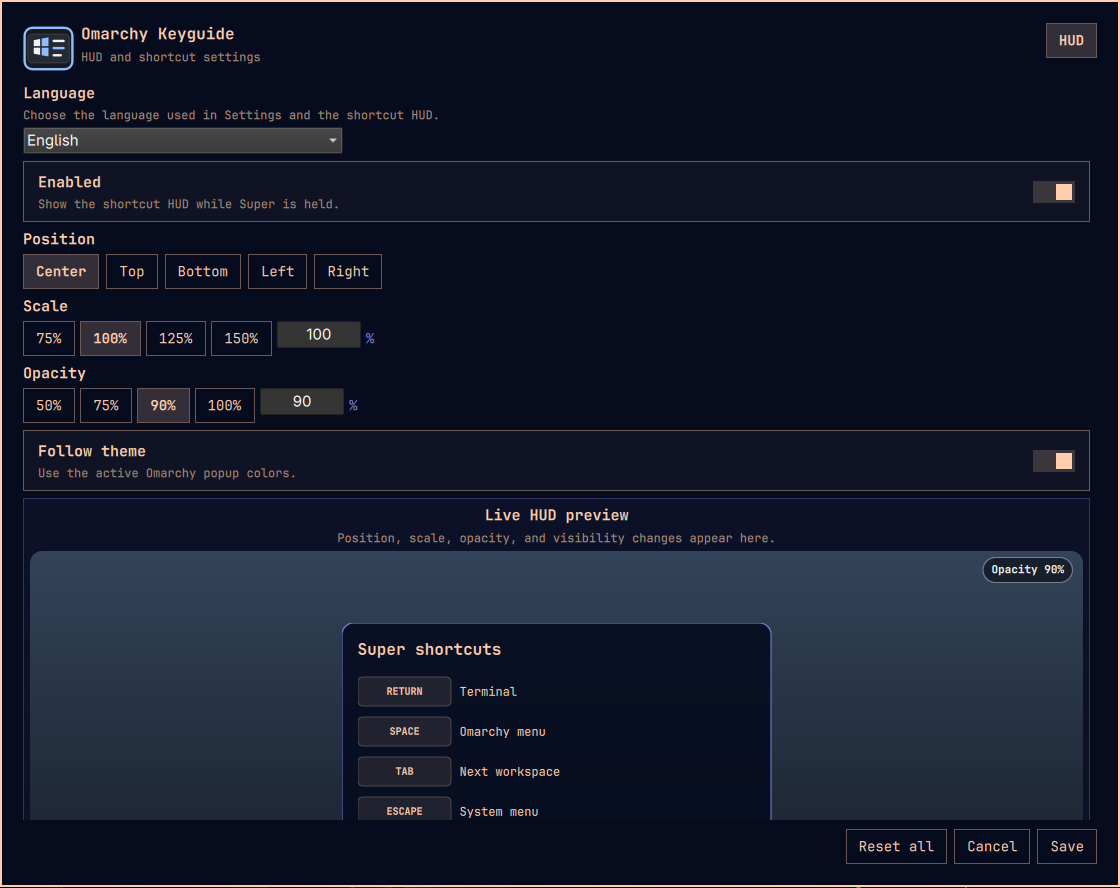
Omarchy Keyguide is a removable shortcut guide for Omarchy. It renders active bindings in an input-transparent HUD and provides settings for both HUD presentation and a deliberately limited shortcut editor. It never grabs, consumes, or synthesizes input and never edits Omarchy's user binding file.
Purpose and intended users
Keyguide helps people learn and use Omarchy shortcuts without having to memorize every combination or repeatedly search configuration files. It is especially useful for new Omarchy users, but it also gives experienced users a quick, searchable view of the bindings that are active on the current machine.
Use it to:
- hold a Super modifier combination and see the shortcuts available now;
- search actions in English or the selected interface language;
- find installed graphical applications and commands in the same chooser;
- move, replace, remove, or restore supported shortcuts with conflict checks;
- adjust HUD position, scale, opacity, theme behavior, and visible rows.
Keyguide is not a general-purpose macro recorder or an unrestricted Hyprland configuration editor. Shortcut editing is intentionally limited to actions it can reconstruct and verify safely.
HUD behavior
Keyguide recognizes exactly the eight Super combinations formed from Ctrl, Shift, and Alt:
SUPER
SUPER+CTRL
SUPER+SHIFT
SUPER+ALT
SUPER+CTRL+SHIFT
SUPER+CTRL+ALT
SUPER+SHIFT+ALT
SUPER+CTRL+SHIFT+ALT
Holding a group shows only its active bindings. Pressing a non-modifier key or mouse button hides the HUD until every pressed action is released; mouse-wheel activity hides it until 120 milliseconds after the last wheel event. The observer reads these events without grabbing, consuming, or replaying them.
Within a group, rows are ordered for lookup: common control keys, punctuation, navigation, digits, letters, other keyboard keys, then mouse actions.
Controls and settings
The Keyguide bar icon opens a compact panel with an enabled switch, an opacity slider, and a button for the full Settings overlay. The icon reflects whether the HUD is enabled. The full overlay also controls screen position, scale, theme following, visible modifier groups, and individual row visibility. English is the default UI language; Korean, Japanese, Simplified Chinese, and Spanish are available, and the selected language is used by Settings and the shortcut HUD.
The full overlay lists each modifier group and its current bindings. Choose a
free key from the key selector to open a centered assignment panel, or press
Change on an existing row to open the same panel beside that row. Every key is
labelled Free or Assigned — <title>. An assigned key shows its title, action
kind/argument, Current key, and whether it is an Omarchy default or is
Managed by Keyguide, with independent Shown/Hidden, Change, and
Remove controls. Removing a binding leaves that chord free; Reset all
restores removable original bindings.
For a free key, use one search field to choose a safely reconstructed Omarchy
action, an installed graphical application, or an executable command. General
actions are searchable by both English and the selected language. Application
rows show their desktop icon, command rows show (CMD), and the list refreshes
while the chooser is open so installed or removed programs are reflected
automatically. Optional arguments are shown only for commands. Registering an
existing action moves it from its current key instead of creating a duplicate;
replacing an assigned key requires a second explicit confirmation naming the
action that will be removed.
Bindings that cannot be changed remain visible and retain their independent HUD visibility control. Instead of a generic read-only state, the editor names the reason:
Mouse binding,Duplicate chord, orUnsupported keyAction cannot be reconstructedAmbiguous action metadataorMalformed action recordUnsupported action kind
Collision checks use the complete live Hyprland binding list, including bindings
hidden from the menu. Physical code: bindings are resolved from Hyprland's
configured first XKB layout instead of assuming a US keyboard; unresolved
physical keys fail closed.
Duplicate targets are rejected before publication and checked again immediately before publication and after Hyprland reloads. A conflict or changed source is shown as an error and the candidate is not retained. Reset all restores the first-install Keyguide presentation defaults, restores original shortcuts and titles that Keyguide moved or replaced, and removes shortcuts added by Keyguide. It does not reset unrelated Omarchy or Hyprland settings.
Shortcut changes are stored in one generated module at
~/.local/state/omarchy/toggles/hypr/omarchy-keyguide.lua, a standard
late-loaded Omarchy toggle location. Each change is staged atomically, checked
against existing Hyprland configuration errors, reloaded, and rolled back to
the exact prior file if the new configuration is rejected or the live runtime
does not exactly match the requested transition. Keyguide does not write
~/.config/hypr/bindings.lua.
HUD presentation preferences are stored at
~/.local/share/omarchy-keyguide/settings.json. Uninstall retains this file by
default so an upgrade keeps the user's choices. Normal uninstall also retains
the independently managed shortcut module; REMOVE_PREFERENCES=1 resets those
shortcuts before removing the saved presentation settings.
Verify compatibility
Run the probe from the repository root:
PYTHONPATH=src/backend python -m keyguide_backend compat
It emits JSON containing the detected Omarchy and Hyprland versions, whether
a readable keyboard event device is available, and any compatibility errors.
It exits non-zero when the machine is not supported. The intended target is
Omarchy 4.0.0-1 and Hyprland 0.56.2 or newer.
Runtime requirements are the standard Omarchy environment, Python 3,
xkbcli, and access to a readable keyboard event device. Source and git-plugin
installation also require a C compiler (base-devel on Arch Linux).
Linux protects keyboard and pointer event devices by default. After cloning or adding the plugin, enable access once from the repository directory:
sudo make install-input-access
omarchy restart shell
This installs one udev rule that uses systemd-logind's uaccess mechanism. It
grants access only to keyboard, mouse, and touchpad event nodes for the active
local seat instead of adding the account to the broad, persistent input
group. The ACL is granted to the active session's user account, not only to the
Keyguide process. While it is active, any process running as that user can read
those selected event nodes. To revoke it while the repository is still
present, run sudo make uninstall-input-access and restart the shell.
Development
Run the complete non-destructive automated verification suite:
make test
GitHub Actions runs make test-ci for the portable C, Python, shell-syntax,
and safety checks. The QML and plugin-validation harnesses depend on a real
Omarchy/Quickshell installation, so release verification must also run the full
make test suite on a supported Omarchy host.
Build the observer and compile-check the Python backend separately:
make build
Install and remove
Omarchy git plugin
The repository root follows Omarchy's third-party plugin contract and can be added directly by URL:
omarchy plugin add https://github.com/mrai125kr/omarchy-keyguide.git --enable
The first enable compiles a small non-grabbing input observer from the checked-in C source, so it may take a moment. No executable binary is downloaded. When the Keyguide icon appears on the bar, click it for quick controls or open the full Settings panel.
First use
- Open Keyguide Settings from the bar icon.
- Choose the interface language. English is the default; Korean, Japanese, Simplified Chinese, and Spanish are included.
- Choose the HUD position, scale, opacity, theme behavior, and visible modifier groups.
- Hold
Super, orSupertogether with Ctrl, Shift, and/or Alt, to show the active shortcuts for that exact modifier group. - In Shortcut Editing, select a free key to register an action. Use
Changebeside an existing row to replace it, orRemoveto leave that key free. - Use
Reset allto restore removable original bindings and remove shortcuts created by Keyguide without resetting unrelated Omarchy settings.
Omarchy clones the repository into ~/.config/omarchy/plugins/mrai.keyguide.
On first enable, Keyguide compiles its non-grabbing input observer from the
checked-in C source into the clone's ignored build/ directory; the Python
backend runs directly from the clone. This mode requires the standard Omarchy
runtime, Python 3, and a C compiler (base-devel on Arch). The build is reused
until the observer source or compiler identity changes. Removing the git plugin
also removes that repository-local build:
omarchy plugin remove mrai.keyguide
Update an installed git-managed copy with:
omarchy plugin update mrai.keyguide --yes
Source installer
Build and install Keyguide for the current user:
make install
This installs the runtime under ~/.local/lib/omarchy-keyguide, the shell
plugin under ~/.config/omarchy/plugins/mrai.keyguide, a settings launcher
under ~/.local/share/applications, and an exact ownership manifest at
~/.local/state/omarchy-keyguide/install-manifest.json. The installer enables
the plugin only when it was not already enabled and records that decision. If
Keyguide is not already on the bar, the installer places it immediately after
omarchy.agents; an existing Keyguide placement is left exactly where it is.
Remove only the files recorded and validated by that manifest:
make uninstall
Removal restores plugin enablement and any installer-owned bar placement from the exact saved shell preimage, without crossing a separate shell-mutating plugin-disable step. Historical manifests migrate only when their saved preimage can be derived from the authenticated live postimage by removing exactly installer-owned plugin/bar state. Uninstall prunes only empty Keyguide-specific directories and retains user settings. If the user has moved the widget or otherwise edited the shell configuration, removal aborts before changing plugin, bar, or installed-file state and preserves that user configuration.
The installer refuses to overwrite an existing installation by default. For an authenticated Keyguide installation whose shell postimage has only unrelated user edits, such as a changed clock format, use the explicit preserve upgrade:
PRESERVE_USER_SHELL=1 make install
Preserve mode authenticates the existing manifest and saved shell preimage,
requires exactly one settings-free Keyguide bar entry immediately after
omarchy.agents, and derives a new baseline by reversing only the proven
Keyguide-owned transform. It journals and atomically publishes that baseline
before following the normal uninstall/install lifecycle. Duplicate, moved, or
settings-bearing Keyguide entries, malformed JSON, changed file modes, changed
backups, and concurrent shell edits abort the upgrade without overwriting the
live shell. Prefix installs cannot use this mode.
For an unchanged installation, the explicit preserve command is also a safe
one-step upgrade. The separate make uninstall then make install path remains
available. The uninstaller accepts the earlier pre-bar-widget manifest so an
existing MVP installation can follow either authenticated path safely.
Troubleshooting
Run the compatibility probe first:
PYTHONPATH=src/backend python -m keyguide_backend compat
- If the observer cannot be built, install the standard Arch build tools with
omarchy pkg add base-devel, then update or reinstall Keyguide. - If the HUD cannot observe held keys, check the probe result for a readable
keyboard event device. If it is unavailable, run
sudo make install-input-accessfrom the repository and restart Omarchy Shell. - If the plugin is installed but its UI does not appear, run
omarchy restart shelland check again. - Validate a downloaded source tree with
omarchy plugin validate .. - Keyguide refuses unsafe, ambiguous, duplicate, or concurrently changed bindings and reports the reason instead of keeping a partial change.
To explicitly reset managed shortcuts and remove saved presentation preferences too, run:
make uninstall REMOVE_PREFERENCES=1
For isolated packaging tests, prefix every destination beneath a disposable root. Prefix mode never invokes Omarchy or reload commands:
make install PREFIX_ROOT=/tmp/omarchy-keyguide-test-root
make uninstall PREFIX_ROOT=/tmp/omarchy-keyguide-test-root
Safety contract
- Keyguide never modifies
/usr/share/omarchy/. - The compatibility probe only reads command output and input-device capabilities; it does not grab, consume, or synthesize input.
- Installation and normal removal never change shortcuts. Explicit Settings
mutations and
REMOVE_PREFERENCES=1use only Keyguide's generated Omarchy toggle module and never access~/.config/hypr/bindings.lua. - Shortcut publication is collision-checked, atomic, reload-validated, and semantically confirmed against the live runtime. Conflicts, source changes, missing restores, or Hyprland configuration errors trigger exact rollback.
- Uninstall validates an exact file allowlist from the install manifest and never recursively deletes user configuration.