
Dusk
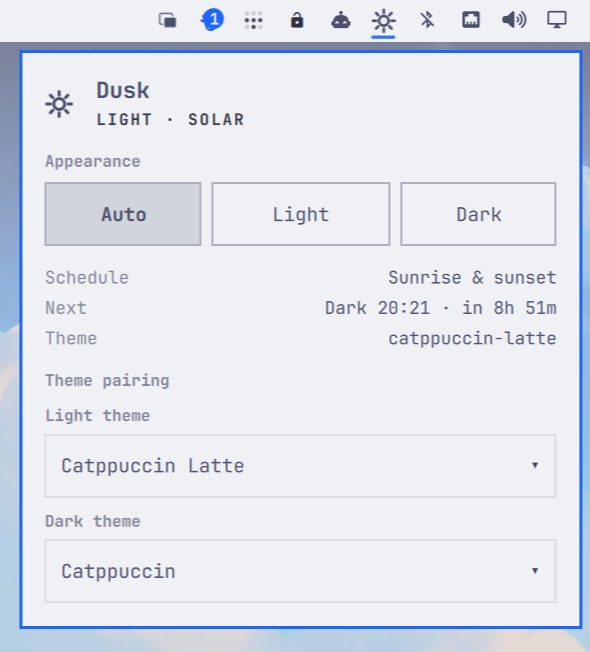
Automatically switch your complete Omarchy desktop between light and dark
themes. Dusk follows sunrise and sunset when location data is available, falls
back to a schedule when it is not, and always applies changes through Omarchy's
native omarchy theme set path.
Why Dusk
- Changes the whole desktop, not just a wallpaper or color scheme.
- Uses solar time from Omarchy's existing weather location, with configurable scheduled fallback times.
- Runs independently as a
systemd --userservice, so switching continues while the shell is restarted. - Includes an optional bar widget for switching between Automatic, Light, and Dark modes without opening a terminal.
- Leaves Omarchy's themes, current-state files, and application configuration under Omarchy's ownership.
Install
Dusk is a standard Omarchy shell plugin — install it the Omarchy way. There are no scripts to clone or run:
omarchy plugin add https://github.com/mrpbennett/qs-dusk.git --enable
omarchy plugin add clones Dusk into
~/.config/omarchy/plugins/mrpbennett.dusk, validates its manifest, and
enables the bar widget. The first time the widget loads it installs the rest
of itself, so nothing else is needed:
- symlinks the
omarchy-auto-themeanddusk-schedulercommands into~/.local/bin, - writes the
dusk.serviceuser unit, which runs the scheduler straight from the plugin folder with your graphical session, and - starts the daemon.
Everything runs from the plugin folder, so omarchy plugin update keeps the
entire extension current. The widget shows the current appearance in the bar
and lets you switch Automatic / Light / Dark modes from the panel.
Then choose your themes and mode:
# Choose the themes to use. List available slugs with: omarchy theme list
omarchy-auto-theme themes --light catppuccin-latte --dark catppuccin

# Follow your Omarchy weather location's sunrise and sunset.
omarchy-auto-theme solar
Choose a Mode
# Automatic, driven by sunrise and sunset.
omarchy-auto-theme solar

# Automatic, driven by local wall-clock times.
omarchy-auto-theme scheduled --light 07:00 --dark 19:00

# Apply one appearance and pause automatic switching.
omarchy-auto-theme manual light
omarchy-auto-theme manual dark
Use omarchy-auto-theme status to see the selected mode, current theme, next
transition, and any solar fallback reason. manual light|dark reports when the
requested theme is already active instead of re-running Omarchy's theme switch.
Keybindings
To switch modes from the keyboard, add these to ~/.config/hypr/bindings.lua:
o.bind("SUPER + SHIFT + ALT + Z", "Dusk: Auto mode", "omarchy-auto-theme solar")
o.bind("SUPER + SHIFT + ALT + L", "Dusk: Light mode", "omarchy-auto-theme manual light")
o.bind("SUPER + SHIFT + ALT + D", "Dusk: Dark mode", "omarchy-auto-theme manual dark")
SUPER + SHIFT + ALT + Z avoids conflicts with stock Omarchy bindings.
How It Works
- The CLI saves your theme pair and scheduling preferences to Dusk's config.
- The
dusk.servicescheduler determines the desired appearance from the selected mode: sunrise/sunset, fixed local times, or a manual choice. - Before changing anything, it compares the desired theme with Omarchy's current theme state, avoiding unnecessary theme applications.
- When a change is needed, it runs
omarchy theme set <slug>. Omarchy then applies the theme to the shell, background, supported applications, and anytheme-sethooks you already use. - The bar widget and
statuscommand read scheduler state through Dusk's local control socket. The widget never applies a theme itself.
Solar mode reads the coordinates already stored by Omarchy's weather widget. If
they are unavailable or invalid, Dusk uses the configured scheduled fallback and
reports that fact in status instead of silently guessing.
Configuration Ownership
Dusk writes preferences only after an explicit omarchy-auto-theme command or
bar-widget choice. Its unattended scheduler writes only Dusk-owned runtime
state. Omarchy's current-theme and weather files are read-only inputs, and Dusk
never edits shell.json, theme files, or application configuration directly.
The scheduler reads only the state it needs and stores its own data separately:
| Path | Purpose |
|---|---|
~/.config/omarchy/dusk/config.json |
Preferences and schedule |
~/.local/state/omarchy/dusk/state.json |
Scheduler status and last successful change |
$XDG_RUNTIME_DIR/dusk/control.sock |
CLI and widget control channel |
Update Dusk
omarchy plugin update mrpbennett.dusk
Remove Dusk
The following removes the bar widget, scheduler, commands, configuration, and saved Dusk state. It does not remove either of the Omarchy themes you selected.
omarchy plugin disable mrpbennett.dusk
omarchy plugin remove mrpbennett.dusk --yes

systemctl --user disable --now dusk.service
rm -f ~/.config/systemd/user/dusk.service
rm -f ~/.local/bin/omarchy-auto-theme ~/.local/bin/dusk-scheduler
rm -rf ~/.local/lib/dusk ~/.config/omarchy/dusk ~/.local/state/omarchy/dusk
rm -rf "${XDG_RUNTIME_DIR:-/run/user/$(id -u)}/dusk"
systemctl --user daemon-reload
Dependencies
python3(standard library only — no pip packages) runs the CLI and scheduler.- The scheduler and CLI speak to Omarchy only through its
omarchy themecommands (set, list, dir) and read-only access to Omarchy's own state files; Dusk makes no network calls of its own. systemd --userruns thedusk.serviceunit.- No non-stdlib QML imports in the bar widget.
License
MIT — see LICENSE.
Documentation
- Usage guide: requirements, installation, configuration, and service commands.
- Design: scheduling model, solar calculation, state, and failure handling.