
FortiVPN Omarchy Widget
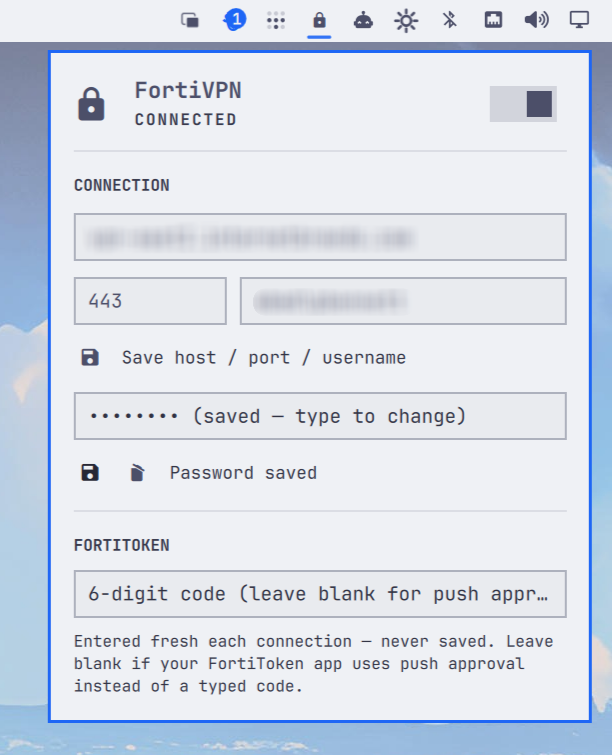
A native Omarchy bar widget for connecting to a Fortinet SSL-VPN gateway (FortiToken 2FA) via openfortivpn, the open-source FortiClient-compatible VPN client.
Features
- Bar icon shows disconnected / connecting / connected / failed at a glance
- Click opens a panel to enter the gateway host, port, username, password, and (per-connection) FortiToken code
- Right click on the bar icon toggles connect/disconnect without opening the panel
- Trust-on-first-use certificate pinning, with an explicit confirmation dialog showing the SHA-256 fingerprint — never auto-trusted
- FortiToken push approval is supported too: just leave the code field blank
- Also comes with a handy
omarchy-fortivpncli incase you ever need to connect via ssh
Requirements
openfortivpnonPATH—sudo pacman -S openfortivpn(Archextra)- A polkit authentication agent running (Omarchy ships one) — changing saved connection settings triggers the standard graphical auth prompt
How credentials are stored
This was the interesting part of building this thing, so it's worth spelling out:
- Host, port, username are non-secret and live in this widget's normal
Omarchy
shell.jsonentry, same as any other widget's settings. - Password is never stored in
shell.jsonor passed on any command line. It remains in transient QML/process memory only until it is handed to the privileged helper, then is cleared. It's written straight into/etc/openfortivpn/omarchy.conf— a config file owned byroot:root, mode600— over the helper's stdin, so it never shows up inps. After handoff, the widget persists only a boolean ("a password is saved"), never the value. - The FortiToken code (OTP) is never written to disk anywhere. It's a
30–60s TOTP, so persisting it would be pointless — you type it fresh each
time you connect (or leave it blank for a push-approval token), and it's
passed once to
openfortivpn --otp=for that single connection attempt. It is visible in that process's argv for the life of the VPN session (ps//proc), same as every other openfortivpn wrapper script in the wild — there's no other way to hand it a fresh one-time code non-interactively. On a shared multi-user box that's worth knowing; on a personal desktop it's a non-issue. - The gateway certificate fingerprint, once trusted, is stored in both
shell.json(so the widget can tell "still the same cert" from "cert changed" without needing root to read the config file) and in the config file itself astrusted-cert = <sha256>. It's not a secret — it's a public fact about the server — so there's no harm in it living in both places.
Every write to the root-owned config file patches exactly one field (host+ port+username together, or password alone, or trusted-cert alone) via a root-owned helper that reads the value from stdin and rewrites the file atomically, so an edit to one field can never clobber another.
Why systemd instead of a raw process
Connecting spawns openfortivpn as a transient systemd unit
(systemd-run --system --unit=omarchy-fortivpn ...) rather than a
plain backgrounded process:
systemctl is-active omarchy-fortivpn.servicegives the widget a cheap, no-privilege way to poll connection state — no pidfile bookkeeping.- The unit runs with
Type=notify; openfortivpn signals systemd once the tunnel is actually up, so "connected" in the UI means the tunnel is really established, not just that a process launched. systemctl stoptears the tunnel down cleanly (openfortivpn handlesSIGTERMto unwind pppd/routes/DNS).- The installed helper reads recent logs for only
omarchy-fortivpn.service, which is how the widget notices "gateway certificate not yet trusted" and shows the trust prompt instead of a generic error. This works without granting the desktop user access to all system journal entries.
Passwordless Privilege Model
Run the one-time installer after installing or updating the plugin:
./scripts/install-passwordless-helper.sh
It prompts once through polkit to install a root-owned helper at
/usr/local/libexec/omarchy-fortivpn-helper and a mode-440 sudoers rule.
That rule permits only the helper's status, start, stop, reset, and constrained
journal actions to run without a password. Status reports non-secret readiness
and compatibility information. The journal action accepts only an attempt
timestamp and always reads a fixed number of entries from this VPN's unit.
Configuration changes are deliberately excluded and use polkit authentication,
preventing an arbitrary desktop process from silently redirecting the root VPN
endpoint. Runtime actions use sudo -n, so a missing or invalid installation
fails visibly instead of opening an authentication prompt. The helper cannot
execute arbitrary commands, read other units' logs, or manage other units.
The installer stages and validates the helper, CLI, and sudoers policy before publishing them, then verifies the installed controller. It preserves the previous installation if publishing fails.
This is intentionally narrower than granting passwordless systemctl access
or broad polkit permission to manage system units.
Command line
The widget UI is the source of truth for the saved gateway, password, and
certificate trust. Once those are configured, the installed
omarchy-fortivpn command can manage only the VPN lifecycle, including from
an SSH session:
omarchy-fortivpn start          # prompts for a FortiToken code; blank uses push approval
omarchy-fortivpn start --push   # request push approval without a prompt
omarchy-fortivpn stop
omarchy-fortivpn status         # non-secret readiness diagnostics
Run ./scripts/install-passwordless-helper.sh again after updating the plugin
so it installs or updates this command. A full-tunnel VPN may interrupt the
SSH session that started it when its routes take effect; the systemd service
continues running and can be stopped in a later session.
Installing
mkdir -p ~/.config/omarchy/plugins
ln -s "$(pwd)" ~/.config/omarchy/plugins/mrpbennett.fortivpn
omarchy plugin enable mrpbennett.fortivpn
omarchy bar move mrpbennett.fortivpn --section right   # optional
./scripts/install-passwordless-helper.sh
Editing files under the symlinked plugin directory hot-reloads in the
running shell — no restart needed. If a change doesn't pick up, force it
with omarchy-shell shell rescanPlugins.
First connection
- Open the panel, fill in Gateway host, port (default 443), and Username, and click the save icon next to them.
- Enter a Password and click its save icon.
- Enter your FortiToken code (or leave it blank for push approval) and flip the switch / click Connect.
- If the gateway's certificate hasn't been seen before, you'll get a dialog with its SHA-256 fingerprint. Only click Trust if it matches what your VPN administrator gave you — then connect again with a fresh code.
Uninstalling
omarchy plugin disable mrpbennett.fortivpn   # or remove it from shell.json's plugins list
rm ~/.config/omarchy/plugins/mrpbennett.fortivpn   # the symlink
pkexec rm -f /etc/openfortivpn/omarchy.conf
pkexec rm -f /usr/local/libexec/omarchy-fortivpn-helper /etc/sudoers.d/omarchy-fortivpn