
Herdr Agents
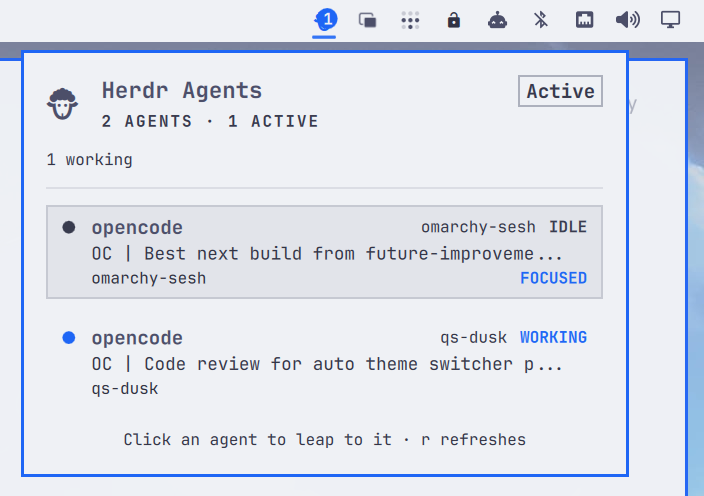
A live agent-status widget for the Omarchy bar that watches your Herdr session.
One bar icon, one panel: every running Herdr agent with its current state, what it is doing right now, and the Herdr workspace it is working in. Click an agent and you land on it inside Herdr — no matter which desktop or window you are looking at.
Features
Bar icon
A static sheep glyph () tinted by fleet state:
- accent while any agent is working,
- urgent when any agent needs attention (blocked),
- muted when herdr is unreachable,
- a count badge of busy agents (working / blocked / done).
Panel
Click the icon to open a list, one row per agent:
- status dot + label (
WORKING,BLOCKED,DONE,IDLE,UNKNOWN), - agent name,
- the agent's current activity (its live terminal title),
- the Herdr workspace and tab it is in, and the project folder,
- a
FOCUSEDmark on the agent currently under the Herdr cursor, - elapsed time in the current status (e.g. "3m 12s").
Agents are grouped by status: blocked, working, done, then idle or unknown. If herdr is not running, the panel offers a Launch Herdr button.
Type / or f to filter agents by name, activity, workspace, tab, or folder.
Press Escape to clear.
Notifications
Desktop toasts when agents change state (toggleable in plugin settings):
| Toast | When | Urgency |
|---|---|---|
| Needs attention | agent entered blocked |
critical |
| Finished | working agent transitioned to done |
normal |
| Agent gone | blocked agent's pane vanished between polls | normal |
Clicking a needs attention or finished toast jumps straight to that agent.
Click to jump
Click (or keyboard-Enter) an agent row and the plugin:
- runs
herdr agent focus <pane>to focus the agent inside the Herdr TUI, - locates the Herdr terminal window and raises it with a Hyprland dispatch.
The active Hyprland workspace follows the Herdr window, so the jump works from anywhere on the desktop — including when Herdr lives in a special workspace (scratchpad or minimize-style setups): it is opened automatically before the jump. If several terminals run herdr, a visible one is preferred. A failed jump shows a desktop toast instead of silently doing nothing.
If Herdr runs on a remote host inside a local terminal (over SSH), the
process-tree lookup finds nothing locally; set the windowClass setting to
your terminal's window class (e.g. ghostty) so the window can still be
found and raised.
IPC actions
Bind global Hyprland keybinds to jump without opening the panel:
# Jump to the first blocked agent (falls back to the first agent):
omarchy-shell ipc call mrpbennett.herdr-agents focus

# Jump to a specific agent by name:
omarchy-shell ipc call mrpbennett.herdr-agents focusAgent opencode

# Other actions: toggle, open, close, show, hide, next, refresh
Settings
| Setting | Default | Description |
|---|---|---|
refreshIntervalSec |
2 |
How often the Herdr session snapshot is polled (1–60s). |
notifyOnBlocked |
true |
Toast when an agent needs attention. |
notifyOnFinished |
true |
Toast when an agent finishes background work. |
windowClass |
(empty) | Fallback terminal window class when Herdr runs remotely. |
Requirements
- Herdr — the plugin polls
herdr api snapshot. - Omarchy with the Quickshell bar.
Dependencies
herdr— shelled out to forherdr api snapshot(polling) andherdr agent focus <pane>(click-to-jump). No network calls; both talk to the local Herdr server only.hyprctl— shelled out to by the Hyprland Window Adapter to locate and raise the Herdr window via a Hyprland dispatch.python3— runsbin/omarchy-herdr-focus, a stdlib-only script (no pip packages required).node— runs the Snapshot Adapter tests (tests/test_snapshot.py).- No non-stdlib QML imports beyond Quickshell and the Omarchy shell's own
qs.Commons/qs.Uimodules.
Install
The standard way to install an Omarchy plugin, straight from the repo:
omarchy plugin add https://github.com/mrpbennett/qs-herdr-agents.git --enable
This clones the plugin into ~/.config/omarchy/plugins/, validates the
manifest, rescans the shell, and enables the widget in the right bar section.
The shell hot-reloads; if the icon does not appear, run
omarchy restart shell.
Update
omarchy plugin update mrpbennett.herdr-agents
Uninstall
omarchy plugin remove mrpbennett.herdr-agents
This disables the plugin and removes it from ~/.config/omarchy/plugins/,
leaving the rest of your shell.json untouched.
Complete removal
-
Remove the plugin (disables and removes the installed copy):
omarchy plugin remove mrpbennett.herdr-agents -
Remove the cloned repository (the source code on disk):
rm -rf ~/path/to/qs-herdr-agents -
Restart the shell (optional, picks up the change immediately):
omarchy restart shell
Architecture
The codebase is split into focused modules with narrow interfaces:
| Module | Purpose |
|---|---|
snapshot.js |
Snapshot Adapter — stateless pure functions for parsing herdr api snapshot output and evolving the per-pane Agent Timeline into records and notification intents. Imported by Service.qml as Snap. |
hyprland.py |
Hyprland Window Adapter — class-based module (HyprlandWindow) owning all Hyprland interaction: client discovery, process-tree inspection, ranking, special workspace management, and window raising. |
bin/omarchy-herdr-focus |
Focus Helper — thin orchestrator that focuses the agent inside Herdr TUI, then delegates to HyprlandWindow for window discovery and raising. |
Service.qml |
Data Layer — polls herdr api snapshot, evolves the Agent Timeline through the Snapshot Adapter, keeps the ListModel in sync, and renders notification intents. |
Panel.qml |
UI — bar icon and agent list panel. |
Data source
One call per poll — herdr api snapshot — returns every agent (state,
current activity title, cwd, pane id) and every workspace (label) from the
running Herdr server. See docs/design.md for the verified API details and
Hyprland 0.56 focus mechanics.
Focus mechanics
herdr agent focus <paneId>moves Herdr's cursor to the agent's workspace/tab/pane.- The helper scans
hyprctl -j clientsand walks each client's/proctree for a process namedherdr, scoring matches (visible normal workspace preferred over special, hidden, or unmapped). - If the chosen window lives in a hidden special workspace, it is opened first.
- Fallback: if no process tree matches, the best-ranked client matching the
windowClasssetting is used (for Herdr over SSH). hl.dsp.focus({ window = "address:0x..." })raises the window and switches the active workspace.
Development
Run the tests and static checks:
PYTHONDONTWRITEBYTECODE=1 python3 -m unittest discover -s tests -v
bash -n install.sh uninstall.sh
omarchy plugin validate .
git diff --check
License
MIT — see LICENSE.