
WalkingPad widget for Omarchy
KingSmith WalkingPad steps in your Omarchy bar: live step counter, daily goal tracking, and a GitHub-style history graph. All data stays on your machine.
Features
- Auto-connect: a lightweight daemon idles in a BLE scan loop and connects the moment your pad powers on. No pairing rituals, no app.
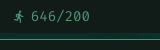
- Live counter in the bar: today's steps (or
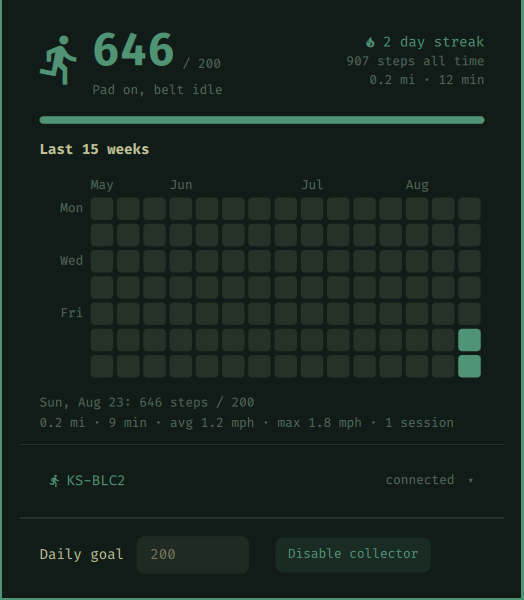
current/goalonce you set a goal), footprints icon while you walk, theme accent color when the goal is met, dimmed when the collector is off. - History popup (left-click): today's progress, live session stats (speed / distance / session time), a 15-week contribution graph where goal days glow in your theme's accent color, hover any day for its exact count, streak and all-time totals.
- Daily goal: set it in the popup; crossing it mid-walk fires a desktop notification.
- Enable/disable switch: right-click the widget (or use the popup button) to start/stop the collector. Stopping it ends all BLE scanning and frees the pad for the KS Fit app.
- Pad picker: multiple pads nearby? Pick yours from the popup, or stay in auto mode (strongest signal wins).
- Crash-safe local history: every status update is recorded the instant it arrives, and each day is compacted into per-day stats at day rollover. The pad's own memory is volatile, so this is what protects your sessions.
Supported pads
Anything the walkingpad-controller library speaks: KingSmith pads over the legacy WiLink protocol (A1, A1 Pro, C1, C2, R1, S1, ...), newer FTMS models (Z1, MC-21, ...), and Sperax P3 Max. Protocol is auto-detected.
Requirements
- Omarchy (Arch + Hyprland + the omarchy-shell Quickshell bar)
- A Bluetooth adapter (
bluez, present on any Omarchy install) - Python 3.10+
Install
omarchy plugin add https://github.com/msegoviadev/omarchy-walkingpad.git --enable
Then set up the collector backend (Python venv + systemd user service):
~/.config/omarchy/plugins/msegoviadev.walkingpad/backend/install.sh
The installer creates a venv in ~/.local/share/walkingpad/, installs the BLE
library there, and registers walkingpad.service so the collector starts at
login. Everything runs unprivileged as your user; no data leaves the machine.
Usage
| Action | Result |
|---|---|
| Left-click widget | Open/close the history popup |
| Right-click widget | Enable/disable the collector |
| Middle-click widget | Refresh stats |
| Walk | Everything else happens by itself |
Configure
Set your daily goal from the popup, or inline in ~/.config/omarchy/shell.json:
{ "id": "msegoviadev.walkingpad", "goalSteps": 6000, "units": "Auto" }
units accepts Auto (follows your system locale: US English gets mph and
feet/miles), Metric, or Imperial. All data is stored in metric; the
setting only changes display.
Move the widget between bar sections:
omarchy bar move msegoviadev.walkingpad --section center
Remove
omarchy plugin remove msegoviadev.walkingpad
systemctl --user disable --now walkingpad
rm ~/.config/systemd/user/walkingpad.service && systemctl --user daemon-reload
rm -rf ~/.local/share/walkingpad   # deletes your step history
How it works
pad (BLE) -> collector.py (systemd user service)
                -> ~/.local/share/walkingpad/history.jsonl   (today's records;
                   older days are compacted into rollup.json and dropped)
                -> ~/.local/share/walkingpad/status.json     (live state)
                -> ~/.local/share/walkingpad/devices.json    (seen pads)
                -> ~/.local/share/walkingpad/rollup.json     (per-day stats,
                   rebuilt at startup and day rollover)
stats.py  -> merges rollup + today's raw tail into today/days/streak/totals JSON
Panel.qml -> renders the bar widget and popup from that JSON
Only one BLE client can be connected to the pad at a time: while the collector is connected, the KS Fit phone app cannot connect (and vice versa). Stop the collector if you want to use the app.
Troubleshooting
journalctl --user -u walkingpad -f        # collector logs
systemctl --user status walkingpad        # service state
omarchy-shell shell summon msegoviadev.walkingpad '{}'   # open the popup
omarchy-shell shell hide msegoviadev.walkingpad          # close it
- Widget shows 0 / pad off: the pad only advertises while powered on. Turn it on and watch the logs; "Found pad" should appear within ~15s.
- Pad not detected: if your model advertises an unusual name, pick it from
the popup's pad list, or add
"device_address": "AA:BB:CC:DD:EE:FF"to~/.config/walkingpad/config.jsonby hand. - Lost a session? Sessions are recorded live once per second, so this should not happen while the collector runs. A session walked with the collector off is only recoverable if the pad kept power: its last-run summary is fetched automatically on the next connect.