
adb-devices
ADB devices & emulator manager for Omarchy



See what is connected to ADB, inspect device state, and start or stop your Android emulators straight from the Omarchy status bar.
</div>Overview
ADB Devices is a status bar widget and popup panel for Omarchy Linux. It talks to your local adb server and Android SDK to show physical devices and emulators in one place, without leaving the bar.
Highlights
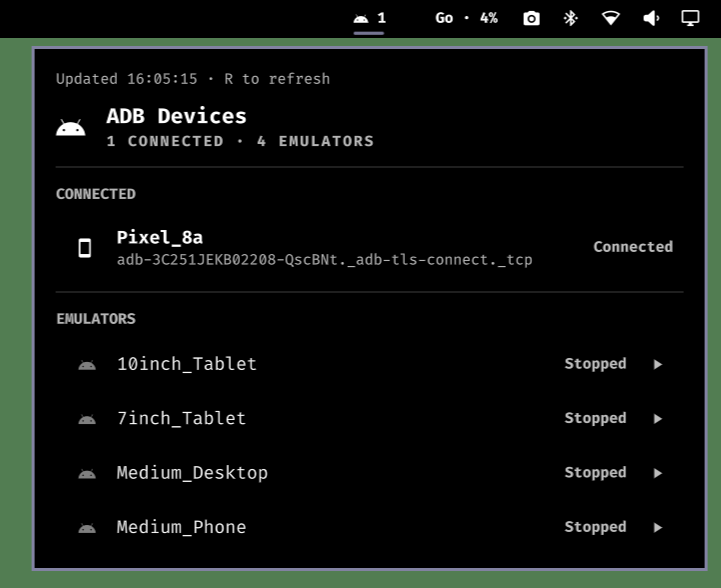
- Live status bar pill: Android icon with the number of connected devices. Just the icon when nothing is attached; turns red only on real problems (offline/unauthorized device or adb errors).
- Device states at a glance: Connected, Offline, or Unauthorized for physical devices and running emulators, with model and serial.
- Start & stop AVDs: Boot any AVD straight from the panel and shut running emulators down with a click.
- Zero configuration: Reads paths from
ANDROID_HOME/ANDROID_SDK_ROOT(falls back to~/Android/Sdk) and resolvesadbandemulatorautomatically. - Theme-reactive: Inherits your active Omarchy color palette, borders, and radiuses automatically.
Prerequisites
- An Android SDK with the
emulatorpackage installed (e.g. Android Studio's SDK). adbonPATHor under$ANDROID_HOME/platform-tools/.- One or more AVDs (create them with Android Studio's Device Manager or
avdmanager).
Installation
Install via the Omarchy plugin manager:
omarchy plugin add https://github.com/Nacchofer31/omarchy-adb-devices.git --enable --yes
Manual Install
git clone https://github.com/Nacchofer31/omarchy-adb-devices.git ~/.config/omarchy/plugins/nacchofer31.adb-devices
omarchy-shell shell rescanPlugins
omarchy plugin enable nacchofer31.adb-devices
The widget lands in the right section of the bar by default. Move it with omarchy bar move nacchofer31.adb-devices --section left.
Note: If you edit the plugin files by hand, changes hot-reload the source but do not rebuild the live widget. Run
omarchy restart shellafterwards to see them applied.
Removal
omarchy plugin disable nacchofer31.adb-devices   # remove widget from the bar
omarchy plugin remove nacchofer31.adb-devices    # remove plugin files
omarchy-shell shell rescanPlugins                # rescan plugin directories
To also remove the emulator floating-window rule added for Hyprland, delete the o.window("Emulator", ...) line from ~/.config/hypr/hyprland.lua and run hyprctl reload.
Screenshots
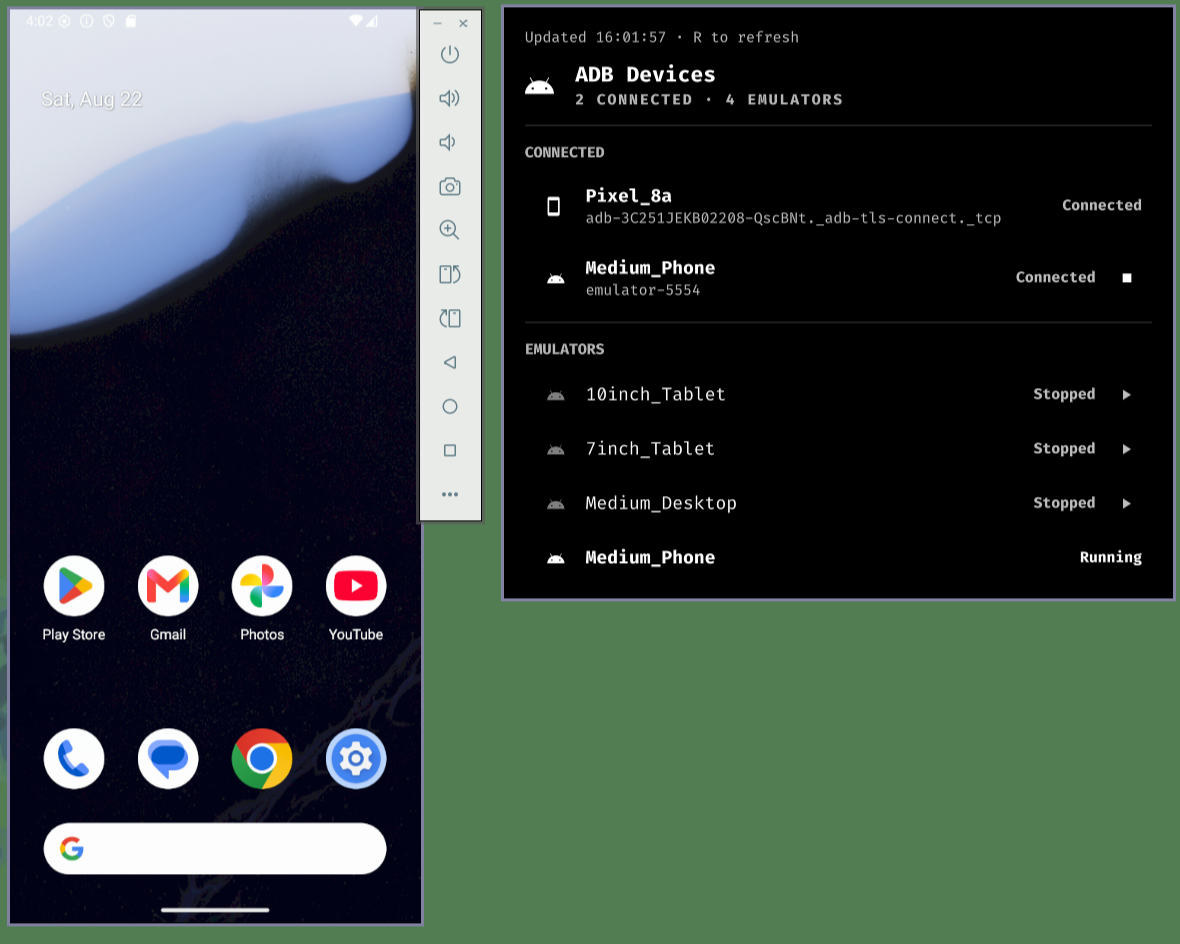
Panel showing a running emulator and a physical device.
Bar indicator showing 1 when only a physical device is connected.
Usage
Click the Android icon in the bar to open the panel. The panel shows two sections:
CONNECTED
Every device adb currently reports, physical or emulator:
| Field | Meaning |
|---|---|
| Icon | Smartphone for physical devices, Android robot for emulators |
| Label | Model name for physical devices, AVD name for emulators |
| Sub-label | Serial number (emulator-5554, or the device serial) |
| Status | Connected, Offline, or Unauthorized (red) |
| ⏹ | Stop button, shown only on running emulators |
EMULATORS
Every AVD found via emulator -list-avds, with its current state:
| Field | Meaning |
|---|---|
| Icon | Android robot (dimmed while stopped) |
| Label | AVD name (Medium_Phone, 10inch_Tablet, …) |
| Status | Running or Stopped |
| ▶ | Start button, shown only on stopped AVDs |
Keyboard
When the popup is open:
| Key | Action |
|---|---|
r |
Force refresh ADB data |
Tab / Shift+Tab |
Cycle to the previous/next popup panel |
Esc |
Close popup |
| Left click on bar icon | Open / close popup |
| Middle / right click on bar icon | Force refresh |
Configuration
Customize the widget in ~/.config/omarchy/shell.json under bar.layout:
{
  "id": "nacchofer31.adb-devices",
  "refreshIntervalSec": 15   // Polling interval in seconds (default: 15, range 5-600)
}
| Setting | Type | Default | Range | Meaning |
|---|---|---|---|---|
refreshIntervalSec |
integer | 15 |
5–600 | How often the widget re-queries adb and emulator |
You can also edit the setting visually in Omarchy Settings → Plugins → ADB Devices when the widget is enabled.
Opening Emulators as Floating Windows
Emulator windows tile like any other window by default. To have them open floating and centered on your Hyprland setup, add a window rule to ~/.config/hypr/hyprland.lua:
-- Android emulators: open floating and centered
o.window("Emulator", { float = true, center = true })
Then reload Hyprland:
hyprctl reload
The rule matches the emulator's window class (Emulator), so it applies whether you launch from this plugin, Android Studio, or the command line.
Why not built into the plugin? Floating is a compositor concern, not an app or shell one. There is no reliable way to force a window floating from inside the plugin, so this stays as a one-line, per-user Hyprland rule.
IPC Interface
Control the widget from scripts, hooks, or the terminal:
omarchy-shell shell toggle nacchofer31.adb-devices '{}' # open / close panel
Troubleshooting
| Symptom | Cause / fix |
|---|---|
| Panel shows "no adb" | adb was not found. Install android-tools or set ADB_PATH to its location. |
| "Emulator binary not found" on start | The SDK's emulator package is missing. Install it via Android Studio's SDK Manager. |
| AVD list is empty | ANDROID_AVD_HOME (default ~/.android/avd) has no AVDs, or emulator -list-avds fails. Create AVDs in Android Studio's Device Manager. |
| Start does nothing | The emulator is launching in the background; AVDs can take 30–60s to appear. Click r or wait for the next poll. |
| Stop does nothing | adb -s <serial> emu kill only works on emulators. Physical devices have no stop button. |
| Widget shows stale data after editing files | Run omarchy restart shell — hot-reload updates source, not the live widget instance. |
Project Layout
nacchofer31.adb-devices/
├── manifest.json      # Plugin manifest (bar-widget, settings schema)
├── collector.sh       # Queries `adb devices -l` + `emulator -list-avds`, emits JSON
├── Model.js           # Parsing + display helpers for device/AVD state
├── Service.qml        # Polls the collector, exposes state, start/stop actions
└── Panel.qml          # Bar pill + popup panel UI