
Better Stack Status — Omarchy bar widget
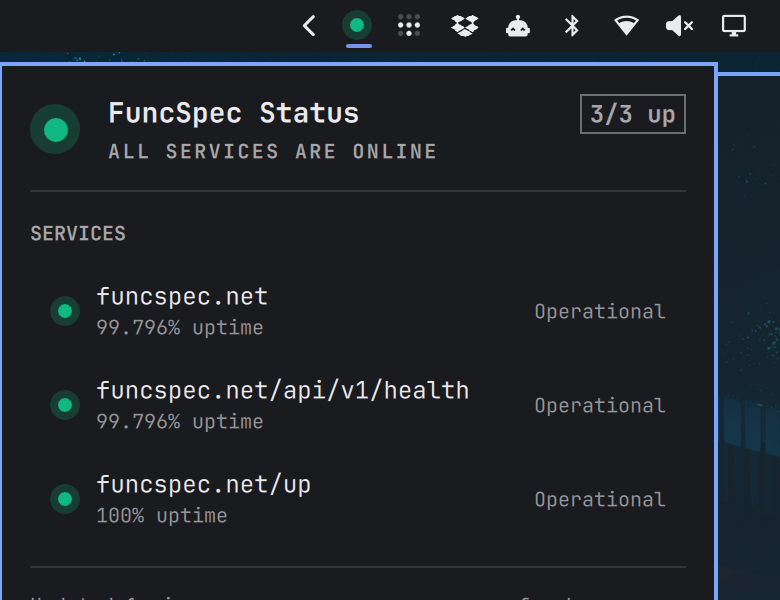
A status dot in the Omarchy bar for any Better Stack status page. Green while every monitored service is up, amber when something is degraded, red (and gently pulsing) when something is down. Click it for a panel listing each service with its uptime, plus recent incidents.
Works with any Better Stack status page — point it at your own domain, no account or API token needed.
Requirements
- Omarchy with the Quickshell-based shell (
omarchy-shell) curl— the only external dependency, already present on an Omarchy system
Install
omarchy plugin add https://github.com/narbs/betterstack-status-bar-omarchy-plugin.git --enable
omarchy bar set narbs.betterstack url https://status.example.com
omarchy plugin add clones the repository into
~/.config/omarchy/plugins/narbs.betterstack, validates the manifest, and
enables the widget. It never runs plugin code or install hooks.
The widget lands in the bar's right section and shows a grey dot with setup
instructions until you set url. Move it with
omarchy bar move narbs.betterstack --section center.
Update
omarchy plugin update narbs.betterstack
Removal
omarchy plugin disable narbs.betterstack   # takes it off the bar, keeps the files
omarchy plugin remove narbs.betterstack    # removes ~/.config/omarchy/plugins/narbs.betterstack
omarchy plugin remove disables the widget first, which drops its entry from
~/.config/omarchy/shell.json. A git-installed copy is deleted outright; a
hand-copied folder is moved to a timestamped backup beside it. Nothing else in
your configuration is touched —
this plugin only ever reads and writes its own inline settings on its own bar
entry, and only when you run omarchy bar set.
Settings
Settings live inline on the widget's entry in ~/.config/omarchy/shell.json
and can be set from the command line:
omarchy bar set narbs.betterstack url https://status.example.com
omarchy bar set narbs.betterstack name "Acme Status"
omarchy bar set narbs.betterstack refreshIntervalSec 120 --json
omarchy bar set narbs.betterstack showLabel true --json
| Key | Type | Default | What it does |
|---|---|---|---|
url |
string | (unset) | The status page to watch. A bare hostname is fine; https:// is assumed. |
name |
string | (hostname) | Title shown in the panel and tooltip. |
refreshIntervalSec |
integer | 60 |
Poll interval, clamped to 15–3600. |
timeoutSec |
integer | 10 |
Per-request curl timeout, clamped to 2–60. |
showLabel |
boolean | false |
Show the "3/3 up" count next to the dot on horizontal bars. |
showIncidents |
boolean | true |
Fetch the incident RSS feed and list it in the panel. |
allowMultiple is on, so several instances can watch different pages:
{
  "bar": {
    "layout": {
      "right": [
        { "id": "narbs.betterstack", "url": "https://status.acme.com", "name": "Acme" },
        { "id": "narbs.betterstack", "url": "https://status.betterstack.com", "name": "Better Stack" }
      ]
    }
  }
}
Interactions
| Where | Input | Action |
|---|---|---|
| Bar | left click | Open/close the panel |
| Bar | right click | Open the status page in the browser |
| Bar | middle click | Refresh now |
| Bar | hover | Tooltip with the page headline |
| Panel | j / k / arrows |
Move the cursor through services and incidents |
| Panel | Enter / Space |
Open the status page, or the selected incident |
| Panel | r |
Refresh |
| Panel | o |
Open the status page |
| Panel | Esc |
Close |
| Panel | Tab |
Switch to the neighbouring bar panel |
IPC
omarchy-shell narbs.betterstack status    # operational | degraded | downtime | maintenance | unknown
omarchy-shell narbs.betterstack summary   # "Acme: All services are online (3/3 up)"
omarchy-shell narbs.betterstack refresh
omarchy-shell shell toggle narbs.betterstack '{}'
status makes a handy exit-condition for scripts, and the panel can be bound to
a key through omarchy-shell shell toggle.
How the data is fetched
Better Stack status pages have no public JSON API, so the widget reads the same three fragments the status page's own front end polls:
GET <url>/overview— the headline and the "last updated" timestampGET <url>/sections— one row per monitored resource, with its uptime figureGET <url>/feed.rss— the incident feed (an empty channel when all is well)
curl does the fetching, so the shell never blocks on the network, and parsing
is deliberately defensive: an unrecognised page shape yields an empty result and
the last good data stays on screen rather than the widget breaking. No
credentials or API tokens are involved — everything read here is what a browser
visiting the page would get, and nothing is sent anywhere else.
Because every response is parsed and rendered, the fetch treats the status page as untrusted input:
- HTTPS only.
urlis normalised tohttps://; an explicithttp://is upgraded, and any other scheme is rejected rather than passed tocurl.--proto =https --proto-redir =httpsenforce this on the request and on every redirect, with--max-redirs 3. - Byte ceilings.
--max-filesizecaps each response (1 MB for/overview, 8 MB for/sections, 2 MB for the feed).curlaborts on both declared and chunked oversize bodies, and an aborted transfer is discarded rather than parsed as a short page. - Bounded records. At most 200 services and 5 incidents are kept, and every field is truncated to 200 characters before it reaches the UI.
- Link allowlist. Incident links come from the feed, so only
http(s)URLs are handed to the browser; anything else falls back to the status page.
This targets Better Stack's current (v2) status page design, and has been checked against several public pages. Other hosted status page products (Atlassian Statuspage, Instatus) serve different markup and will show as "Unknown".
Development
omarchy plugin validate ~/.config/omarchy/plugins/narbs.betterstack
qmllint -I "$OMARCHY_PATH/shell" ~/.config/omarchy/plugins/narbs.betterstack/*.qml
omarchy-shell shell rescanPlugins   # saving a file already hot-reloads
qmllint exits non-zero on Panel.qml over the typed function open(): void
IPC syntax; Omarchy's own first-party panels fail the same check under the
system qmllint, so it is a linter mismatch rather than a defect.
| File | Role |
|---|---|
manifest.json |
Plugin contract: id, kind, entry point, settings schema |
Panel.qml |
Bar widget entry point — the bar button and the panel |
Service.qml |
Polling, curl processes, published state |
StatusDot.qml |
The coloured dot, used in the bar, the hero, and each row |
Model.js |
URL handling, HTML/RSS parsing, formatting |
License
MIT — see LICENSE.