
Omahub
← All plugins
N

Omarchy Framework Fan Control

by Nathan Hoersch

Automatic and ten-step manual fan control for Framework laptops using Linux cros_ec hwmon

Security review

Review recommended · 3 findings

Deterministic scan — not a security guarantee

Medium
Risk level
Medium
Analyzed commit
1ab67d3
Scanned
1 month ago
  • medium sudo setup:62

    Command runs with sudo, elevating the process beyond the plugin environment.

    sudo rule for %s\n' "$target_user"
  • medium sudo setup:68

    Command runs with sudo, elevating the process beyond the plugin environment.

    sudo rule is not installed for $target_user"
  • medium sudo setup:80

    Command runs with sudo, elevating the process beyond the plugin environment.

    sudo rule for %s; fan control is automatic\n' "$target_user"

Automated analysis only — not a security guarantee.

AI advisory review

No obvious issues detected

Language-model assessment · ~deepseek/deepseek-v4-flash-latest — advisory only

Low
AI risk level
Low
Recommendation
install
Model
~deepseek/deepseek-v4-flash-latest
Analyzed commit
1ab67d3
Reviewed
1 month ago

The deterministic medium finding is not supported: the flagged lines are printf strings containing the word "sudo", not actual elevation commands. The real privileged integration is a user-invoked `sudo ./setup install` that installs a root-owned helper and a tightly scoped sudoers rule allowing only `auto` and ten fixed manual percentages, and the helper only reads/writes the cros_ec hwmon fan interface with validated values.

  • Installing the plugin requires the user to explicitly run `sudo ./setup install`, which places a helper in /usr/local/libexec and writes a sudoers.d rule; this is expected for fan control but is a privileged system change.
  • The passwordless sudoers rule is narrowly limited to the installed helper path with fixed arguments, so it does not grant a general root shell; the helper path should remain root-owned and be reviewed on updates.
  • Manual fan control can reduce cooling if the user selects a low speed, but this is the plugin's stated purpose and is user-controlled.
How this check works

This review combines the deterministic scan (the rule-based results above) with an independent look at the plugin's code by a language model. The model reads a trimmed sample of the repository's files, the manifest, and the README, then gives a plain-language risk level and a recommendation: install (no notable danger), review (look closer first), or avoid (clearly dangerous).

It runs on the same analyzed commit as the deterministic scan and is strictly advisory — it is not a security guarantee and never blocks a plugin by itself. A human moderator still reviews plugins before they are listed.

AI advisory only — automated analysis, not a security guarantee.

Install
$ omarchy plugin add https://github.com/njhoersch/omarchy-framework-fan-control --enable
Hardware #bar #quickshell #power-management

Omarchy Framework Fan Control

A native Omarchy bar widget for Framework laptops whose Linux kernel exposes a controllable cros_ec hwmon fan. It shows current RPM and the primary CPU-labeled EC temperature, offers ten manual steps from 10% through 100%, and provides explicit Automatic and Manual control modes.
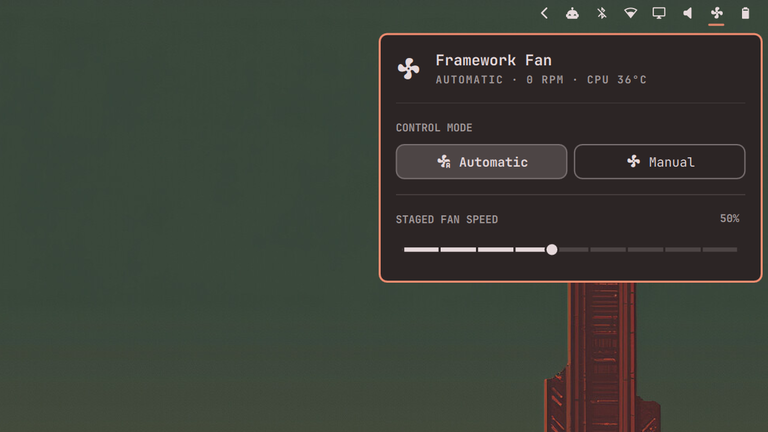
Framework Fan Control panel

The slider is deliberately staged while Automatic mode is active. Moving it does not change the fan until Manual control is explicitly enabled. Manual 0% is not offered.

Requirements

  • Omarchy 4.x with the manifest-based Quickshell plugin API
  • One hwmon device named cros_ec exposing fan1_input, pwm1, and pwm1_enable
  • sudo, visudo, and jq
  • No ectool, fw-fanctrl, or framework_tool dependency

Do not run another fan-control service at the same time; two controllers will race.

Install

Install from Git:

omarchy plugin add https://github.com/njhoersch/omarchy-framework-fan-control.git --yes
cd ~/.config/omarchy/plugins/nate.framework.fan-control
sudo ./setup install
omarchy plugin enable nate.framework.fan-control --before omarchy.power

The setup copies a small, root-owned helper to /usr/local/libexec and installs a sudoers rule for only auto and the ten valid manual values. The QML plugin itself stays unprivileged. The initial placement is directly left of Power; afterward it remains a normal Omarchy widget that can be dragged or moved with omarchy bar move.

For a local checkout already placed under ~/.config/omarchy/plugins, run the final three commands above.

Update

omarchy plugin update nate.framework.fan-control
cd ~/.config/omarchy/plugins/nate.framework.fan-control
sudo ./setup install

Rerunning setup keeps the installed helper protocol synchronized with the plugin.

Uninstall

Restore Automatic mode and remove the privileged integration before removing the plugin:

cd ~/.config/omarchy/plugins/nate.framework.fan-control
sudo ./setup uninstall
omarchy plugin remove nate.framework.fan-control --yes

Setup refuses to uninstall if it cannot request Automatic control.

Development

tests/run

The helper tests use a temporary fake hwmon tree. The real-hardware smoke test is opt-in, accepts a manual percentage, and uses an exit trap to request Automatic control:

tests/hardware-smoke 50

Plugin ID: nate.framework.fan-control. License: MIT.