
EasyEffects Presets for Omarchy
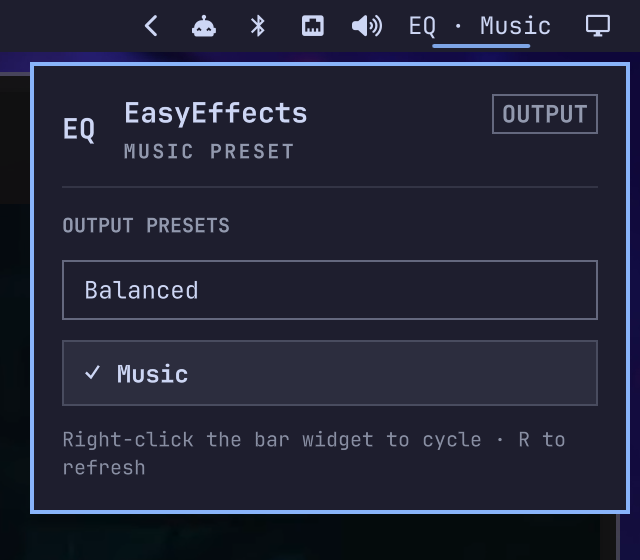
A small Omarchy bar widget for switching between your EasyEffects output presets.
The widget reads presets from EasyEffects, shows the active preset in the bar, and verifies changes against the running EasyEffects process so the displayed state stays accurate.
Features
- Left-click to open the preset list
- Right-click to cycle through presets
- Keyboard navigation inside the panel
- Live active-preset detection
- Friendly labels derived from preset filenames
- Protection against EasyEffects autoload rules immediately reverting a manual selection
Requirements
- Omarchy with shell plugin support
- EasyEffects
- At least one saved EasyEffects output preset
jq(included with Omarchy)
Install
Review the repository, then add the plugin:
omarchy plugin add https://github.com/nerdyworm/omarchy-easyeffects-presets.git
Accept the prompt to enable the plugin during installation.
For an unattended install from a repository you already trust:
omarchy plugin add https://github.com/nerdyworm/omarchy-easyeffects-presets.git --enable --yes
Update
Review and install the next update:
omarchy plugin update nerdyworm.easyeffects-presets
Or update all Git-managed plugins:
omarchy plugin update --all
Remove
Remove the plugin from Omarchy:
omarchy plugin remove nerdyworm.easyeffects-presets
This does not delete your EasyEffects presets. If the plugin disabled an autoload rule, restore it using the instructions below before removing the plugin.
Usage
- Left-click the bar widget to open the preset list.
- Right-click the widget to switch to the next preset.
- Use the arrow keys and Enter in the panel to select a preset.
- Press
Rin the panel to refresh the preset list.
The widget discovers output presets in:
~/.local/share/easyeffects/output
EasyEffects autoload rules
An EasyEffects autoload rule can immediately restore a different preset after a manual switch. When this widget finds an autoload rule for the current output device, it moves that rule to:
~/.local/state/omarchy/easyeffects-presets/autoload-disabled
The rule is preserved rather than deleted. To restore it, move the JSON file back to:
~/.local/share/easyeffects/autoload/output
Security and behavior
This plugin runs unsandboxed inside omarchy-shell when enabled. Review its source before installing it.
The plugin:
- Runs
easyeffectsto read and load output presets. - Runs local shell tools to find presets and manage autoload rules.
- Reads EasyEffects preset, state, and autoload files in your home directory.
- Writes a local switch log under
~/.local/state/omarchy/easyeffects-presets. - Moves a matching autoload rule to the backup directory described above.
- Provides local IPC methods for status, preset selection, and cycling.
- Does not use the network or start a background service.
Validate from source
Validate the plugin with:
omarchy plugin validate .
qmllint -I /usr/share/omarchy/shell BarWidget.qml