Omahub
← All plugins
C

Network Devices

by Chris Vanderplank

Browse machines on the local network with IP and .local addresses via mDNS.

Security review

No obvious issues detected

Deterministic scan — not a security guarantee

None
Risk level
None
Analyzed commit
cc96c67
Scanned
1 month ago

No potentially dangerous behavior detected in the analyzed commit.

Automated analysis only — not a security guarantee.

AI advisory review

No obvious issues detected

Language-model assessment · ~deepseek/deepseek-v4-flash-latest — advisory only

Low
AI risk level
Low
Recommendation
install
Model
~deepseek/deepseek-v4-flash-latest
Analyzed commit
cc96c67
Reviewed
1 month ago

The plugin is a straightforward mDNS network scanner that runs avahi-browse and displays host information; it includes defensive sanitization of LAN-controlled strings and caps output sizes. The only notable risk is that it executes avahi-browse and wl-copy, but these are expected and non-destructive. No malicious or obfuscated code was found.

  • The plugin invokes external binaries (avahi-browse, wl-copy) but only for intended functionality; no destructive commands or hidden behavior detected.
  • The helper script and QML sanitize LAN-provided strings to prevent markup injection, which is good practice; no bypass found in the sampled code.
How this check works

This review combines the deterministic scan (the rule-based results above) with an independent look at the plugin's code by a language model. The model reads a trimmed sample of the repository's files, the manifest, and the README, then gives a plain-language risk level and a recommendation: install (no notable danger), review (look closer first), or avoid (clearly dangerous).

It runs on the same analyzed commit as the deterministic scan and is strictly advisory — it is not a security guarantee and never blocks a plugin by itself. A human moderator still reviews plugins before they are listed.

AI advisory only — automated analysis, not a security guarantee.

Install
$ omarchy plugin add https://github.com/intrepid-developer/omarchy-network-devices --enable
System #system

Network Devices

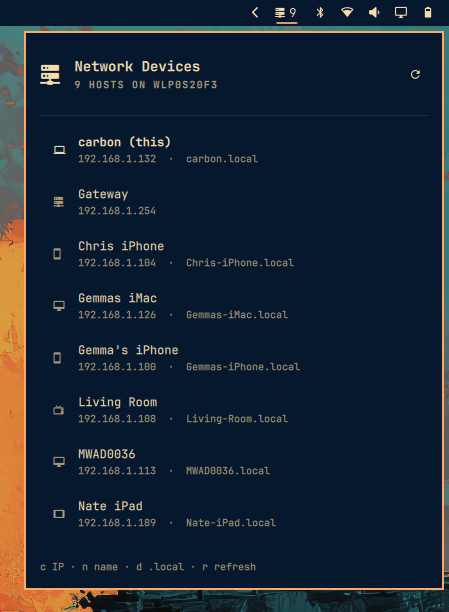
Browse machines discovered on your local network from the Omarchy Quattro bar.

Uses mDNS (avahi-browse) so each host can show:

  • a friendly name
  • IPv4 address
  • .local hostname when advertised

Network Devices overlay

Install

omarchy plugin add https://github.com/intrepid-developer/omarchy-network-devices.git --enable

Usage

  • Left click — open / close the host list
  • Middle click — refresh now
  • In the panel: j / k move, Enter copies IP
  • c copy IP · n copy name · d copy .local · r refresh
  • Click a row to copy its IP · right-click to copy .local

IPC:

omarchy-shell shell summon network-devices.plugin '{}'
omarchy-shell shell hide network-devices.plugin

Configure

Key Default What it does
refreshIntervalSec 60 How often to rescan (15–600)
showCount On Show the host count next to the bar icon
omarchy bar set network-devices.plugin refreshIntervalSec 30
omarchy bar set network-devices.plugin showCount Off
omarchy bar move network-devices.plugin --section right

Requirements

  • avahi / avahi-browse on PATH
  • wl-copy for clipboard actions
  • Python 3 (for bin/lan-hosts)

Remove

omarchy plugin remove network-devices.plugin

License

MIT — see LICENSE.